
Source: Roblox Creator Hub · CC BY 4.0 · View source · Code samples: MIT Imported 2026-10-03. Formatting adapted for this site.
AnimationNodeType
Used by AnimationNodeDefinition.NodeType to define how a node in an animation graph processes animation. Setting a node's type resets its input pins to the default set for that type.
ClipNode

A reference to an AnimationClip asset. This serves as a leaf node in the graph, generating the raw animation data that feeds into other nodes for blending, selection, or modification.
Inputs
- None
Properties
| Property | Type | Description |
|---|---|---|
| AnimationId | String | The animation asset to play (for example, rbxassetid://12345). |
| PlayMode | AnimationNodePlayMode | Defines the behavior of the clip once it reaches the end of its duration. |
| Reverse | Boolean | Controls the direction of playback. |
| Speed | Number | A multiplier for the playback rate. 0.0 pauses the graph, 1.0 is normal speed, and 2.0 is double speed. |
| Trim | Boolean | Toggles whether the clip's duration should be truncated. |
| TrimStart | Number | The absolute timestamp (in seconds) where playback should begin. |
| TrimEnd | Number | The absolute timestamp (in seconds) where playback should terminate. |
PlayMode accepts the following values:
- Loop (default): Automatically restarts from the beginning once the clip finishes.
- PingPong: Plays from start to end, then immediately plays in reverse from end to start.
- OnceAndHold: Plays once and maintains the final pose upon completion.
- OnceAndReset: Plays once and snaps back to the initial start pose upon completion.
Event data
- Event Handling: None. This is a leaf node with no children.
- Event Emission: Reads custom markers embedded in the animation clip (e.g., "Footstep", "WeaponSwing") and emits them as named events at the precise frame they occur. If the clip is trimmed, only markers within the defined
[TrimStart, TrimEnd]interval (inclusive) are emitted.
SelectNode
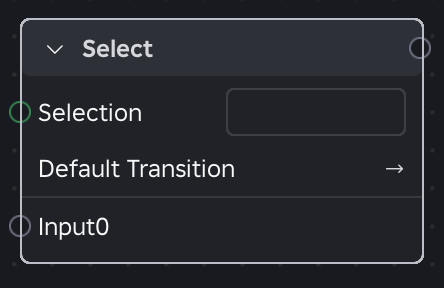
Selects between any number of inputs via the Selection property. Whenever the current selection changes, it triggers a new transition.
Inputs
- Input1...InputN
Properties
| Property | Type | Description |
|---|---|---|
| Selection | String | The unique ID of the input to select, matching the input connection name (for example, "Walk"). |
Event data
- Event Handling: Events from the currently selected input pass through with their weight unchanged.
- Event Emission: Passes through all events from the currently selected input only. During a transition, event emission follows global event rules.
PrioritySelectNode

Evaluates a list of connected inputs from top to bottom and plays the first one whose condition evaluates to true. This allows for hierarchical animation selection based on specific logic. Whenever the current selection changes, it triggers a new transition.
Inputs
- Input1...InputN
- Trigger (Boolean): A logical condition that must be true for this input to activate. This is wired to a boolean parameter.
- TransitionOverrideInterruptible (
AnimationNodeInterruptible): Defines the rule for when this active animation can be interrupted by a higher-priority input. Overrides the node-level DefaultInterruptible setting.- Always (default): The input can be interrupted at any time by a higher-priority condition.
- Finished: The current animation must complete its playback before a higher-priority input can take over.
- Trigger: The input is only interruptible when the
InterruptibleTriggeris set to true.
- InterruptibleTrigger (Boolean): Only available if TransitionOverrideInterruptible is set to Trigger. The input can be interrupted when this specific expression is true.
Properties
| Property | Type | Description |
|---|---|---|
| DefaultInterruptible | AnimationNodeInterruptible | The baseline interruption rule applied to all inputs. Each input can override this with its TransitionOverrideInterruptible input property. |
Event data
- Event Handling: Events from the currently selected input pass through with their weight unchanged.
- Event Emission: Passes through all events from the currently selected input only. During a transition, event emission follows global event rules.
SequenceNode

Activates connected inputs in a specific sequential order based on defined wait conditions. Whenever the current selection changes, it triggers a new transition.
Inputs
- Input1...InputN
- TransitionOverrideWaitFor (
AnimationNodeWaitFor): Specifies the condition that must be met before the sequence advances to the next input. Overrides the node-level DefaultWaitFor setting.- Finished (default): Advances to the next input when the current input completes a cycle. The advancement behavior depends on the connected input:
- Play-once clip: Advances when the clip finishes.
- Looping clip: Advances after one full loop completes.
- Sequence with infinite loops: Advances after one full cycle through all inputs.
- Sequence with finite loops: Advances after all loops complete.
- Trigger: Activates the next input when a custom logical expression evaluates to true.
- Finished (default): Advances to the next input when the current input completes a cycle. The advancement behavior depends on the connected input:
- WaitForTrigger (Boolean): Only available when
TransitionOverrideWaitForis set toTrigger.
- TransitionOverrideWaitFor (
Properties
| Property | Type | Description |
|---|---|---|
| LoopCount | Number | The number of times to cycle through the entire sequence. A value of 0 (default) indicates an infinite loop. Once reached, the node respects the looping or hold setting of the final input. |
| DefaultWaitFor | AnimationNodeWaitFor | The baseline wait condition applied to all inputs. Each input can override this with its TransitionOverrideWaitFor input property. |
Event data
- Event Handling: Events from the currently active input pass through with their weight unchanged.
- Event Emission: Passes through all events from the currently active input in the sequence only. During a transition, event emission follows global event rules.
RandomSequenceNode
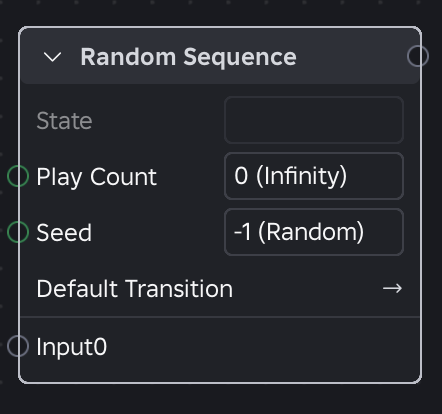
Selects and plays one of its connected inputs at random. When the currently selected animation completes, the node randomly picks another input to play. Assign each input a specific weight to influence the probability of it being chosen. Whenever the current selection changes, it triggers a new transition.
Inputs
- Input1...InputN
- Weight (Number): Determines the probability of this input being selected; higher weights increase the chance of selection.
Properties
| Property | Type | Description |
|---|---|---|
| PlayCount | Number | The number of inputs the node plays before stopping. Once reached, the node respects the looping or hold setting of the final input. Defaults to 0, which repeats indefinitely. |
| Seed | Number | A value used to initialize the random number generator, ensuring the sequence remains consistent across clients. Defaults to -1, which uses a random seed. |
Event data
- Event Handling: Events from the currently active input pass through with their weight unchanged.
- Event Emission: Passes through all events from the currently active input in the sequence only. During a transition, event emission follows global event rules.
OverNode
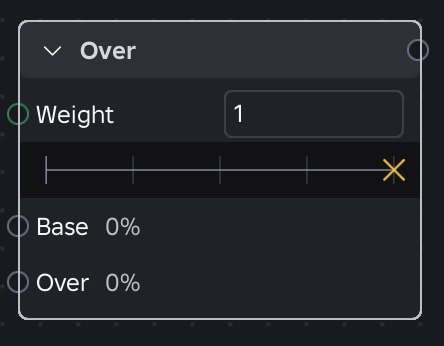
Layers the Over pose on top of the Base pose. When combined with a Mask node, masked-out joints in the Over pose reveal the Base pose entirely, creating a transparent overlay effect.
Inputs
- Base: The background or bottom layer, typically a full-body animation like locomotion or an idle state.
- Over: The foreground or top layer to be applied over the base, such as a hand gesture or tool-use animation.
Properties
| Property | Type | Description |
|---|---|---|
| Weight | Number | The blend weight used to attenuate the Over pose. Defaults to 1.0 (full override) and is unclamped. |
Event data
- Event Handling:
- The node listens for events from both the Base and Over inputs.
- Event Emission:
- Base Events: All events from the Base input are passed through unmodified.
- Over Events: Events from the Over input are scaled by the Weight property.
- At Weight
0.5, Over events propagate at half weight - At Weight
0, they are silenced.
- At Weight
AddNode
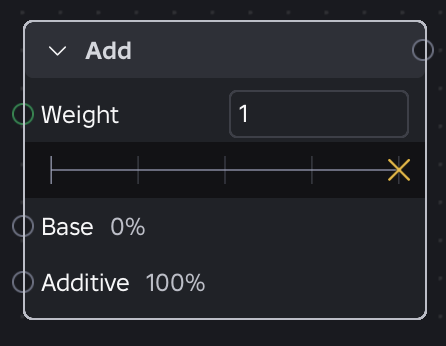
Adds the Additive pose to the Base pose, attenuated by a specific Weight (unclamped).
Inputs
- Base: The primary animation pose.
- Additive: The pose to be layered onto the base.
Properties
| Property | Type | Description |
|---|---|---|
| Weight | Number | Determines the strength of the additive pose applied to the base. |
Event data
- Event Handling: The node listens for events from both the Base and Additive inputs.
- Event Emission: All events from both the Base and Additive inputs are passed through unmodified.
SubtractNode

Converts an animation into an additive pose by subtracting a relative base pose from the target pose (A - Weight * B). The Weight scales the B pose before subtraction (unclamped).
Inputs
- A: The target animation pose.
- B: The relative base pose to be subtracted.
Properties
| Property | Type | Description |
|---|---|---|
| Weight | Number | Scales the B pose before it is subtracted from A. At 1.0 (default), B is fully subtracted; at 0.0, no subtraction occurs. |
Event data
- Event Handling: The node listens for events from both Input A and Input B.
- Event Emission: All events from both Input A and Input B are passed through unmodified.
Blend1DNode

Linearly interpolates between the two animation poses closest to the current input position on a single axis.
Inputs
- Input1...InputN
- Position (Number): The specific coordinate for each subsequent input on the blend axis.
Properties
| Property | Type | Description |
|---|---|---|
| Position | Number | The current active value on the blend axis used to sample the animations. If Position is outside the range of defined input positions, the node extrapolates using the two nearest inputs. |
| PhaseSync | AnimationNodePhaseSync | Configures whether the timing of child inputs should synchronize. |
PhaseSync accepts the following values:
- Synced (default): Uses normalized synchronization. The node calculates a "virtual duration" from the weighted average of active inputs. Each input node's time step adjusts so all children converge on the same phase, keeping animations of different lengths in lockstep.
- Unsynced: Clips advance independently at their own playback rates.
Event data
- Event Handling: The node listens for events from all currently active child nodes.
- Event Emission: Only events from the highest-weight active input propagate, scaled by its blend weight. Events from the secondary input are silenced.
Blend2DNode

Blends multiple animation poses together based on two input parameters within a 2D coordinate space. This generalizes the Blend1D node to handle complex scenarios, such as blending based on both movement direction and speed simultaneously.
Inputs
- Input1...InputN
- X (Number): The X-coordinate for each subsequent input.
- Y (Number): The Y-coordinate for each subsequent input.
Properties
| Property | Type | Description |
|---|---|---|
| InputMode | AnimationNodeBlend2DInputMode | Defines the coordinate system used to evaluate the blendspace. |
| X | Number | The current X-coordinate in Cartesian mode or direction in radians in Polar mode. |
| Y | Number | The current Y-coordinate in Cartesian mode or magnitude in Polar mode. |
| PhaseSync | AnimationNodePhaseSync | Configures whether the timing of child inputs should synchronize. |
InputMode accepts the following values:
- Cartesian (default): Uses standard 2D grid coordinates. X and Y represent the current position within the blendspace.
- Polar: Uses angular and magnitude values. X represents direction in radians, while Y represents movement magnitude or strength. Direction is weighted more heavily, so inputs at similar angles but different magnitudes blend more smoothly than inputs at different angles.
PhaseSync accepts the following values:
- Synced (default): Uses normalized synchronization. The node calculates a "virtual duration" from the weighted average of active inputs. Each input node's time step adjusts so all children converge on the same phase, keeping animations of different lengths in lockstep.
- Unsynced: Clips advance independently at their own playback rates.
Event data
- Event Handling: The node listens for events from all currently active child nodes.
- Event Emission: Only events from the highest-weight active input propagate, scaled by its blend weight. Events from the secondary input are silenced.
MaskNode
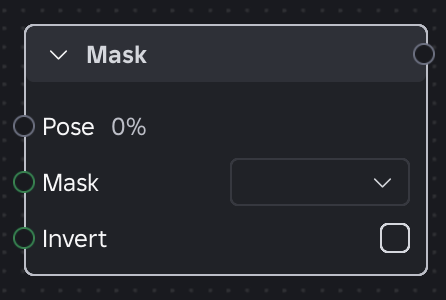
Applies a predefined mask to the input Pose. A mask is defined by a weight per object (e.g. joint) in the rig hierarchy, allowing for precise control or "feathering" of the animation.
Inputs
- Pose: The animation pose to be masked.
Properties
| Property | Type | Description |
|---|---|---|
| Mask | ObjectValue | A direct child of the Mask AnimationNodeDefinition that defines mask weights. |
| Invert | Boolean | When true, applies each weight as 1 - weight, allowing the mask to be reused inversely without creating a new asset. |
Mask can define weights in either of the following ways:
- Directly: The
ObjectValuecontains attributes that map rig object names to weight values. - By Reference: The
ObjectValuereferences anotherInstancewith the mapping attributes, enabling shared masks across graph nodes.
To populate the mask hierarchy, choose a rig schema:
HumanoidRigDescription: Standardizes the mask for humanoid characters.- Picker: Lets you select any rig in the workspace to populate the mask hierarchy.
Event data
- Event Handling: The node listens for all events from the input Pose.
- Event Emission: All events from the input Pose are passed through unmodified.
SpeedNode
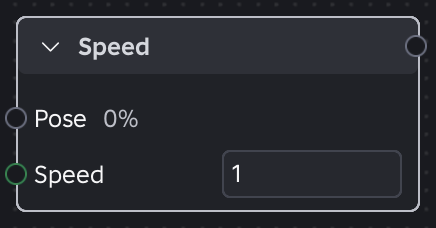
Modifies the playback rate of an incoming animation pose.
Inputs
- Pose: The animation pose or subgraph whose playback speed will be modified.
Properties
| Property | Type | Description |
|---|---|---|
| Speed | Number | A multiplier applied to the time delta ($dt$). 0.0 pauses the graph, 1.0 is normal speed, and 2.0 is double speed. |
Event data
- Event Handling: The node listens for events from the input Pose.
- Event Emission: All events from the input Pose are passed through unmodified. Note that while the visual playback speed changes, the timing of emitted events (such as markers) will scale accordingly with the modified playback rate.
GraphOutput
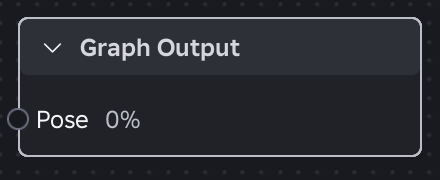
Represents the final evaluated pose of the graph. This node is automatically included in all new graphs in the Animation Graph Editor. Its presence ensures that the graph is always valid and consistently produces an animation pose.
Inputs
- Pose: The final processed animation data to be applied to the rig.
Properties
- None
Event data
- Event Handling: The node listens for all events passed through the final connected input.
- Event Emission: This node serves as the exit point for the animation pipeline and does not emit signals back into the graph.
Items
| Name | Value | Description |
|---|---|---|
| InvalidNode | 0 | The default unassigned type indicating a node has not been configured. |
| AddNode | 1 | An additive blend node that layers an additive pose on top of a base pose. |
| OverNode | 2 | A layering node that composites an overlay pose on top of a base pose using per-joint masking. |
| Blend1DNode | 3 | A blend node that interpolates between multiple inputs along a single numeric axis. |
| Blend2DNode | 4 | A blend node that interpolates between multiple inputs using a two-dimensional position. |
| ClipNode | 5 | A leaf node that plays back an animation clip asset. |
| GraphOutput | 6 | The terminal output node of an animation graph that receives the final pose. |
| MaskNode | 7 | A node that filters its input pose through a per-joint weight mask. |
| PrioritySelectNode | 8 | A state node that plays the highest-priority input whose trigger condition is true. |
| RandomSequenceNode | 9 | A sequence node that plays its inputs in a weighted random order. |
| SelectNode | 10 | A state node that plays whichever input is chosen by a string selection parameter. |
| SequenceNode | 11 | A node that plays its inputs one after another in order, optionally looping. |
| SpeedNode | 12 | A node that scales the playback speed of its input. |
| SubtractNode | 13 | A blend node that subtracts one pose from another to produce a difference pose. |
| OneShotNode | 14 | A layering node that plays a one-shot pose over a looping base pose on trigger, blending it in and back out. |
| StateMachineNode | 16 | A node that selects and transitions between animation states according to a state machine definition. |
InvalidNode
The default unassigned type indicating a node has not been configured.
| Field | Value |
|---|---|
| value | 0 |
AddNode
An additive blend node that layers an additive pose on top of a base pose.
| Field | Value |
|---|---|
| value | 1 |
OverNode
A layering node that composites an overlay pose on top of a base pose using per-joint masking.
| Field | Value |
|---|---|
| value | 2 |
Blend1DNode
A blend node that interpolates between multiple inputs along a single numeric axis.
| Field | Value |
|---|---|
| value | 3 |
Blend2DNode
A blend node that interpolates between multiple inputs using a two-dimensional position.
| Field | Value |
|---|---|
| value | 4 |
ClipNode
A leaf node that plays back an animation clip asset.
| Field | Value |
|---|---|
| value | 5 |
GraphOutput
The terminal output node of an animation graph that receives the final pose.
| Field | Value |
|---|---|
| value | 6 |
MaskNode
A node that filters its input pose through a per-joint weight mask.
| Field | Value |
|---|---|
| value | 7 |
PrioritySelectNode
A state node that plays the highest-priority input whose trigger condition is true.
| Field | Value |
|---|---|
| value | 8 |
RandomSequenceNode
A sequence node that plays its inputs in a weighted random order.
| Field | Value |
|---|---|
| value | 9 |
SelectNode
A state node that plays whichever input is chosen by a string selection parameter.
| Field | Value |
|---|---|
| value | 10 |
SequenceNode
A node that plays its inputs one after another in order, optionally looping.
| Field | Value |
|---|---|
| value | 11 |
SpeedNode
A node that scales the playback speed of its input.
| Field | Value |
|---|---|
| value | 12 |
SubtractNode
A blend node that subtracts one pose from another to produce a difference pose.
| Field | Value |
|---|---|
| value | 13 |
OneShotNode
A layering node that plays a one-shot pose over a looping base pose on trigger, blending it in and back out.
| Field | Value |
|---|---|
| value | 14 |
StateMachineNode
A node that selects and transitions between animation states according to a state machine definition.
| Field | Value |
|---|---|
| value | 16 |