
Source: Roblox Creator Hub · CC BY 4.0 · View source · Code samples: MIT Imported 2026-10-03. Formatting adapted for this site.
BillboardGui
Inherits from: LayerCollector → GuiBase2d → GuiBase → Instance → Object
BillboardGui is a container for UI objects to appear in the 3D space but always face the camera. The container's position is relative to the parent BasePart or Attachment (or the Adornee). For BaseParts, the Position property is used, while for Attachments, the WorldPosition property is used.
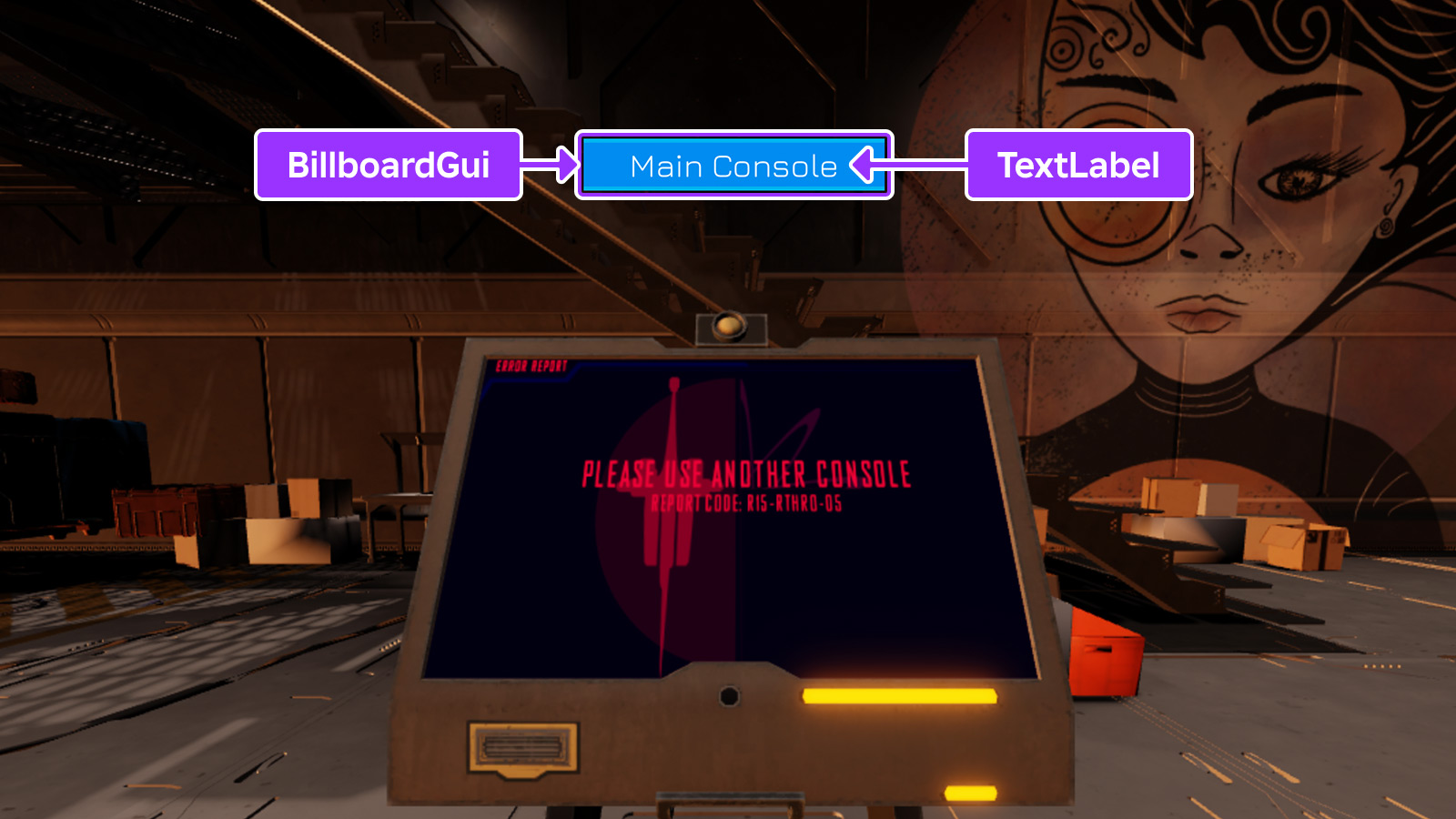
A billboard's Size property works slightly differently than GuiObject.Size. While the offset components work the same, the scale components are used as stud sizes in 3D space.
When creating a size-scaled BillboardGui that contains a TextLabel, it's useful to enable the label's TextScaled property so that its text scales along with the billboard canvas as the camera distance changes.
Note that interactive UI elements like ImageButtons and TextButtons inside a BillboardGui will only receive user input if they are parented to the PlayerGui, typically via placing the BillboardGui inside StarterGui. The Adornee property can be used to target a part or attachment in the 3D world while the BillboardGui itself remains in the PlayerGui.
See In-Experience UI for a guide on working with BillboardGui containers.
Caching Behavior
To help improve performance, the appearance of a BillboardGui is cached until one of the following occurs, after which its appearance will be recomputed on the next rendering frame.
- A descendant is added to or removed from the
BillboardGui. - A property of a descendant of the
BillboardGuichanges. - A property of the
BillboardGuiitself changes.
Inherits from: LayerCollector
Memory category: Instances
Properties
| Name | Type / Returns | Description |
|---|---|---|
| BillboardGui.Active | boolean | Controls whether the descendants will receive input events. |
| BillboardGui.Adornee | Instance | Sets the target part or attachment that the BillboardGui is positioned relative to. |
| BillboardGui.AlwaysOnTop | boolean | Determines whether the BillboardGui will always be rendered on top of other 3D objects. |
| BillboardGui.Brightness | float | Determines the factor by which the BillboardGui container's light is scaled when LightInfluence is 0. |
| BillboardGui.ClipsDescendants | boolean | Whether portions of GuiObjects that fall outside of the BillboardGui canvas borders will be drawn. |
| BillboardGui.CurrentDistance | float | The current distance in studs that the BillboardGui is from the player's camera. |
| BillboardGui.DistanceLowerLimit | float | Determines the distance in studs at which the BillboardGui will stop scaling larger in size. |
| BillboardGui.DistanceStep | float | Determines the size CurrentDistance increments and decrements in studs as the player's camera moves closer and further from the BillboardGui. |
| BillboardGui.DistanceUpperLimit | float | Determines the distance in studs at which the BillboardGui will stop scaling smaller in size. |
| BillboardGui.ExtentsOffset | Vector3 | Determines how the BillboardGui is offset from its Adornee, relative to the Camera orientation, in units half the dimensions of the model's Camera-aligned bounding box. |
| BillboardGui.ExtentsOffsetWorldSpace | Vector3 | Determines how the BillboardGui is offset from its Adornee, relative to the global axes, in units half the dimensions of the model's axis-aligned bounding box. |
| BillboardGui.LightInfluence | float | Controls how much the BillboardGui is influenced by environmental lighting. |
| BillboardGui.MaxDistance | float | Controls how far away the BillboardGui can be displayed before it stops rendering. |
| BillboardGui.PlayerToHideFrom | Instance | Used by scripts to hide the BillboardGui from a specific player. |
| BillboardGui.Size | UDim2 | Controls the size that the BillboardGui will have on screen. |
| BillboardGui.SizeOffset | Vector2 | A 2D offset in size-relative units that acts like an anchor point. |
| BillboardGui.StudsOffset | Vector3 | Determines how the BillboardGui is offset from its Adornee in studs, relative to the Camera orientation. |
| BillboardGui.StudsOffsetWorldSpace | Vector3 | Determines how the BillboardGui is offset from its Adornee in studs, relative to the global axes. |
Inherited from LayerCollector
| Name | Type / Returns | Description |
|---|---|---|
| LayerCollector.Enabled | boolean | Toggles the visibility of this LayerCollector. |
| LayerCollector.ResetOnSpawn | boolean | Determines if the LayerCollector resets (deletes itself and re-clones into the player's PlayerGui) every time the player's character respawns. |
| LayerCollector.ZIndexBehavior | ZIndexBehavior | Controls how GuiObject.ZIndex behaves on all descendants of this LayerCollector. |
Inherited from GuiBase2d
| Name | Type / Returns | Description |
|---|---|---|
| GuiBase2d.AbsolutePosition | Vector2 | Describes the actual screen position of a GuiBase2d element, in pixels. |
| GuiBase2d.AbsoluteRotation | float | Describes the actual screen rotation of a GuiBase2d element, in degrees. |
| GuiBase2d.AbsoluteSize | Vector2 | Describes the actual screen size of a GuiBase2d element, in pixels. |
| GuiBase2d.AutoLocalize | boolean | When set to true, localization will be applied to this GuiBase2d and its descendants. |
| GuiBase2d.Localize | boolean | Automatically set to true when a localization table's LocalizationTable.Root targets this object, or an ancestor of this object. |
| GuiBase2d.RootLocalizationTable | LocalizationTable | A reference to a LocalizationTable to be used to apply automated localization to this GuiBase2d and its descendants. |
| GuiBase2d.SelectionBehaviorDown | SelectionBehavior | Customizes gamepad selection behavior in the down direction. |
| GuiBase2d.SelectionBehaviorLeft | SelectionBehavior | Customizes gamepad selection behavior in the left direction. |
| GuiBase2d.SelectionBehaviorRight | SelectionBehavior | Customizes gamepad selection behavior in the right direction. |
| GuiBase2d.SelectionBehaviorUp | SelectionBehavior | Customizes gamepad selection behavior in the up direction. |
| GuiBase2d.SelectionGroup | boolean | Allows customization of gamepad selection movement. |
Inherited from Instance
| Name | Type / Returns | Description |
|---|---|---|
| Instance.Archivable | boolean | Determines if an Instance and its descendants can be cloned using Instance:Clone(), and can be saved/published. |
| Instance.archivable | boolean | |
| Instance.Capabilities | SecurityCapabilities | The set of capabilities allowed to be used for scripts inside this container. |
| Instance.IsInSandbox | boolean | Indicates whether the instance is inside a sandboxed container. |
| Instance.Name | string | A non-unique identifier of the Instance. |
| Instance.Parent | Instance | Determines the hierarchical parent of the Instance. |
| Instance.PredictionMode | PredictionMode | Reflects the client-side prediction mode applied to the instance under server-authoritative physics. |
| Instance.RobloxLocked | boolean | A deprecated property that used to protect CoreGui objects. |
| Instance.Sandboxed | boolean | When enabled, the instance can only access abilities in its Capabilities list. |
| Instance.UniqueId | UniqueId | A unique identifier for the instance. |
Inherited from Object
| Name | Type / Returns | Description |
|---|---|---|
| Object.ClassName | string | A read-only string representing the class this Object belongs to. |
| Object.className | string |
BillboardGui.Active
Controls whether the descendants will receive input events. If the BillboardGui contains a GuiButton, that button will become clickable only if Active is set to true on both the BillboardGui and the button.
Note that interactive UI elements like ImageButtons and TextButtons inside a BillboardGui will only receive user input if they are parented to the PlayerGui, typically via placing the BillboardGui inside StarterGui. The Adornee property can be used to target a part or attachment in the 3D world while the BillboardGui itself remains in the PlayerGui.
| Field | Value |
|---|---|
| type | boolean |
| security | {"read":"None","write":"None"} |
| thread safety | ReadSafe |
| category | Data |
| serialization | {"can_load":true,"can_save":true} |
| capabilities | ["UI"] |
BillboardGui.Adornee
Sets the target BasePart or Attachment that the BillboardGui is positioned relative to, overriding the parent part or attachment.
| Field | Value |
|---|---|
| type | Instance |
| security | {"read":"None","write":"None"} |
| thread safety | ReadSafe |
| category | Data |
| serialization | {"can_load":true,"can_save":true} |
| capabilities | ["UI"] |
BillboardGui.AlwaysOnTop
This property determines whether the BillboardGui will always render on top of other 3D objects.
When set to false (default), the BillboardGui renders like other 3D content and is occluded by other 3D objects. When set to true, the BillboardGui always renders on top of 3D content and the appearance changes significantly:
- Colors match how they appear inside a
ScreenGui. - Text may appear sharper on high DPI devices.
LightInfluenceis treated as though it's0.Brightnesshas no effect.
| Field | Value |
|---|---|
| type | boolean |
| security | {"read":"None","write":"None"} |
| thread safety | ReadSafe |
| category | Data |
| serialization | {"can_load":true,"can_save":true} |
| capabilities | ["UI"] |
BillboardGui.Brightness
This property determines the factor by which the BillboardGui container's light is scaled when LightInfluence is 0. By default, this property is 1 and can be set to any number between 0 and 1000. By modifying this property, the apparent brightness of a BillboardGui can be better matched to its environment. For instance, a video billboard can be brightened inside a dark room by increasing Brightness to 10.
Note that Brightness is inaccessible in Studio and has no effect when either LightInfluence is 1 or AlwaysOnTop is true.
| Field | Value |
|---|---|
| type | float |
| security | {"read":"None","write":"None"} |
| thread safety | ReadSafe |
| category | Data |
| serialization | {"can_load":true,"can_save":true} |
| capabilities | ["UI"] |
BillboardGui.ClipsDescendants
When set to true (default), portions of GuiObjects that fall outside of the BillboardGui canvas borders will not be drawn.
Even when this property is false, GuiObjects that are completely outside of the canvas will not render.
| Field | Value |
|---|---|
| type | boolean |
| security | {"read":"None","write":"None"} |
| thread safety | ReadSafe |
| category | Behavior |
| serialization | {"can_load":true,"can_save":true} |
| capabilities | ["UI"] |
BillboardGui.CurrentDistance
The current distance in studs that the BillboardGui is from the player's camera. A changed event does not fire for this property unless DistanceStep is more than 0.
| Field | Value |
|---|---|
| type | float |
| tags | ["ReadOnly","NotReplicated"] |
| security | {"read":"None","write":"None"} |
| thread safety | ReadSafe |
| category | Data |
| serialization | {"can_load":false,"can_save":false} |
| capabilities | ["UI"] |
BillboardGui.DistanceLowerLimit
Deprecated.
Determines the distance in studs at which the BillboardGui will stop scaling larger in size relative to the player's current camera, with a default of 0. If the CurrentDistance of the BillboardGui is below this value, it will not scale any larger than it would at this distance.
| Field | Value |
|---|---|
| type | float |
| tags | ["Deprecated"] |
| security | {"read":"None","write":"None"} |
| thread safety | ReadSafe |
| category | Data |
| serialization | {"can_load":true,"can_save":true} |
| capabilities | ["UI"] |
BillboardGui.DistanceStep
Determines the size CurrentDistance increments and decrements in studs as the player's camera moves closer and further from the BillboardGui. The property defaults to 0.
| Field | Value |
|---|---|
| type | float |
| tags | ["NotReplicated"] |
| security | {"read":"None","write":"None"} |
| thread safety | ReadSafe |
| category | Data |
| serialization | {"can_load":true,"can_save":false} |
| capabilities | ["UI"] |
BillboardGui.DistanceUpperLimit
Deprecated.
Determines the distance in studs at which the BillboardGui will stop scaling smaller in size relative to the player's current camera. If the CurrentDistance of the BillboardGui is above this value, it will not scale any smaller than it would at this distance.
This property is ignored if the value is less than 0. The default value is -1, meaning the property is ignored by default.
| Field | Value |
|---|---|
| type | float |
| tags | ["Deprecated"] |
| security | {"read":"None","write":"None"} |
| thread safety | ReadSafe |
| category | Data |
| serialization | {"can_load":true,"can_save":true} |
| capabilities | ["UI"] |
BillboardGui.ExtentsOffset
This property determines how the BillboardGui is offset from its Adornee, relative to the Camera orientation, in units half the dimensions of the model's Camera-aligned bounding box.
See also StudsOffset which works similarly but uses stud units, or ExtentsOffsetWorldSpace which works similarly except the offset orientation is relative to the global axes.
| Field | Value |
|---|---|
| type | Vector3 |
| security | {"read":"None","write":"None"} |
| thread safety | ReadSafe |
| category | Data |
| serialization | {"can_load":true,"can_save":true} |
| capabilities | ["UI"] |
BillboardGui.ExtentsOffsetWorldSpace
This property determines how the BillboardGui is offset from its Adornee, relative to the global axes, in units half the dimensions of the model's axis-aligned bounding box.
See also StudsOffset which works similarly but uses stud units, or ExtentsOffset which works similarly except the offset orientation is relative to the Camera.
| Field | Value |
|---|---|
| type | Vector3 |
| security | {"read":"None","write":"None"} |
| thread safety | ReadSafe |
| category | Data |
| serialization | {"can_load":true,"can_save":true} |
| capabilities | ["UI"] |
BillboardGui.LightInfluence
Controls how much the BillboardGui is influenced by environmental lighting, in a range from 0 to 1. Setting this to 1 means that surrounding lighting has complete control over the appearance, while setting it to 0 means that the lighting has no effect.
| Field | Value |
|---|---|
| type | float |
| security | {"read":"None","write":"None"} |
| thread safety | ReadSafe |
| category | Data |
| serialization | {"can_load":true,"can_save":true} |
| capabilities | ["UI"] |
BillboardGui.MaxDistance
This property controls how far from the camera the BillboardGui will be displayed before it stops rendering. A value of 0 or inf (default) means there is no limit and it will render infinitely far away.
For BillboardGuis that appear outdoors, it's recommended that MaxDistance is high enough to ensure that the container's UI is sufficiently small on the screen when it appears or disappears, minimizing the sudden pop‑in/out effect.
| Field | Value |
|---|---|
| type | float |
| security | {"read":"None","write":"None"} |
| thread safety | ReadSafe |
| category | Data |
| serialization | {"can_load":true,"can_save":true} |
| capabilities | ["UI"] |
BillboardGui.PlayerToHideFrom
Used by scripts to hide the BillboardGui from a specific player.
To hide a BillboardGui from more than one player, place it into StarterGui and use a script to set the Enabled property according to whether the LocalPlayer should be able to see it. The Adornee property can be used to attach the BillboardGui to a BasePart or Attachment in the Workspace, instead of parenting it.
| Field | Value |
|---|---|
| type | Instance |
| security | {"read":"None","write":"None"} |
| thread safety | ReadSafe |
| category | Data |
| serialization | {"can_load":true,"can_save":true} |
| capabilities | ["UI"] |
BillboardGui.Size
Controls the size that the BillboardGui will have on screen. Unlike GuiObject.Size, the scale components of this property set the billboard's stud size in 3D space.
| Field | Value |
|---|---|
| type | UDim2 |
| security | {"read":"None","write":"None"} |
| thread safety | ReadSafe |
| category | Data |
| serialization | {"can_load":true,"can_save":true} |
| capabilities | ["UI"] |
BillboardGui.SizeOffset
A 2D offset in size-relative units that acts like an anchor point. This can be used similarly to the GuiObject.AnchorPoint property, but the values are different.
| Size Offset | Explanation |
|---|---|
0, 0 | The default in which UI will be anchored at its center. |
0.5, 0.5 | UI will anchor at the bottom left. |
0.5, -0.5 | UI will anchor at the top left. |
-0.5, 0.5 | UI will anchor at the top right. |
-0.5, -0.5 | UI will anchor at the bottom right. |
See also StudsOffset, StudsOffsetWorldSpace, ExtentsOffset, and ExtentsOffsetWorldSpace which are offset properties that work in 3D space instead.
| Field | Value |
|---|---|
| type | Vector2 |
| security | {"read":"None","write":"None"} |
| thread safety | ReadSafe |
| category | Data |
| serialization | {"can_load":true,"can_save":true} |
| capabilities | ["UI"] |
BillboardGui.StudsOffset
This property determines how the BillboardGui is offset from its Adornee in studs, relative to the Camera orientation.
See also StudsOffsetWorldSpace which works similarly except the offset orientation is relative to the global axes.
| Field | Value |
|---|---|
| type | Vector3 |
| security | {"read":"None","write":"None"} |
| thread safety | ReadSafe |
| category | Data |
| serialization | {"can_load":true,"can_save":true} |
| capabilities | ["UI"] |
BillboardGui.StudsOffsetWorldSpace
This property determines how the BillboardGui is offset from its Adornee in studs, relative to the global axes.
See also StudsOffset which works similarly except the offset orientation is relative to the Camera.
| Field | Value |
|---|---|
| type | Vector3 |
| security | {"read":"None","write":"None"} |
| thread safety | ReadSafe |
| category | Data |
| serialization | {"can_load":true,"can_save":true} |
| capabilities | ["UI"] |
Methods
Inherited from LayerCollector
| Name | Type / Returns | Description |
|---|---|---|
| LayerCollector:GetLayoutNodeTree | Dictionary |
Inherited from Instance
| Name | Type / Returns | Description |
|---|---|---|
| Instance:AddTag | () | Applies a tag to the instance. |
| Instance:children | Instances | Returns an array of the object's children. |
| Instance:ClearAllChildren | () | This method destroys all of an instance's children. |
| Instance:Clone | Instance | Create a copy of an instance and all its descendants, ignoring instances that are not Archivable. |
| Instance:clone | Instance | |
| Instance:Destroy | () | Sets the Instance.Parent property to nil, locks the Instance.Parent property, disconnects all connections, and calls Destroy() on all children. |
| Instance:destroy | () | |
| Instance:FindFirstAncestor | Instance? | Returns the first ancestor of the Instance whose Instance.Name is equal to the given name. |
| Instance:FindFirstAncestorOfClass | Instance? | Returns the first ancestor of the Instance whose Object.ClassName is equal to the given className. |
| Instance:FindFirstAncestorWhichIsA | Instance? | Returns the first ancestor of the Instance for whom Object:IsA() returns true for the given className. |
| Instance:FindFirstChild | Instance? | Returns the first child of the Instance found with the given name. |
| Instance:findFirstChild | Instance | |
| Instance:FindFirstChildOfClass | Instance? | Returns the first child of the Instance whose ClassName is equal to the given class name. |
| Instance:FindFirstChildWhichIsA | Instance? | Returns the first child of the Instance for whom Object:IsA() returns true for the given className. |
| Instance:FindFirstDescendant | Instance? | Returns the first descendant found with the given Instance.Name. |
| Instance:GetActor | Actor? | Returns the Actor associated with the Instance, if any. |
| Instance:GetAttribute | Variant | Returns the value which has been assigned to the given attribute name. |
| Instance:GetAttributeChangedSignal | RBXScriptSignal | Returns an event that fires when the given attribute changes. |
| Instance:GetAttributes | Dictionary | Returns a dictionary of the instance's attributes. |
| Instance:GetChildren | Instances | Returns an array containing all of the instance's children. |
| Instance:getChildren | Instances | |
| Instance:GetDebugId | string | Returns a coded string of the debug ID used internally by Roblox. |
| Instance:GetDescendants | Instances | Returns an array containing all of the descendants of the instance. |
| Instance:GetFullName | string | Returns a string describing the instance's ancestry. |
| Instance:GetStyled | Variant | Returns the styled or explicitly modified value of the specified property, or else the default property value if it hasn't been styled/modified. |
| Instance:GetStyledPropertyChangedSignal | RBXScriptSignal | Returns an event that fires when the given style property changes on the instance. |
| Instance:GetTags | Array | Gets an array of all tags applied to the instance. |
| Instance:HasTag | boolean | Check whether the instance has a given tag. |
| Instance:IsAncestorOf | boolean | Returns true if an Instance is an ancestor of the given descendant. |
| Instance:IsDescendantOf | boolean | Returns true if an Instance is a descendant of the given ancestor. |
| Instance:isDescendantOf | boolean | |
| Instance:IsPropertyModified | boolean | Returns true if the value stored in the specified property is not equal to the code-instantiated default. |
| Instance:QueryDescendants | Instances | Returns an array containing all descendants of the instance that match the selector string. |
| Instance:Remove | () | Sets the object's Parent to nil, and does the same for all its descendants. |
| Instance:remove | () | |
| Instance:RemoveTag | () | Removes a tag from the instance. |
| Instance:ResetPropertyToDefault | () | Resets a property to its default value. |
| Instance:SetAttribute | () | Sets the attribute with the given name to the given value. |
| Instance:WaitForChild | Instance | Returns the child of the Instance with the given name. If the child does not exist, it will yield the current thread until it does. |
Inherited from Object
| Name | Type / Returns | Description |
|---|---|---|
| Object:GetPropertyChangedSignal | RBXScriptSignal | Get an event that fires when a given property of the object changes. |
| Object:IsA | boolean | Returns true if an object's class matches or inherits from a given class. |
| Object:isA | boolean |
Events
Inherited from GuiBase2d
| Name | Type / Returns | Description |
|---|---|---|
| GuiBase2d.SelectionChanged | Fires when the gamepad selection moves to, leaves, or changes within the connected GuiBase2d or any descendant GuiObjects. |
Inherited from Instance
| Name | Type / Returns | Description |
|---|---|---|
| Instance.AncestryChanged | Fires when the Instance.Parent property of this object or one of its ancestors is changed. | |
| Instance.AttributeChanged | Fires whenever an attribute is changed on the Instance. | |
| Instance.ChildAdded | Fires after an object is parented to this Instance. | |
| Instance.childAdded | ||
| Instance.ChildRemoved | Fires after a child is removed from this Instance. | |
| Instance.DescendantAdded | Fires after a descendant is added to the Instance. | |
| Instance.DescendantRemoving | Fires immediately before a descendant of the Instance is removed. | |
| Instance.Destroying | Fires immediately before (or is deferred until after) the instance is destroyed via Instance:Destroy(). | |
| Instance.StyledPropertiesChanged | Fires whenever any style property is changed on the instance, including when a property is set to nil. |
Inherited from Object
| Name | Type / Returns | Description |
|---|---|---|
| Object.Changed | Fires immediately after a property of the object changes, with some limitations. |