
Source: Roblox Creator Hub · CC BY 4.0 · View source · Code samples: MIT Imported 2026-10-03. Formatting adapted for this site.
ScrollingFrame
Inherits from: GuiObject → GuiBase2d → GuiBase → Instance → Object
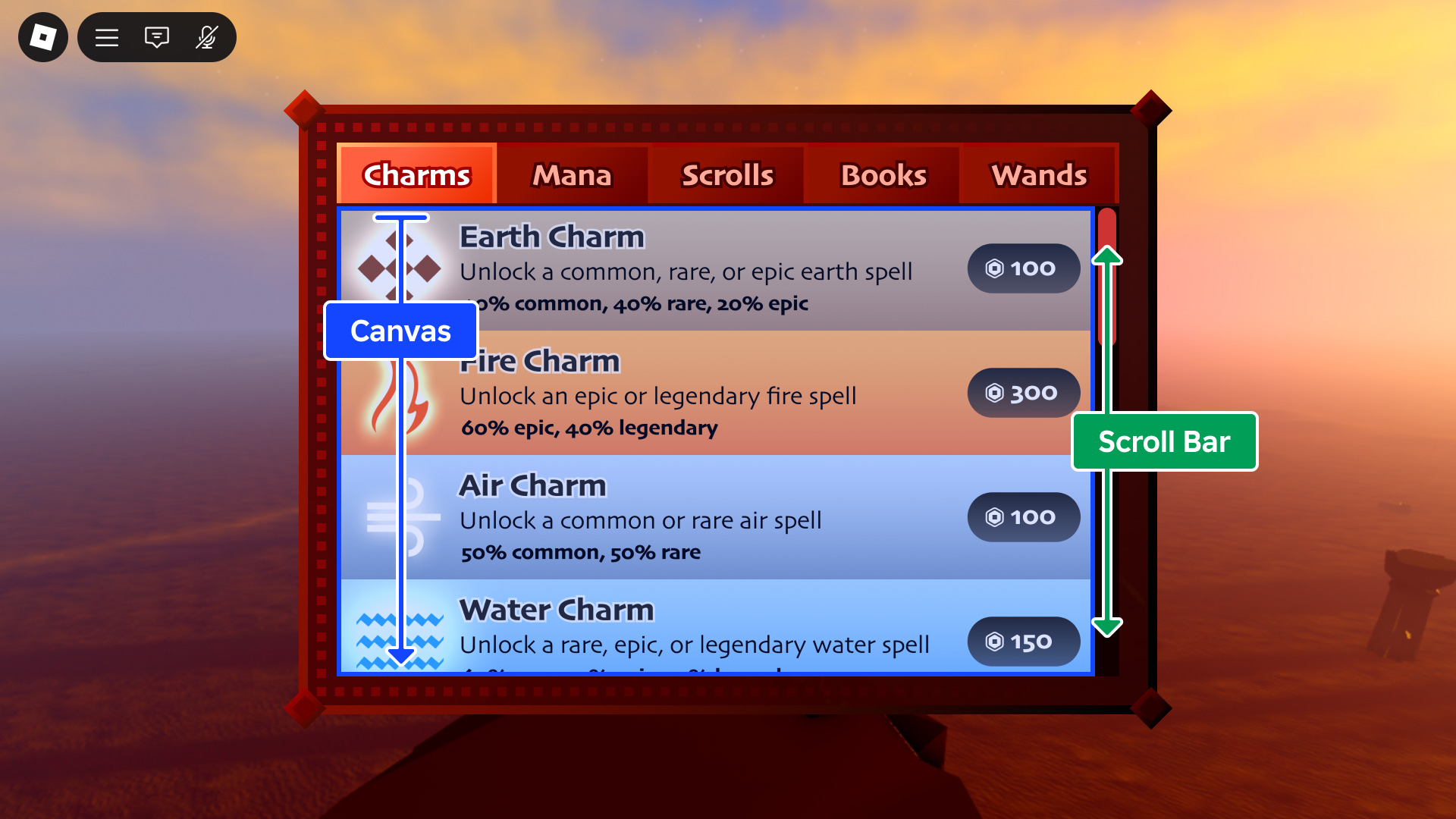
ScrollingFrame is a special Frame type with built-in scrolling interactivity and different ways to customize how the scrolling works.
Inherits from: GuiObject
Memory category: Gui
Properties
| Name | Type / Returns | Description |
|---|---|---|
| ScrollingFrame.AbsoluteCanvasSize | Vector2 | The size of the area that is scrollable, in offsets. |
| ScrollingFrame.AbsoluteWindowSize | Vector2 | The size of the frame, in offsets, without the scroll bars. |
| ScrollingFrame.AutomaticCanvasSize | AutomaticSize | Determines whether ScrollingFrame.CanvasSize is resized based on child content. |
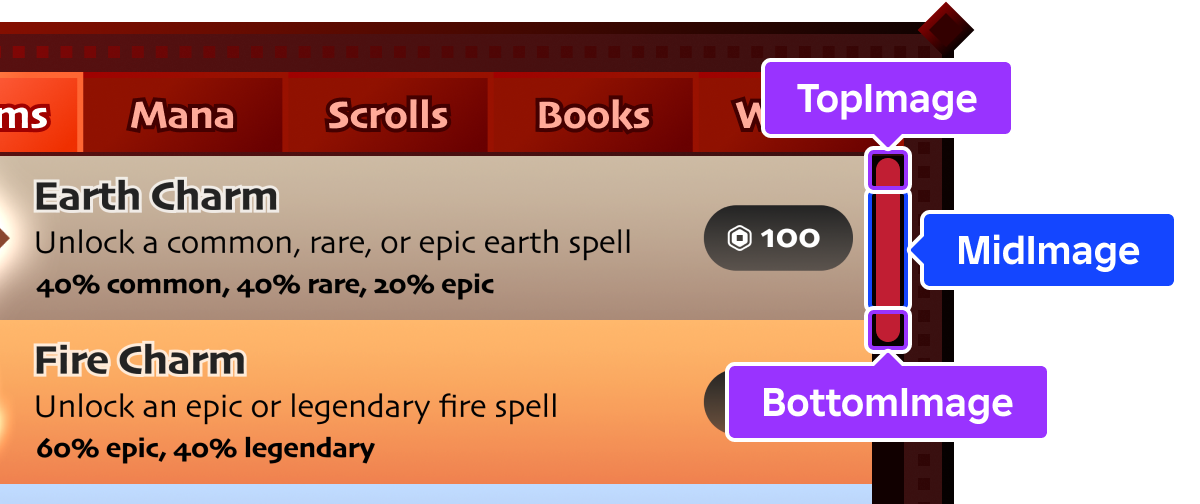
| ScrollingFrame.BottomImage | ContentId | Image that displays on the bottom of a vertical scroll bar, or the right of a horizontal scroll bar (rotated 90° counterclockwise for a horizontal scroll bar). |
| ScrollingFrame.BottomImageContent | Content | The Content-typed equivalent of BottomImage. |
| ScrollingFrame.CanvasPosition | Vector2 | Reflects the current positional offset of the canvas within the frame, in pixels, and sets the position of scroll bars accordingly. |
| ScrollingFrame.CanvasSize | UDim2 | Determines the size of the scrollable area. |
| ScrollingFrame.ElasticBehavior | ElasticBehavior | Determines if and when elastic scrolling is allowed on touch‑enabled devices. |
| ScrollingFrame.HorizontalScrollBarInset | ScrollBarInset | Indicates whether CanvasSize is inset by ScrollBarThickness on the horizontal axis. |
| ScrollingFrame.MidImage | ContentId | Image which spans the area between TopImage and BottomImage (rotated 90° counterclockwise for a horizontal scroll bar). |
| ScrollingFrame.MidImageContent | Content | The Content-typed equivalent of MidImage. |
| ScrollingFrame.ScrollBarImageColor3 | Color3 | Determines how the rendered scroll bar images are colorized. |
| ScrollingFrame.ScrollBarImageTransparency | float | Determines the opacity of the scroll bar images. |
| ScrollingFrame.ScrollBarThickness | int | Thickness of the scroll bar in pixels; applies to both horizontal and vertical scroll bars. |
| ScrollingFrame.ScrollingDirection | ScrollingDirection | Determines the direction(s) in which scrolling is allowed. |
| ScrollingFrame.ScrollingEnabled | boolean | Determines whether scrolling is allowed on the frame. |
| ScrollingFrame.TopImage | ContentId | Image which displays on the top of a vertical scroll bar, or the left of a horizontal scroll bar (rotated 90° counterclockwise for a horizontal scroll bar). |
| ScrollingFrame.TopImageContent | Content | The Content-typed equivalent of TopImage. |
| ScrollingFrame.VerticalScrollBarInset | ScrollBarInset | Indicates whether CanvasSize is inset by ScrollBarThickness on the vertical axis. |
| ScrollingFrame.VerticalScrollBarPosition | VerticalScrollBarPosition | Indicates whether the vertical scroll bar is positioned to the left or right of the canvas. |
Inherited from GuiObject
| Name | Type / Returns | Description |
|---|---|---|
| GuiObject.Active | boolean | Determines whether this UI element sinks input. |
| GuiObject.AnchorPoint | Vector2 | Determines the origin point of a GuiObject, relative to its absolute size. |
| GuiObject.AutomaticSize | AutomaticSize | Determines whether resizing occurs based on child content. |
| GuiObject.BackgroundColor | BrickColor | Determines the color of the GuiObject background. |
| GuiObject.BackgroundColor3 | Color3 | Determines the GuiObject background color. |
| GuiObject.BackgroundTransparency | float | Determines the transparency of the GuiObject background and border. |
| GuiObject.BorderColor | BrickColor | Determines the color of the GuiObject border. |
| GuiObject.BorderColor3 | Color3 | Determines the color of the GuiObject border. |
| GuiObject.BorderMode | BorderMode | Determines in what manner the GuiObject border is laid out relative to its dimensions. |
| GuiObject.BorderSizePixel | int | Determines the pixel width of the GuiObject border. |
| GuiObject.ClipsDescendants | boolean | Determines if descendant GuiObjects outside of the bounds of a parent GUI element should render. |
| GuiObject.Draggable | boolean | Determines whether a GuiObject (and its descendants) can be dragged around the screen. |
| GuiObject.GuiState | GuiState | Determines whether the player's mouse is being actively pressed on the GuiObject or not. |
| GuiObject.InputSink | InputSink | Controls whether, and how, the GuiObject sinks input that occurs over it. |
| GuiObject.Interactable | boolean | Determines whether the GuiButton can be interacted with or not, or if the GuiState of the GuiObject is changing or not. |
| GuiObject.LayoutOrder | int | Controls the sort order of the GuiObject when used with a UIGridStyleLayout. |
| GuiObject.NextSelectionDown | GuiObject | Sets the GuiObject which will be selected when the gamepad selector is moved downward. |
| GuiObject.NextSelectionLeft | GuiObject | Sets the GuiObject which will be selected when the gamepad selector is moved to the left. |
| GuiObject.NextSelectionRight | GuiObject | Sets the GuiObject which will be selected when the gamepad selector is moved to the right. |
| GuiObject.NextSelectionUp | GuiObject | Sets the GuiObject which will be selected when the gamepad selector is moved upward. |
| GuiObject.Position | UDim2 | Determines the pixel and scalar position of the GuiObject. |
| GuiObject.Rotation | float | Determines the number of degrees by which the GuiObject is rotated. |
| GuiObject.Selectable | boolean | Determine whether the GuiObject can be selected by a gamepad. |
| GuiObject.SelectionImageObject | GuiObject | Overrides the default selection adornment used for gamepads. |
| GuiObject.SelectionOrder | int | The order of GuiObjects selected by the gamepad UI selection. |
| GuiObject.Size | UDim2 | Determines the pixel and scalar size of the GuiObject. |
| GuiObject.SizeConstraint | SizeConstraint | Sets the Size axes that the GuiObject will be based on, relative to the size of its parent. |
| GuiObject.Transparency | float | A mixed property of BackgroundTransparency and TextTransparency. |
| GuiObject.Visible | boolean | Determines whether the GuiObject and its descendants will be rendered. |
| GuiObject.ZIndex | int | Determines the order in which a GuiObject renders relative to others. |
Inherited from GuiBase2d
| Name | Type / Returns | Description |
|---|---|---|
| GuiBase2d.AbsolutePosition | Vector2 | Describes the actual screen position of a GuiBase2d element, in pixels. |
| GuiBase2d.AbsoluteRotation | float | Describes the actual screen rotation of a GuiBase2d element, in degrees. |
| GuiBase2d.AbsoluteSize | Vector2 | Describes the actual screen size of a GuiBase2d element, in pixels. |
| GuiBase2d.AutoLocalize | boolean | When set to true, localization will be applied to this GuiBase2d and its descendants. |
| GuiBase2d.Localize | boolean | Automatically set to true when a localization table's LocalizationTable.Root targets this object, or an ancestor of this object. |
| GuiBase2d.RootLocalizationTable | LocalizationTable | A reference to a LocalizationTable to be used to apply automated localization to this GuiBase2d and its descendants. |
| GuiBase2d.SelectionBehaviorDown | SelectionBehavior | Customizes gamepad selection behavior in the down direction. |
| GuiBase2d.SelectionBehaviorLeft | SelectionBehavior | Customizes gamepad selection behavior in the left direction. |
| GuiBase2d.SelectionBehaviorRight | SelectionBehavior | Customizes gamepad selection behavior in the right direction. |
| GuiBase2d.SelectionBehaviorUp | SelectionBehavior | Customizes gamepad selection behavior in the up direction. |
| GuiBase2d.SelectionGroup | boolean | Allows customization of gamepad selection movement. |
Inherited from Instance
| Name | Type / Returns | Description |
|---|---|---|
| Instance.Archivable | boolean | Determines if an Instance and its descendants can be cloned using Instance:Clone(), and can be saved/published. |
| Instance.archivable | boolean | |
| Instance.Capabilities | SecurityCapabilities | The set of capabilities allowed to be used for scripts inside this container. |
| Instance.IsInSandbox | boolean | Indicates whether the instance is inside a sandboxed container. |
| Instance.Name | string | A non-unique identifier of the Instance. |
| Instance.Parent | Instance | Determines the hierarchical parent of the Instance. |
| Instance.PredictionMode | PredictionMode | Reflects the client-side prediction mode applied to the instance under server-authoritative physics. |
| Instance.RobloxLocked | boolean | A deprecated property that used to protect CoreGui objects. |
| Instance.Sandboxed | boolean | When enabled, the instance can only access abilities in its Capabilities list. |
| Instance.UniqueId | UniqueId | A unique identifier for the instance. |
Inherited from Object
| Name | Type / Returns | Description |
|---|---|---|
| Object.ClassName | string | A read-only string representing the class this Object belongs to. |
| Object.className | string |
ScrollingFrame.AbsoluteCanvasSize
The size of the area that is scrollable, in offsets. This property is set to the maximum of the CanvasSize property and the size of the children if AutomaticCanvasSize is set to something other than AutomaticSize.None.
| Field | Value |
|---|---|
| type | Vector2 |
| tags | ["ReadOnly","NotReplicated"] |
| security | {"read":"None","write":"None"} |
| thread safety | Unsafe |
| category | Scrolling |
| serialization | {"can_load":false,"can_save":true} |
| capabilities | ["UI"] |
ScrollingFrame.AbsoluteWindowSize
The size of the frame, in offsets, without the scroll bars. This read-only property represents the visible content area of the ScrollingFrame: the frame's AbsoluteSize minus the space occupied by any currently visible scroll bar gutters (ScrollBarThickness). If no scroll bars are visible, this equals the frame's absolute size.
| Field | Value |
|---|---|
| type | Vector2 |
| tags | ["ReadOnly","NotReplicated"] |
| security | {"read":"None","write":"None"} |
| thread safety | Unsafe |
| category | Scrolling |
| serialization | {"can_load":false,"can_save":true} |
| capabilities | ["UI"] |
ScrollingFrame.AutomaticCanvasSize
This property is used to automatically size parent UI objects based on the size of its descendants. You can use this property to dynamically add text and other content to a ScrollingFrame at edit or run time and the size will adjust to fit that content.
When this property is set to an AutomaticSize value other than None, AbsoluteCanvasSize may resize depending on its child content.
| Field | Value |
|---|---|
| type | AutomaticSize |
| security | {"read":"None","write":"None"} |
| thread safety | ReadSafe |
| category | Scrolling |
| serialization | {"can_load":true,"can_save":true} |
| capabilities | ["UI"] |
ScrollingFrame.BottomImage
Image that displays on the bottom of a vertical scroll bar, or the right of a horizontal scroll bar (rotated 90° counterclockwise for a horizontal scroll bar).
| Field | Value |
|---|---|
| type | ContentId |
| security | {"read":"None","write":"None"} |
| thread safety | ReadSafe |
| category | Scrolling |
| serialization | {"can_load":true,"can_save":true} |
| capabilities | ["UI"] |
ScrollingFrame.BottomImageContent
Image that displays on the bottom of a vertical scroll bar, or the right of a horizontal scroll bar (rotated 90° counterclockwise for a horizontal scroll bar). Only supports asset URIs as textures.
| Field | Value |
|---|---|
| type | Content |
| security | {"read":"None","write":"None"} |
| thread safety | ReadSafe |
| category | Scrolling |
| serialization | {"can_load":true,"can_save":true} |
| capabilities | ["UI"] |
ScrollingFrame.CanvasPosition
Reflects the current positional offset of the canvas within the frame, in pixels, and sets the position of scroll bars accordingly. Note that this property doesn't do anything if scroll bars aren't visible.
| Field | Value |
|---|---|
| type | Vector2 |
| security | {"read":"None","write":"None"} |
| thread safety | ReadSafe |
| category | Scrolling |
| serialization | {"can_load":true,"can_save":true} |
| capabilities | ["UI"] |
ScrollingFrame.CanvasSize
Determines the size of the scrollable area. For an adaptive alternative based on the overall size of children within the ScrollingFrame, consider using AutomaticCanvasSize.
| Field | Value |
|---|---|
| type | UDim2 |
| security | {"read":"None","write":"None"} |
| thread safety | ReadSafe |
| category | Scrolling |
| serialization | {"can_load":true,"can_save":true} |
| capabilities | ["UI"] |
ScrollingFrame.ElasticBehavior
This property determines if and when elastic scrolling is allowed on touch‑enabled devices. Defaults to WhenScrollable.
| Field | Value |
|---|---|
| type | ElasticBehavior |
| security | {"read":"None","write":"None"} |
| thread safety | ReadSafe |
| category | Scrolling |
| serialization | {"can_load":true,"can_save":true} |
| capabilities | ["UI"] |
ScrollingFrame.HorizontalScrollBarInset
Indicates whether the scrollable canvas is inset by ScrollBarThickness to account for the horizontal scroll bar. Because the horizontal scroll bar occupies space along the bottom edge, this inset reduces the canvas height. Defaults to ScrollBarInset.None.
None— the canvas is never inset; content may be obscured behind the horizontal scroll bar when it is visible.ScrollBar— the canvas is inset only while the horizontal scroll bar is visible.Always— the canvas is always inset regardless of whether the horizontal scroll bar is visible.
| Field | Value |
|---|---|
| type | ScrollBarInset |
| security | {"read":"None","write":"None"} |
| thread safety | ReadSafe |
| category | Scrolling |
| serialization | {"can_load":true,"can_save":true} |
| capabilities | ["UI"] |
ScrollingFrame.MidImage
Image which spans the area between TopImage and BottomImage (rotated 90° counterclockwise for a horizontal scroll bar). This image automatically scales to fill the space between the cap segments.
| Field | Value |
|---|---|
| type | ContentId |
| security | {"read":"None","write":"None"} |
| thread safety | ReadSafe |
| category | Scrolling |
| serialization | {"can_load":true,"can_save":true} |
| capabilities | ["UI"] |
ScrollingFrame.MidImageContent
Image which spans the area between TopImageContent and BottomImageContent (rotated 90° counterclockwise for a horizontal scroll bar). This image automatically scales to fill the space between the cap segments. Only supports asset URIs as textures.
| Field | Value |
|---|---|
| type | Content |
| security | {"read":"None","write":"None"} |
| thread safety | ReadSafe |
| category | Scrolling |
| serialization | {"can_load":true,"can_save":true} |
| capabilities | ["UI"] |
ScrollingFrame.ScrollBarImageColor3
Determines how the scroll bar images (TopImage, MidImage, BottomImage) are colorized. When set to white, no colorization occurs. This property is useful for reusing image assets; if the source images are completely white with transparency, you can set the color of the entire scroll bar at once.
| Field | Value |
|---|---|
| type | Color3 |
| security | {"read":"None","write":"None"} |
| thread safety | ReadSafe |
| category | Scrolling |
| serialization | {"can_load":true,"can_save":true} |
| capabilities | ["UI"] |
ScrollingFrame.ScrollBarImageTransparency
Determines the opacity of the scroll bar images (TopImage, MidImage, BottomImage). A value of 0 is completely opaque and a value of 1 is completely transparent (invisible).
| Field | Value |
|---|---|
| type | float |
| security | {"read":"None","write":"None"} |
| thread safety | ReadSafe |
| category | Scrolling |
| serialization | {"can_load":true,"can_save":true} |
| capabilities | ["UI"] |
ScrollingFrame.ScrollBarThickness
Thickness of the scroll bar in pixels; applies to both horizontal and vertical scroll bars. If set to 0, no scroll bars are rendered.
| Field | Value |
|---|---|
| type | int |
| security | {"read":"None","write":"None"} |
| thread safety | ReadSafe |
| category | Scrolling |
| serialization | {"can_load":true,"can_save":true} |
| capabilities | ["UI"] |
ScrollingFrame.ScrollingDirection
This property determines the direction(s) in which scrolling is allowed. If scrolling is disallowed in a direction, the associated scroll bar will not appear. Defaults to ScrollingDirection.XY.
| Field | Value |
|---|---|
| type | ScrollingDirection |
| security | {"read":"None","write":"None"} |
| thread safety | ReadSafe |
| category | Scrolling |
| serialization | {"can_load":true,"can_save":true} |
| capabilities | ["UI"] |
ScrollingFrame.ScrollingEnabled
Determines whether scrolling is allowed on the frame. If false, no scroll bars will be rendered.
| Field | Value |
|---|---|
| type | boolean |
| security | {"read":"None","write":"None"} |
| thread safety | ReadSafe |
| category | Scrolling |
| serialization | {"can_load":true,"can_save":true} |
| capabilities | ["UI"] |
ScrollingFrame.TopImage
Image which displays on the top of a vertical scroll bar, or the left of a horizontal scroll bar (rotated 90° counterclockwise for a horizontal scroll bar).
| Field | Value |
|---|---|
| type | ContentId |
| security | {"read":"None","write":"None"} |
| thread safety | ReadSafe |
| category | Scrolling |
| serialization | {"can_load":true,"can_save":true} |
| capabilities | ["UI"] |
ScrollingFrame.TopImageContent
Image which displays on the top of a vertical scroll bar, or the left of a horizontal scroll bar (rotated 90° counterclockwise for a horizontal scroll bar). Only supports asset URIs as textures. Defaults to the built-in scroll bar top cap texture (rbxasset://textures/ui/Scroll/scroll-top.png).
| Field | Value |
|---|---|
| type | Content |
| security | {"read":"None","write":"None"} |
| thread safety | ReadSafe |
| category | Scrolling |
| serialization | {"can_load":true,"can_save":true} |
| capabilities | ["UI"] |
ScrollingFrame.VerticalScrollBarInset
Indicates whether the scrollable canvas is inset by ScrollBarThickness to account for the vertical scroll bar. Because the vertical scroll bar occupies space along a side edge, this inset reduces the canvas width. Defaults to ScrollBarInset.None.
None— the canvas is never inset; content may be obscured behind the vertical scroll bar when it is visible.ScrollBar— the canvas is inset only while the vertical scroll bar is visible.Always— the canvas is always inset regardless of whether the vertical scroll bar is visible.
| Field | Value |
|---|---|
| type | ScrollBarInset |
| security | {"read":"None","write":"None"} |
| thread safety | ReadSafe |
| category | Scrolling |
| serialization | {"can_load":true,"can_save":true} |
| capabilities | ["UI"] |
ScrollingFrame.VerticalScrollBarPosition
Indicates whether the vertical scroll bar is positioned to the left or right of the canvas. Defaults to VerticalScrollBarPosition.Right.
| Field | Value |
|---|---|
| type | VerticalScrollBarPosition |
| security | {"read":"None","write":"None"} |
| thread safety | ReadSafe |
| category | Scrolling |
| serialization | {"can_load":true,"can_save":true} |
| capabilities | ["UI"] |
Methods
| Name | Type / Returns | Description |
|---|---|---|
| ScrollingFrame:GetScrollVelocity | Vector2 | Returns a Vector2 representing the current inertial scroll velocity after the user stops their input. |
| ScrollingFrame:ResetScrollVelocity | () | Resets the inertial scroll velocity of the ScrollingFrame to 0 on both axes. |
Inherited from GuiObject
| Name | Type / Returns | Description |
|---|---|---|
| GuiObject:TweenPosition | boolean | Smoothly moves a GUI to a new UDim2. |
| GuiObject:TweenSize | boolean | Smoothly resizes a GuiObject to a new UDim2. |
| GuiObject:TweenSizeAndPosition | boolean | Smoothly moves a GUI to a new size and position. |
Inherited from Instance
| Name | Type / Returns | Description |
|---|---|---|
| Instance:AddTag | () | Applies a tag to the instance. |
| Instance:children | Instances | Returns an array of the object's children. |
| Instance:ClearAllChildren | () | This method destroys all of an instance's children. |
| Instance:Clone | Instance | Create a copy of an instance and all its descendants, ignoring instances that are not Archivable. |
| Instance:clone | Instance | |
| Instance:Destroy | () | Sets the Instance.Parent property to nil, locks the Instance.Parent property, disconnects all connections, and calls Destroy() on all children. |
| Instance:destroy | () | |
| Instance:FindFirstAncestor | Instance? | Returns the first ancestor of the Instance whose Instance.Name is equal to the given name. |
| Instance:FindFirstAncestorOfClass | Instance? | Returns the first ancestor of the Instance whose Object.ClassName is equal to the given className. |
| Instance:FindFirstAncestorWhichIsA | Instance? | Returns the first ancestor of the Instance for whom Object:IsA() returns true for the given className. |
| Instance:FindFirstChild | Instance? | Returns the first child of the Instance found with the given name. |
| Instance:findFirstChild | Instance | |
| Instance:FindFirstChildOfClass | Instance? | Returns the first child of the Instance whose ClassName is equal to the given class name. |
| Instance:FindFirstChildWhichIsA | Instance? | Returns the first child of the Instance for whom Object:IsA() returns true for the given className. |
| Instance:FindFirstDescendant | Instance? | Returns the first descendant found with the given Instance.Name. |
| Instance:GetActor | Actor? | Returns the Actor associated with the Instance, if any. |
| Instance:GetAttribute | Variant | Returns the value which has been assigned to the given attribute name. |
| Instance:GetAttributeChangedSignal | RBXScriptSignal | Returns an event that fires when the given attribute changes. |
| Instance:GetAttributes | Dictionary | Returns a dictionary of the instance's attributes. |
| Instance:GetChildren | Instances | Returns an array containing all of the instance's children. |
| Instance:getChildren | Instances | |
| Instance:GetDebugId | string | Returns a coded string of the debug ID used internally by Roblox. |
| Instance:GetDescendants | Instances | Returns an array containing all of the descendants of the instance. |
| Instance:GetFullName | string | Returns a string describing the instance's ancestry. |
| Instance:GetStyled | Variant | Returns the styled or explicitly modified value of the specified property, or else the default property value if it hasn't been styled/modified. |
| Instance:GetStyledPropertyChangedSignal | RBXScriptSignal | Returns an event that fires when the given style property changes on the instance. |
| Instance:GetTags | Array | Gets an array of all tags applied to the instance. |
| Instance:HasTag | boolean | Check whether the instance has a given tag. |
| Instance:IsAncestorOf | boolean | Returns true if an Instance is an ancestor of the given descendant. |
| Instance:IsDescendantOf | boolean | Returns true if an Instance is a descendant of the given ancestor. |
| Instance:isDescendantOf | boolean | |
| Instance:IsPropertyModified | boolean | Returns true if the value stored in the specified property is not equal to the code-instantiated default. |
| Instance:QueryDescendants | Instances | Returns an array containing all descendants of the instance that match the selector string. |
| Instance:Remove | () | Sets the object's Parent to nil, and does the same for all its descendants. |
| Instance:remove | () | |
| Instance:RemoveTag | () | Removes a tag from the instance. |
| Instance:ResetPropertyToDefault | () | Resets a property to its default value. |
| Instance:SetAttribute | () | Sets the attribute with the given name to the given value. |
| Instance:WaitForChild | Instance | Returns the child of the Instance with the given name. If the child does not exist, it will yield the current thread until it does. |
Inherited from Object
| Name | Type / Returns | Description |
|---|---|---|
| Object:GetPropertyChangedSignal | RBXScriptSignal | Get an event that fires when a given property of the object changes. |
| Object:IsA | boolean | Returns true if an object's class matches or inherits from a given class. |
| Object:isA | boolean |
ScrollingFrame:GetScrollVelocity
Returns a Vector2 representing the current inertial scroll velocity after the user stops their input, for example lifts their finger off the ScrollingFrame on a touch-enabled device.
Note that this method may only produce noticable data on an actual device or in an emulated scenario from Studio's Device Emulator.
Returns
| Type | Description |
|---|---|
| Vector2 | The current inertial scroll velocity in pixels per second on each axis, or (0, 0) if the frame is not coasting. |
| Field | Value |
|---|---|
| security | None |
| thread safety | Unsafe |
| capabilities | ["UI"] |
ScrollingFrame:ResetScrollVelocity
Resets the inertial scroll velocity of the ScrollingFrame to 0 on both axes.
Returns
| Type | Description |
|---|---|
| () |
| Field | Value |
|---|---|
| security | None |
| thread safety | Unsafe |
| capabilities | ["UI"] |
Events
Inherited from GuiObject
| Name | Type / Returns | Description |
|---|---|---|
| GuiObject.DragBegin | Fired when a player begins dragging the object. | |
| GuiObject.DragStopped | Fired when a player stops dragging the object. | |
| GuiObject.InputBegan | Fired when a user begins interacting via a Human-Computer Interface device (Mouse button down, touch begin, keyboard button down, etc). | |
| GuiObject.InputChanged | Fired when a user changes how they're interacting via a Human-Computer Interface device (Mouse button down, touch begin, keyboard button down, etc). | |
| GuiObject.InputEnded | Fired when a user stops interacting via a Human-Computer Interface device (Mouse button down, touch begin, keyboard button down, etc). | |
| GuiObject.MouseEnter | Fires when a user moves their mouse into a GUI element. | |
| GuiObject.MouseLeave | Fires when a user moves their mouse out of a GUI element. | |
| GuiObject.MouseMoved | Fires whenever a user moves their mouse while it is inside a GUI element. | |
| GuiObject.MouseWheelBackward | Fires when a user scrolls their mouse wheel back when the mouse is over a GUI element. | |
| GuiObject.MouseWheelForward | Fires when a user scrolls their mouse wheel forward when the mouse is over a GUI element. | |
| GuiObject.SelectionGained | Fired when the GuiObject is being focused on with the Gamepad selector. | |
| GuiObject.SelectionLost | Fired when the Gamepad selector stops focusing on the GuiObject. | |
| GuiObject.TouchLongPress | Fires when the player starts, continues and stops long-pressing the UI element. | |
| GuiObject.TouchPan | Fires when the player moves their finger on the UI element. | |
| GuiObject.TouchPinch | Fires when the player performs a pinch or pull gesture using two fingers on the UI element. | |
| GuiObject.TouchRotate | Fires when the player performs a rotation gesture using two fingers on the UI element. | |
| GuiObject.TouchSwipe | Fires when the player performs a swipe gesture on the UI element. | |
| GuiObject.TouchTap | Fires when the player performs a tap gesture on the UI element. |
Inherited from GuiBase2d
| Name | Type / Returns | Description |
|---|---|---|
| GuiBase2d.SelectionChanged | Fires when the gamepad selection moves to, leaves, or changes within the connected GuiBase2d or any descendant GuiObjects. |
Inherited from Instance
| Name | Type / Returns | Description |
|---|---|---|
| Instance.AncestryChanged | Fires when the Instance.Parent property of this object or one of its ancestors is changed. | |
| Instance.AttributeChanged | Fires whenever an attribute is changed on the Instance. | |
| Instance.ChildAdded | Fires after an object is parented to this Instance. | |
| Instance.childAdded | ||
| Instance.ChildRemoved | Fires after a child is removed from this Instance. | |
| Instance.DescendantAdded | Fires after a descendant is added to the Instance. | |
| Instance.DescendantRemoving | Fires immediately before a descendant of the Instance is removed. | |
| Instance.Destroying | Fires immediately before (or is deferred until after) the instance is destroyed via Instance:Destroy(). | |
| Instance.StyledPropertiesChanged | Fires whenever any style property is changed on the instance, including when a property is set to nil. |
Inherited from Object
| Name | Type / Returns | Description |
|---|---|---|
| Object.Changed | Fires immediately after a property of the object changes, with some limitations. |