
Source: Roblox Creator Hub · CC BY 4.0 · View source · Code samples: MIT Imported 2026-10-03. Formatting adapted for this site.
Beam
Inherits from: Instance → Object
A Beam object connects two Attachments by drawing a texture between them.
To display, a beam must be a descendant of the Workspace with its Attachment0 and Attachment1 properties set to Attachments also descending from the Workspace.
The beam's appearance can be customized using the range of properties outlined below. Also see the Beams guide for visual examples.
Beam Curvature
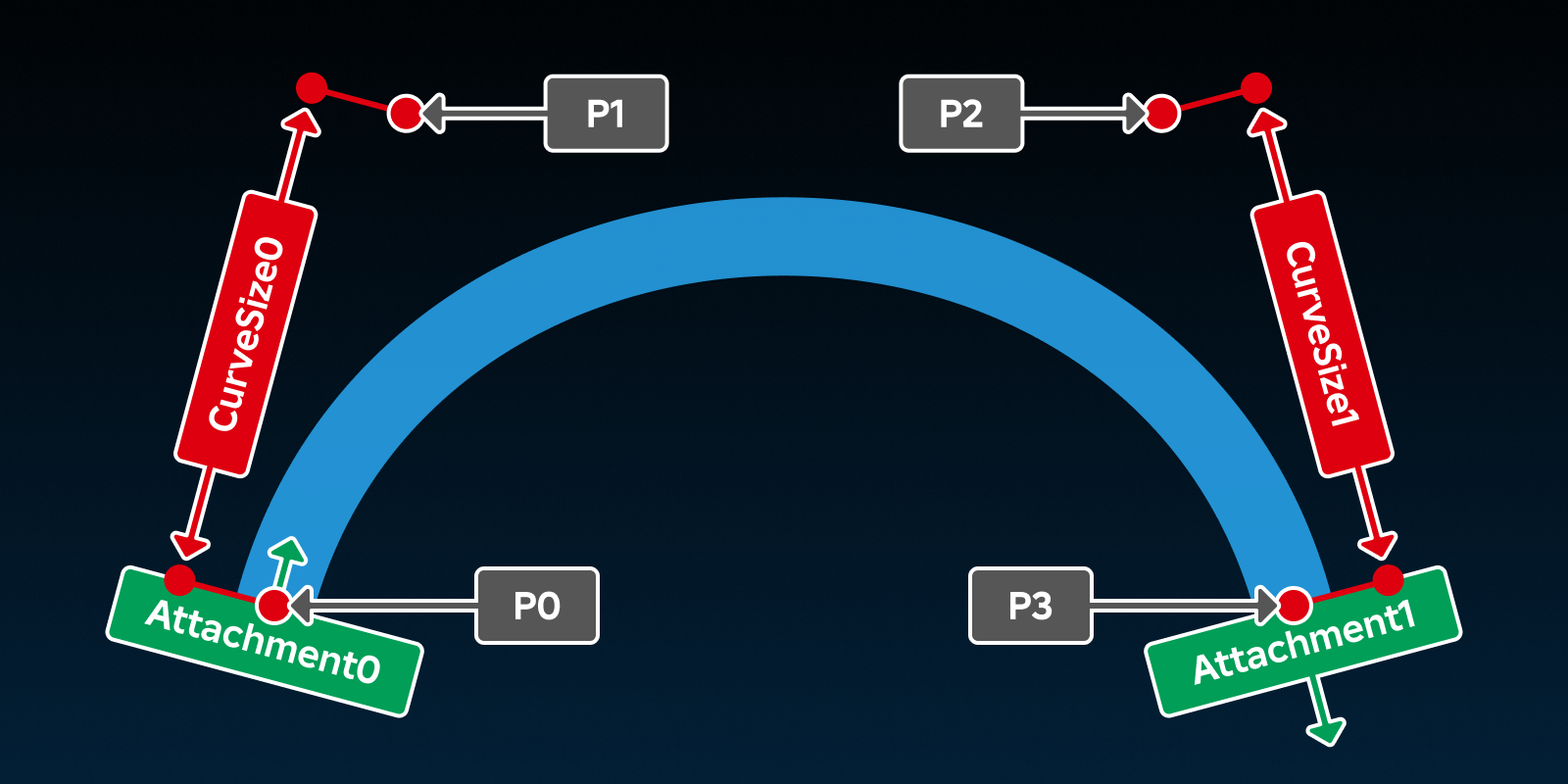
Beams are configured to use a cubic Bézier curve formed by four control points. This means they are not constrained to straight lines and the curve of the beam can be modified by changing CurveSize0, CurveSize1, and the orientation of the beam's Attachments.
- P0 — The start of the beam; position of
Attachment0. - P1 —
CurveSize0studs away fromAttachment0, in the positive X direction ofAttachment0. - P2 —
CurveSize1studs away fromAttachment1, in the negative X direction ofAttachment1. - P3 — The end of the beam; position of
Attachment1
Inherits from: Instance
Memory category: Instances
Code samples: View on Creator Hub (Creating-a-Beam-From-Scratch).
Properties
| Name | Type / Returns | Description |
|---|---|---|
| Beam.Attachment0 | Attachment | The Attachment the beam originates from. |
| Beam.Attachment1 | Attachment | The Attachment the beam ends at. |
| Beam.Brightness | float | Scales the light emitted from the beam when LightInfluence is less than 1. |
| Beam.Color | ColorSequence | Determines the color of the beam across its Segments. |
| Beam.CurveSize0 | float | Determines, along with Attachment0, the position of the second control point in the beam's Bézier curve. |
| Beam.CurveSize1 | float | Determines, along with Attachment1, the position of the third control point in the beam's Bézier curve. |
| Beam.Enabled | boolean | Determines whether the beam is visible or not. |
| Beam.FaceCamera | boolean | Determines whether the Segments of the beam will always face the camera, regardless of its orientation. |
| Beam.LightEmission | float | Determines to what degree the colors of the beam are blended with the colors behind it. |
| Beam.LightInfluence | float | Determines the degree to which the beam is influenced by the environment's lighting. |
| Beam.LocalTransparencyModifier | float | Determines a multiplier for Beam.Transparency that is only visible to the local client. |
| Beam.Segments | int | Sets how many straight segments the beam is made up of. |
| Beam.Texture | ContentId | The content ID of the texture to be displayed on the beam. |
| Beam.TextureContent | Content | The texture displayed on the beam. Supports asset URIs. |
| Beam.TextureLength | float | Sets the length of the beam's texture, dependent on TextureMode. |
| Beam.TextureMode | TextureMode | Determines the manner in which the Texture scales and repeats. |
| Beam.TextureSpeed | float | Determines the speed at which the Texture image moves along the beam. |
| Beam.Transparency | NumberSequence | Determines the transparency of the beam across its segments. |
| Beam.Width0 | float | The width of the beam at its origin (Attachment0), in studs. |
| Beam.Width1 | float | The width of the beam at its end (Attachment1), in studs. |
| Beam.ZOffset | float | The distance, in studs, the beam display is offset relative to the CurrentCamera. |
Inherited from Instance
| Name | Type / Returns | Description |
|---|---|---|
| Instance.Archivable | boolean | Determines if an Instance and its descendants can be cloned using Instance:Clone(), and can be saved/published. |
| Instance.archivable | boolean | |
| Instance.Capabilities | SecurityCapabilities | The set of capabilities allowed to be used for scripts inside this container. |
| Instance.IsInSandbox | boolean | Indicates whether the instance is inside a sandboxed container. |
| Instance.Name | string | A non-unique identifier of the Instance. |
| Instance.Parent | Instance | Determines the hierarchical parent of the Instance. |
| Instance.PredictionMode | PredictionMode | Reflects the client-side prediction mode applied to the instance under server-authoritative physics. |
| Instance.RobloxLocked | boolean | A deprecated property that used to protect CoreGui objects. |
| Instance.Sandboxed | boolean | When enabled, the instance can only access abilities in its Capabilities list. |
| Instance.UniqueId | UniqueId | A unique identifier for the instance. |
Inherited from Object
| Name | Type / Returns | Description |
|---|---|---|
| Object.ClassName | string | A read-only string representing the class this Object belongs to. |
| Object.className | string |
Beam.Attachment0
The Attachment the beam originates from. This attachment is the first control point on the beam's cubic Bézier curve; its orientation, alongside the CurveSize0 property, determines the position of the second control point. See Beams for more details.
For the Attachment where the beam ends, see Attachment1.
| Field | Value |
|---|---|
| type | Attachment |
| security | {"read":"None","write":"None"} |
| thread safety | ReadSafe |
| category | Shape |
| serialization | {"can_load":true,"can_save":true} |
| capabilities | ["Basic"] |
Beam.Attachment1
The Attachment the beam ends at. This attachment is the fourth and final control point on the beam's cubic Bézier curve; its orientation, alongside the CurveSize1 property, determines the position of the third control point. See Beams for more details.
For the Attachment where the beam originates from, see Attachment0.
| Field | Value |
|---|---|
| type | Attachment |
| security | {"read":"None","write":"None"} |
| thread safety | ReadSafe |
| category | Shape |
| serialization | {"can_load":true,"can_save":true} |
| capabilities | ["Basic"] |
Beam.Brightness
Scales the light emitted from the beam when LightInfluence is less than 1. This property is 1 by default and can set to any number within the range of 0 to 10000. Increasing the value of LightInfluence decreases the effect of this property's value.
| Field | Value |
|---|---|
| type | float |
| security | {"read":"None","write":"None"} |
| thread safety | ReadSafe |
| category | Appearance |
| serialization | {"can_load":true,"can_save":true} |
| capabilities | ["Basic"] |
Beam.Color
Determines the color of the beam across its Segments. If Texture is set, this color will be applied to the beam's texture. If no Texture is set, the Beam will appear as a solid line colored in accordance with this property.
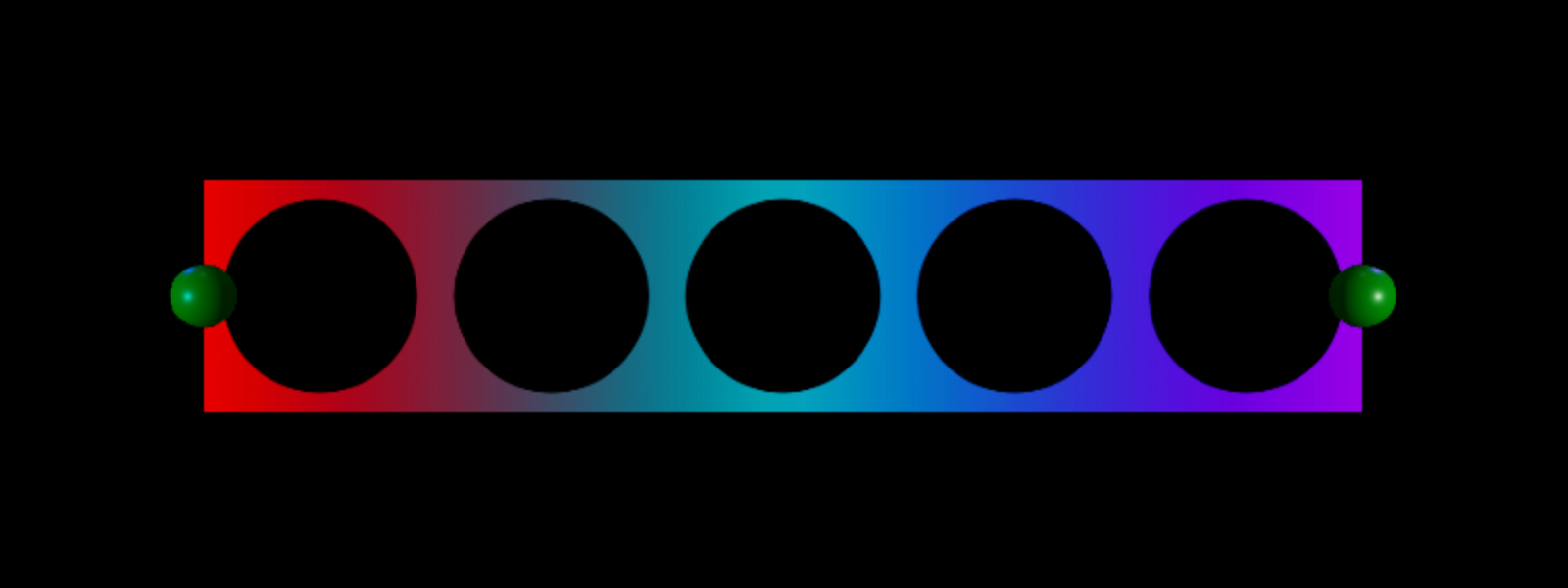
This property is a ColorSequence, allowing the color to be configured to vary across the length of the beam. Consider the following ColorSequence which, when applied to a beam, would yield the pictured result.
local colorSequence = ColorSequence.new({
		ColorSequenceKeypoint.new(0, Color3.fromRGB(255, 0, 0)), -- Red
		ColorSequenceKeypoint.new(0.5, Color3.fromRGB(0, 188, 203)), -- Cyan
		ColorSequenceKeypoint.new(1, Color3.fromRGB(196, 0, 255)), -- Purple
	}
)
Note the beam's coloration also depends on the number of Segments the Beam has. Each segment of the beam can only show a transition between two colors. Therefore a Beam will need to have at least n-1 segments in order for the color to display correctly, where n is the number of ColorSequenceKeypoints in the ColorSequence.
| Field | Value |
|---|---|
| type | ColorSequence |
| security | {"read":"None","write":"None"} |
| thread safety | ReadSafe |
| category | Appearance |
| serialization | {"can_load":true,"can_save":true} |
| capabilities | ["Basic"] |
Beam.CurveSize0
Determines, along with Attachment0, the position of the second control point in the beam's Bézier curve. See Beams for more details.
The position of this point can be determined by the following equation:
| Field | Value |
|---|---|
| type | float |
| security | {"read":"None","write":"None"} |
| thread safety | ReadSafe |
| category | Shape |
| serialization | {"can_load":true,"can_save":true} |
| capabilities | ["Basic"] |
Code samples: View on Creator Hub (Beam-CurveSize0).
Beam.CurveSize1
Determines, along with Attachment1, the position of the third control point in the beam's Bézier curve. See Beams for more details.
The position of this point can be determined by the following equation:
| Field | Value |
|---|---|
| type | float |
| security | {"read":"None","write":"None"} |
| thread safety | ReadSafe |
| category | Shape |
| serialization | {"can_load":true,"can_save":true} |
| capabilities | ["Basic"] |
Code samples: View on Creator Hub (Beam-CurveSize1).
Beam.Enabled
Determines whether the beam is visible or not.
When this property is set to false, the beam's Segments will not be displayed.
| Field | Value |
|---|---|
| type | boolean |
| security | {"read":"None","write":"None"} |
| thread safety | ReadSafe |
| category | Appearance |
| serialization | {"can_load":true,"can_save":true} |
| capabilities | ["Basic"] |
Beam.FaceCamera
A Beam is a 2D projection existing in 3D space, meaning that it may not be visible from every angle. The FaceCamera property, when set to true, ensures that the beam always faces the CurrentCamera, regardless of its orientation.
| Field | Value |
|---|---|
| type | boolean |
| security | {"read":"None","write":"None"} |
| thread safety | ReadSafe |
| category | Shape |
| serialization | {"can_load":true,"can_save":true} |
| capabilities | ["Basic"] |
Beam.LightEmission
Determines to what degree the colors of the beam are blended with the colors behind it. It should be set in the range of 0 to 1. A value of 0 uses normal blending modes and a value of 1 uses additive blending.
This property should not be confused with LightInfluence which determines how the beam is affected by environmental light.
This property does not cause the beam to light the environment.
| Field | Value |
|---|---|
| type | float |
| security | {"read":"None","write":"None"} |
| thread safety | ReadSafe |
| category | Appearance |
| serialization | {"can_load":true,"can_save":true} |
| capabilities | ["Basic"] |
Beam.LightInfluence
Determines the degree to which the beam is influenced by the environment's lighting, clamped between 0 and 1. When 0, the beam will be unaffected by the environment's lighting. When 1, it will be fully affected by lighting as a BasePart would be.
See also LightEmission which specifies to what degree the colors of the beam are blended with the colors behind it.
| Field | Value |
|---|---|
| type | float |
| security | {"read":"None","write":"None"} |
| thread safety | ReadSafe |
| category | Appearance |
| serialization | {"can_load":true,"can_save":true} |
| capabilities | ["Basic"] |
Beam.LocalTransparencyModifier
The LocalTransparencyModifier property is a multiplier applied to the beam's Transparency that is only visible to the local client. It does not replicate from client to server and is useful for when a beam should not render for a specific client.
Uses the same formula as BasePart.LocalTransparencyModifier.
A value of 0 (default) has no effect on the beam's transparency. A value of 1 makes the beam completely invisible to the local client regardless of its Transparency value.
| Field | Value |
|---|---|
| type | float |
| tags | ["Hidden","NotReplicated"] |
| security | {"read":"None","write":"None"} |
| thread safety | ReadSafe |
| category | Appearance |
| serialization | {"can_load":false,"can_save":false} |
| capabilities | ["Basic"] |
Beam.Segments
Rather than being a perfect curve, a beam is made up of straight segments. The more segments, the higher the resolution of the curve. The Segments property sets how many straight segments the beam is made up of, with a default value of 10.
Note that the Color and Transparency properties require a certain number of segments to display correctly. This is because each segment can only show a transition between two colors or transparencies. Therefore a Beam requires at least n-1 segments to display correctly, where n is the number of keypoint associated with the beam's Color and Transparency.
| Field | Value |
|---|---|
| type | int |
| security | {"read":"None","write":"None"} |
| thread safety | ReadSafe |
| category | Shape |
| serialization | {"can_load":true,"can_save":true} |
| capabilities | ["Basic"] |
Beam.Texture
The content ID of the texture to be displayed on the beam. If this property is not set, the beam will be displayed as a solid line; this also occurs when the texture is set to an invalid content ID or the image associated with the texture has not yet loaded.
The appearance of the texture can be further modified by other beam properties including Color and Transparency.
Scaling of the texture is determined by the TextureMode, TextureLength, Width0, and Width1 properties.
| Field | Value |
|---|---|
| type | ContentId |
| security | {"read":"None","write":"None"} |
| thread safety | ReadSafe |
| category | Appearance |
| serialization | {"can_load":true,"can_save":true} |
| capabilities | ["Basic"] |
Beam.TextureContent
The texture displayed on the beam. Supports asset URIs.
If this property is set to Content.none, the beam displays as a solid line colored by its Color property. The appearance of the texture can be further modified by Color, Transparency, and scaling is determined by TextureMode, TextureLength, Width0, and Width1.
| Field | Value |
|---|---|
| type | Content |
| security | {"read":"None","write":"None"} |
| thread safety | ReadSafe |
| category | Appearance |
| serialization | {"can_load":true,"can_save":true} |
| capabilities | ["Basic"] |
Beam.TextureLength
Sets the length of the beam's texture, dependent on TextureMode.
| Field | Value |
|---|---|
| type | float |
| security | {"read":"None","write":"None"} |
| thread safety | ReadSafe |
| category | Appearance |
| serialization | {"can_load":true,"can_save":true} |
| capabilities | ["Basic"] |
Beam.TextureMode
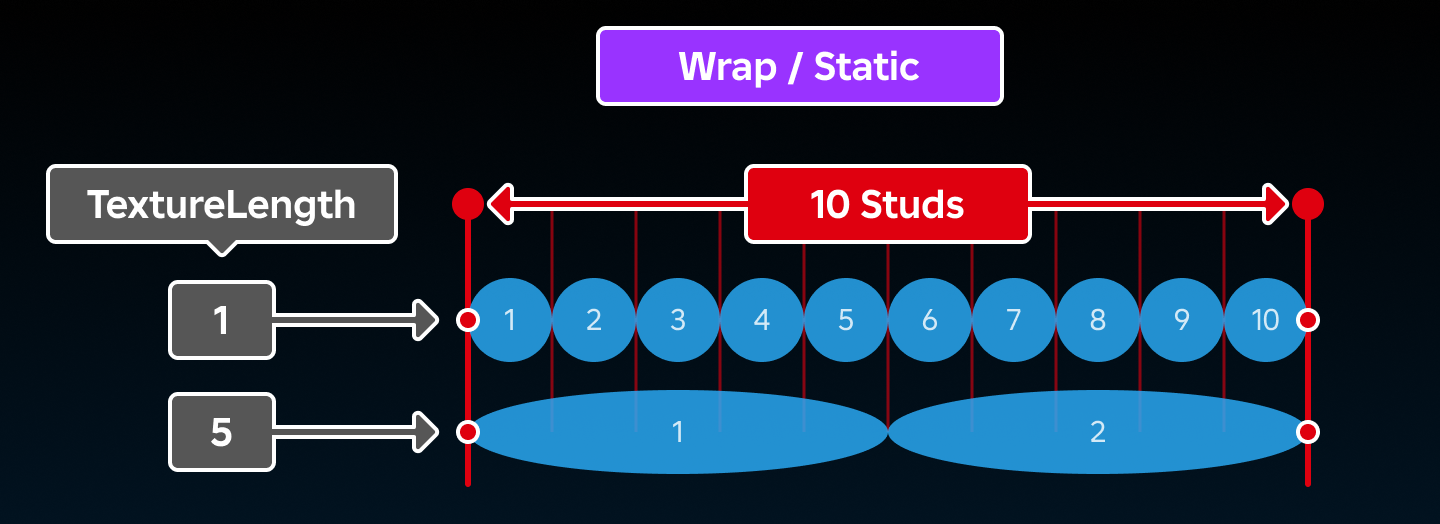
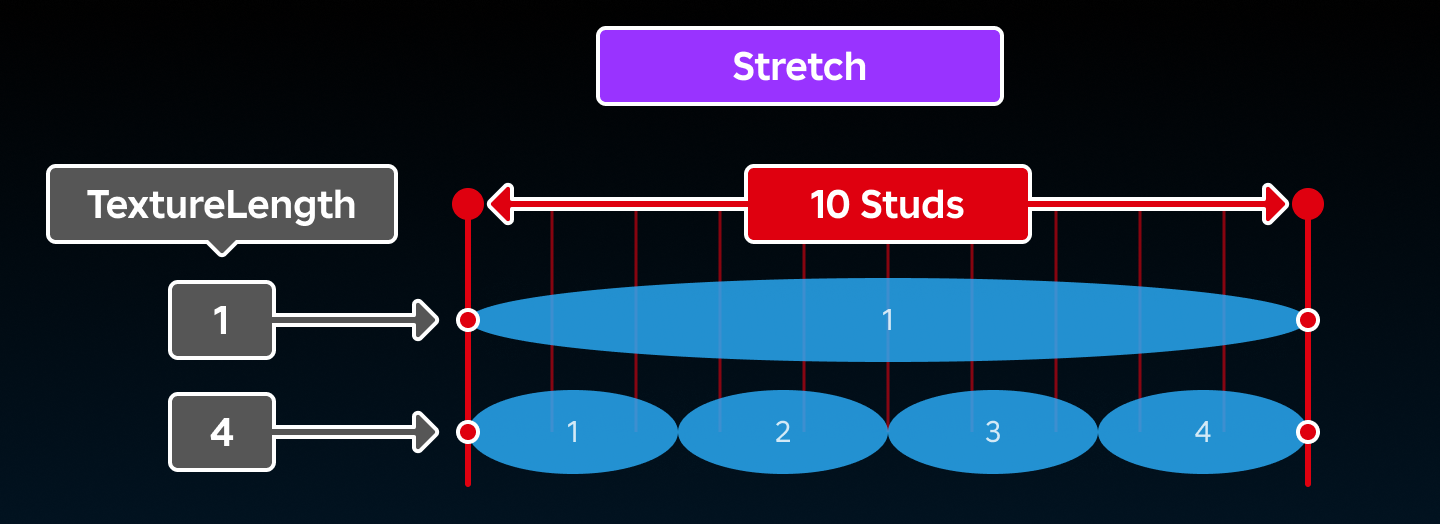
This property, alongside TextureLength, determines how a beam's Texture repeats.
When set to TextureMode.Wrap or TextureMode.Static, the texture repetitions will equal the beam's overall length (in studs) divided by its TextureLength.
When set to TextureMode.Stretch, the texture will repeat TextureLength times across the beam's overall length.
| Field | Value |
|---|---|
| type | TextureMode |
| security | {"read":"None","write":"None"} |
| thread safety | ReadSafe |
| category | Appearance |
| serialization | {"can_load":true,"can_save":true} |
| capabilities | ["Basic"] |
Beam.TextureSpeed
Sets the number of texture cycles per second at which the Texture image moves along the beam, where one cycle is a full traversal of the texture's UV range. When this property is a positive value, the beam's texture will move from Attachment0 to Attachment1. This direction can be inverted by setting this property to a negative number. The default value is 1.
How far one cycle travels along the beam in studs depends on TextureMode and TextureLength.
Examples
-2— Texture scrolls fromAttachment1towardAttachment0, completing two cycles per second.0— Texture is static.1— Texture scrolls fromAttachment0towardAttachment1, completing one cycle per second (default).2— Texture scrolls fromAttachment0towardAttachment1, completing two cycles per second.
| Field | Value |
|---|---|
| type | float |
| security | {"read":"None","write":"None"} |
| thread safety | ReadSafe |
| category | Appearance |
| serialization | {"can_load":true,"can_save":true} |
| capabilities | ["Basic"] |
Beam.Transparency
Determines the transparency of the beam across its segments. This property is a NumberSequence, allowing the transparency to be configured to vary across the length of the beam.
Consider the following NumberSequence which, when applied to a beam, would yield the pictured result.
local numberSequence = NumberSequence.new({
		NumberSequenceKeypoint.new(0, 0), -- Opaque
		NumberSequenceKeypoint.new(0.5, 1), -- Transparent
		NumberSequenceKeypoint.new(1, 0), -- Opaque
	}
)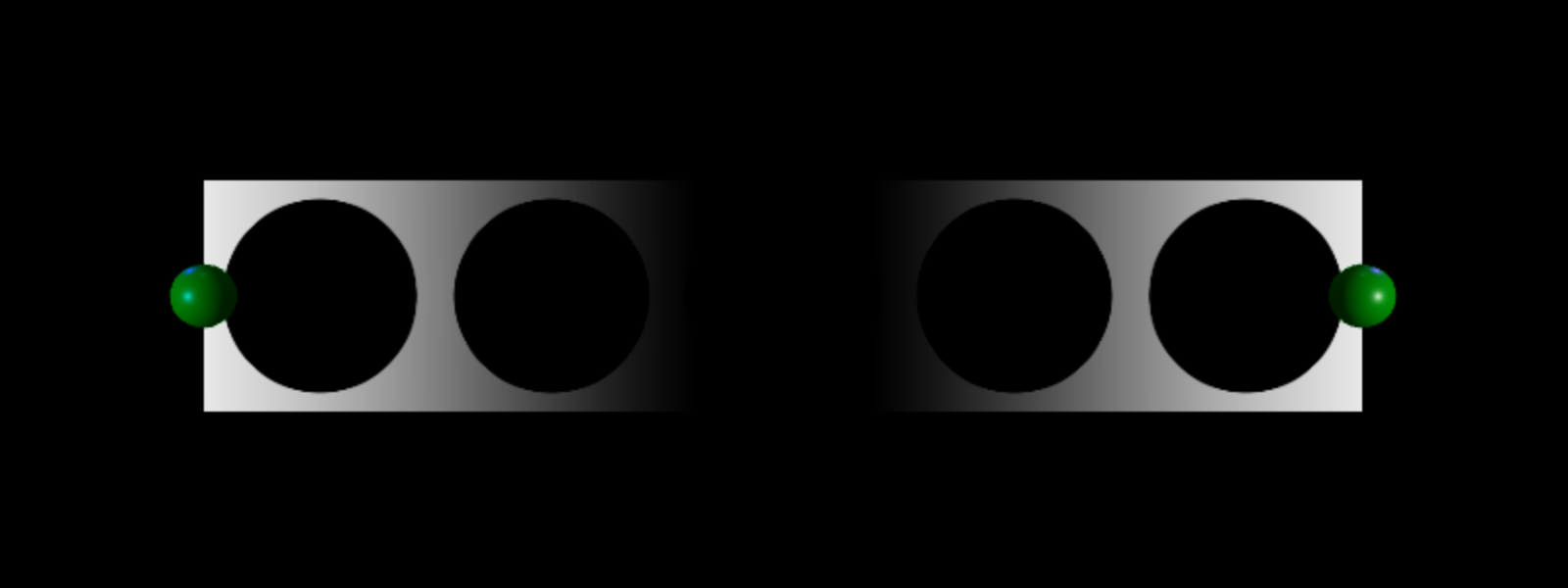
Note that the beam's transparency also depends on the number of Segments. Each segment of the beam can only show a transition between two transparencies. Therefore a beam will need to have at least n-1 segments in order to display correctly, where n is the number of NumberSequenceKeypoints in the NumberSequence.
| Field | Value |
|---|---|
| type | NumberSequence |
| security | {"read":"None","write":"None"} |
| thread safety | ReadSafe |
| category | Appearance |
| serialization | {"can_load":true,"can_save":true} |
| capabilities | ["Basic"] |
Beam.Width0
The width of the beam at its origin (Attachment0), in studs. The beam's width will change linearly to Width1 studs at its end (Attachment1).
| Field | Value |
|---|---|
| type | float |
| security | {"read":"None","write":"None"} |
| thread safety | ReadSafe |
| category | Shape |
| serialization | {"can_load":true,"can_save":true} |
| capabilities | ["Basic"] |
Beam.Width1
The width of the beam at its end (Attachment1), in studs. The beam's width will change linearly from Width0 studs at its origin (Attachment0).
| Field | Value |
|---|---|
| type | float |
| security | {"read":"None","write":"None"} |
| thread safety | ReadSafe |
| category | Shape |
| serialization | {"can_load":true,"can_save":true} |
| capabilities | ["Basic"] |
Beam.ZOffset
The distance, in studs, the beam display is offset relative to the CurrentCamera. When 0, the beam will be displayed in its standard position between Attachment0 and Attachment1. ZOffset can be either positive or negative.
This property is particularly useful to avoid "Z‑fighting" when using multiple Beams between the same Attachments.
| Field | Value |
|---|---|
| type | float |
| security | {"read":"None","write":"None"} |
| thread safety | ReadSafe |
| category | Appearance |
| serialization | {"can_load":true,"can_save":true} |
| capabilities | ["Basic"] |
Code samples: View on Creator Hub (Beam-ZOffset).
Methods
| Name | Type / Returns | Description |
|---|---|---|
| Beam:SetTextureOffset | () | Sets the current offset of the beam's texture cycle. |
Inherited from Instance
| Name | Type / Returns | Description |
|---|---|---|
| Instance:AddTag | () | Applies a tag to the instance. |
| Instance:children | Instances | Returns an array of the object's children. |
| Instance:ClearAllChildren | () | This method destroys all of an instance's children. |
| Instance:Clone | Instance | Create a copy of an instance and all its descendants, ignoring instances that are not Archivable. |
| Instance:clone | Instance | |
| Instance:Destroy | () | Sets the Instance.Parent property to nil, locks the Instance.Parent property, disconnects all connections, and calls Destroy() on all children. |
| Instance:destroy | () | |
| Instance:FindFirstAncestor | Instance? | Returns the first ancestor of the Instance whose Instance.Name is equal to the given name. |
| Instance:FindFirstAncestorOfClass | Instance? | Returns the first ancestor of the Instance whose Object.ClassName is equal to the given className. |
| Instance:FindFirstAncestorWhichIsA | Instance? | Returns the first ancestor of the Instance for whom Object:IsA() returns true for the given className. |
| Instance:FindFirstChild | Instance? | Returns the first child of the Instance found with the given name. |
| Instance:findFirstChild | Instance | |
| Instance:FindFirstChildOfClass | Instance? | Returns the first child of the Instance whose ClassName is equal to the given class name. |
| Instance:FindFirstChildWhichIsA | Instance? | Returns the first child of the Instance for whom Object:IsA() returns true for the given className. |
| Instance:FindFirstDescendant | Instance? | Returns the first descendant found with the given Instance.Name. |
| Instance:GetActor | Actor? | Returns the Actor associated with the Instance, if any. |
| Instance:GetAttribute | Variant | Returns the value which has been assigned to the given attribute name. |
| Instance:GetAttributeChangedSignal | RBXScriptSignal | Returns an event that fires when the given attribute changes. |
| Instance:GetAttributes | Dictionary | Returns a dictionary of the instance's attributes. |
| Instance:GetChildren | Instances | Returns an array containing all of the instance's children. |
| Instance:getChildren | Instances | |
| Instance:GetDebugId | string | Returns a coded string of the debug ID used internally by Roblox. |
| Instance:GetDescendants | Instances | Returns an array containing all of the descendants of the instance. |
| Instance:GetFullName | string | Returns a string describing the instance's ancestry. |
| Instance:GetStyled | Variant | Returns the styled or explicitly modified value of the specified property, or else the default property value if it hasn't been styled/modified. |
| Instance:GetStyledPropertyChangedSignal | RBXScriptSignal | Returns an event that fires when the given style property changes on the instance. |
| Instance:GetTags | Array | Gets an array of all tags applied to the instance. |
| Instance:HasTag | boolean | Check whether the instance has a given tag. |
| Instance:IsAncestorOf | boolean | Returns true if an Instance is an ancestor of the given descendant. |
| Instance:IsDescendantOf | boolean | Returns true if an Instance is a descendant of the given ancestor. |
| Instance:isDescendantOf | boolean | |
| Instance:IsPropertyModified | boolean | Returns true if the value stored in the specified property is not equal to the code-instantiated default. |
| Instance:QueryDescendants | Instances | Returns an array containing all descendants of the instance that match the selector string. |
| Instance:Remove | () | Sets the object's Parent to nil, and does the same for all its descendants. |
| Instance:remove | () | |
| Instance:RemoveTag | () | Removes a tag from the instance. |
| Instance:ResetPropertyToDefault | () | Resets a property to its default value. |
| Instance:SetAttribute | () | Sets the attribute with the given name to the given value. |
| Instance:WaitForChild | Instance | Returns the child of the Instance with the given name. If the child does not exist, it will yield the current thread until it does. |
Inherited from Object
| Name | Type / Returns | Description |
|---|---|---|
| Object:GetPropertyChangedSignal | RBXScriptSignal | Get an event that fires when a given property of the object changes. |
| Object:IsA | boolean | Returns true if an object's class matches or inherits from a given class. |
| Object:isA | boolean |
Beam:SetTextureOffset
The offset of a beam's texture cycle represents the progress of its texture animation. This method sets the current offset of the beam's texture cycle; hence, it can be used to reset the cycle by passing 0 as the offset parameter.
Notes
- The given
offsetparameter is expected to be a value between 0 and 1, but greater values can be used. - The texture cycle wraps at 0 and 1, meaning the texture is in the same position when the offset is at 0 or 1.
- If the
Textureproperty is not set, this method does nothing. - Increasing the offset will act in the inverse direction to the
TextureSpeedproperty, meaning it will move the texture in the opposite direction to the direction the texture animates whenTextureSpeedis greater than 0.
Parameters
| Name | Type | Default | Description |
|---|---|---|---|
| offset | float | 0 | The desired offset of the texture cycle. |
Returns
| Type | Description |
|---|---|
| () |
| Field | Value |
|---|---|
| security | None |
| thread safety | Unsafe |
| capabilities | ["Basic"] |
Events
Inherited from Instance
| Name | Type / Returns | Description |
|---|---|---|
| Instance.AncestryChanged | Fires when the Instance.Parent property of this object or one of its ancestors is changed. | |
| Instance.AttributeChanged | Fires whenever an attribute is changed on the Instance. | |
| Instance.ChildAdded | Fires after an object is parented to this Instance. | |
| Instance.childAdded | ||
| Instance.ChildRemoved | Fires after a child is removed from this Instance. | |
| Instance.DescendantAdded | Fires after a descendant is added to the Instance. | |
| Instance.DescendantRemoving | Fires immediately before a descendant of the Instance is removed. | |
| Instance.Destroying | Fires immediately before (or is deferred until after) the instance is destroyed via Instance:Destroy(). | |
| Instance.StyledPropertiesChanged | Fires whenever any style property is changed on the instance, including when a property is set to nil. |
Inherited from Object
| Name | Type / Returns | Description |
|---|---|---|
| Object.Changed | Fires immediately after a property of the object changes, with some limitations. |