
Source: Roblox Creator Hub · CC BY 4.0 · View source · Code samples: MIT Imported 2026-10-03. Formatting adapted for this site.
ScreenGui
Inherits from: LayerCollector → GuiBase2d → GuiBase → Instance → Object
ScreenGui is a storage container for 2D GuiObjects displayed on the user's screen. A ScreenGui only shows if parented to a player's PlayerGui; parenting a ScreenGui to StarterGui ensures it clones into each player's PlayerGui when they join the experience and their character first spawns. See On‑Screen UI Containers for further details.
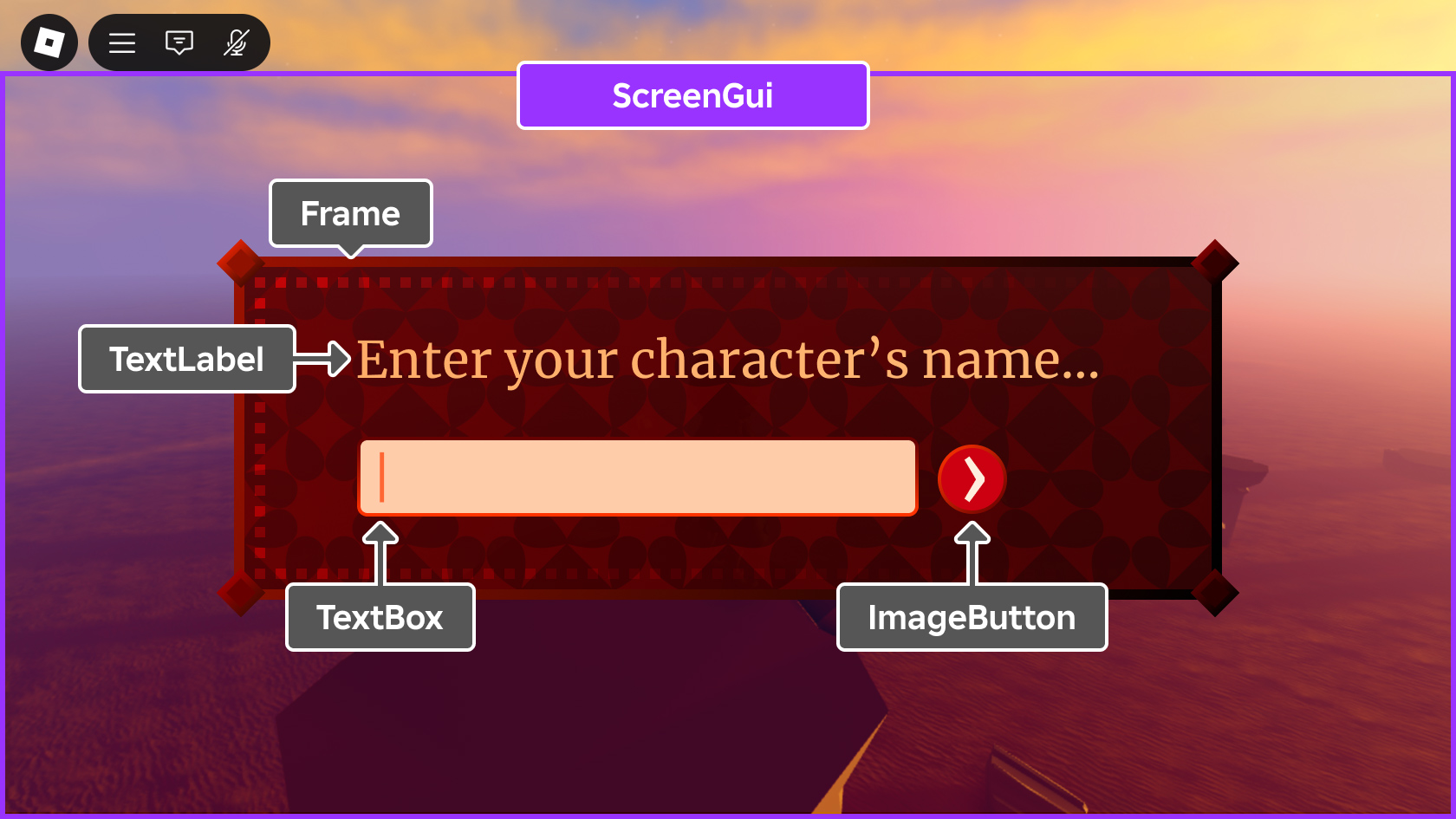
For performance improvements, the appearance of a ScreenGui is cached until one of the following events occurs:
- A descendant is added to or removed from it.
- A property of a descendant changes.
- A property of the
ScreenGuiitself changes.
If any of these events occur, the ScreenGui appearance is recomputed on the next frame it gets rendered.
Inherits from: LayerCollector
Descendants: GuiMain
Memory category: Instances
Properties
| Name | Type / Returns | Description |
|---|---|---|
| ScreenGui.ClipToDeviceSafeArea | boolean | Whether to clip the contents of this ScreenGui to the device's safe area. |
| ScreenGui.DisplayOrder | int | Controls the Z-index order in which multiple ScreenGui containers are drawn. |
| ScreenGui.IgnoreGuiInset | boolean | Determines whether the ScreenGui overflows into the range of Roblox's core UI elements. |
| ScreenGui.SafeAreaCompatibility | SafeAreaCompatibility | Specifies whether automatic UI compatibility transformations are applied to descendant "fullscreen" GuiObjects on displays with screen cutouts. |
| ScreenGui.ScreenInsets | ScreenInsets | Controls the safe area insets that are applied to the contents of the ScreenGui. |
Inherited from LayerCollector
| Name | Type / Returns | Description |
|---|---|---|
| LayerCollector.Enabled | boolean | Toggles the visibility of this LayerCollector. |
| LayerCollector.ResetOnSpawn | boolean | Determines if the LayerCollector resets (deletes itself and re-clones into the player's PlayerGui) every time the player's character respawns. |
| LayerCollector.ZIndexBehavior | ZIndexBehavior | Controls how GuiObject.ZIndex behaves on all descendants of this LayerCollector. |
Inherited from GuiBase2d
| Name | Type / Returns | Description |
|---|---|---|
| GuiBase2d.AbsolutePosition | Vector2 | Describes the actual screen position of a GuiBase2d element, in pixels. |
| GuiBase2d.AbsoluteRotation | float | Describes the actual screen rotation of a GuiBase2d element, in degrees. |
| GuiBase2d.AbsoluteSize | Vector2 | Describes the actual screen size of a GuiBase2d element, in pixels. |
| GuiBase2d.AutoLocalize | boolean | When set to true, localization will be applied to this GuiBase2d and its descendants. |
| GuiBase2d.Localize | boolean | Automatically set to true when a localization table's LocalizationTable.Root targets this object, or an ancestor of this object. |
| GuiBase2d.RootLocalizationTable | LocalizationTable | A reference to a LocalizationTable to be used to apply automated localization to this GuiBase2d and its descendants. |
| GuiBase2d.SelectionBehaviorDown | SelectionBehavior | Customizes gamepad selection behavior in the down direction. |
| GuiBase2d.SelectionBehaviorLeft | SelectionBehavior | Customizes gamepad selection behavior in the left direction. |
| GuiBase2d.SelectionBehaviorRight | SelectionBehavior | Customizes gamepad selection behavior in the right direction. |
| GuiBase2d.SelectionBehaviorUp | SelectionBehavior | Customizes gamepad selection behavior in the up direction. |
| GuiBase2d.SelectionGroup | boolean | Allows customization of gamepad selection movement. |
Inherited from Instance
| Name | Type / Returns | Description |
|---|---|---|
| Instance.Archivable | boolean | Determines if an Instance and its descendants can be cloned using Instance:Clone(), and can be saved/published. |
| Instance.archivable | boolean | |
| Instance.Capabilities | SecurityCapabilities | The set of capabilities allowed to be used for scripts inside this container. |
| Instance.IsInSandbox | boolean | Indicates whether the instance is inside a sandboxed container. |
| Instance.Name | string | A non-unique identifier of the Instance. |
| Instance.Parent | Instance | Determines the hierarchical parent of the Instance. |
| Instance.PredictionMode | PredictionMode | Reflects the client-side prediction mode applied to the instance under server-authoritative physics. |
| Instance.RobloxLocked | boolean | A deprecated property that used to protect CoreGui objects. |
| Instance.Sandboxed | boolean | When enabled, the instance can only access abilities in its Capabilities list. |
| Instance.UniqueId | UniqueId | A unique identifier for the instance. |
Inherited from Object
| Name | Type / Returns | Description |
|---|---|---|
| Object.ClassName | string | A read-only string representing the class this Object belongs to. |
| Object.className | string |
ScreenGui.ClipToDeviceSafeArea
If this property is true, all GuiObject descendants of the ScreenGui will be clipped to the device's safe area (see ScreenInsets). The default is true to maintain backwards compatibility of UI that is intentionally hidden offscreen, such as objects that slide into view from a screen edge when they're needed.

If this property is false, GuiObject descendants will not be clipped to the device's safe area and may be obscured by the camera notch or other screen cutouts.

Note that this property will be ignored if you set ScreenInsets to None, as doing so implies that you intentionally want to disregard the device's safe insets.
| Field | Value |
|---|---|
| type | boolean |
| security | {"read":"None","write":"None"} |
| thread safety | ReadSafe |
| category | Appearance |
| serialization | {"can_load":true,"can_save":true} |
| capabilities | ["UI"] |
ScreenGui.DisplayOrder
This property controls the Z-index order in which multiple ScreenGui containers are drawn. Those with a higher DisplayOrder will be drawn on top of those with a lower value.
| Field | Value |
|---|---|
| type | int |
| security | {"read":"None","write":"None"} |
| thread safety | ReadSafe |
| category | Data |
| serialization | {"can_load":true,"can_save":true} |
| capabilities | ["UI"] |
ScreenGui.IgnoreGuiInset
If this property is false (default), ScreenInsets is set to CoreUISafeInsets, effectively keeping its bounds below the Roblox top bar core UI.
If this property is changed to true and ScreenInsets is currently set to CoreUISafeInsets, ScreenInsets will be set to DeviceSafeInsets.
See ScreenInsets for details on how screen insets affect the contents of a ScreenGui.
| Field | Value |
|---|---|
| type | boolean |
| tags | ["NotReplicated"] |
| security | {"read":"None","write":"None"} |
| thread safety | ReadSafe |
| category | Data |
| serialization | {"can_load":true,"can_save":false} |
| capabilities | ["UI"] |
ScreenGui.SafeAreaCompatibility
This property specifies whether automatic UI compatibility transformations are applied to descendant "fullscreen" GuiObjects of the ScreenGui on displays with screen cutouts. Eligibility occurs if the total area of the descendant GuiObject (including any applied border or UIStroke) covers the device's safe area both horizontally and vertically. See the SafeAreaCompatibility enum reference for details.
The default value is FullscreenExtension in order to automatically improve the appearance of UI that was authored for screens without any cutouts. However, it's recommended that you avoid fullscreen extensions for new work; instead, use the ScreenInsets property to specify which insets should be respected for different ScreenGui containers.
Note that descendant UI objects will continue to be clipped by the device's safe area if ClipToDeviceSafeArea is set to true.
| Field | Value |
|---|---|
| type | SafeAreaCompatibility |
| security | {"read":"None","write":"None"} |
| thread safety | ReadSafe |
| category | Appearance |
| serialization | {"can_load":true,"can_save":true} |
| capabilities | ["UI"] |
ScreenGui.ScreenInsets
This property controls the safe area insets that are applied to the contents of the ScreenGui.
The default of CoreUISafeInsets keeps all descendant GuiObjects inside the core UI safe area, clear of the Roblox top bar buttons and other screen cutouts like the device's camera notch.
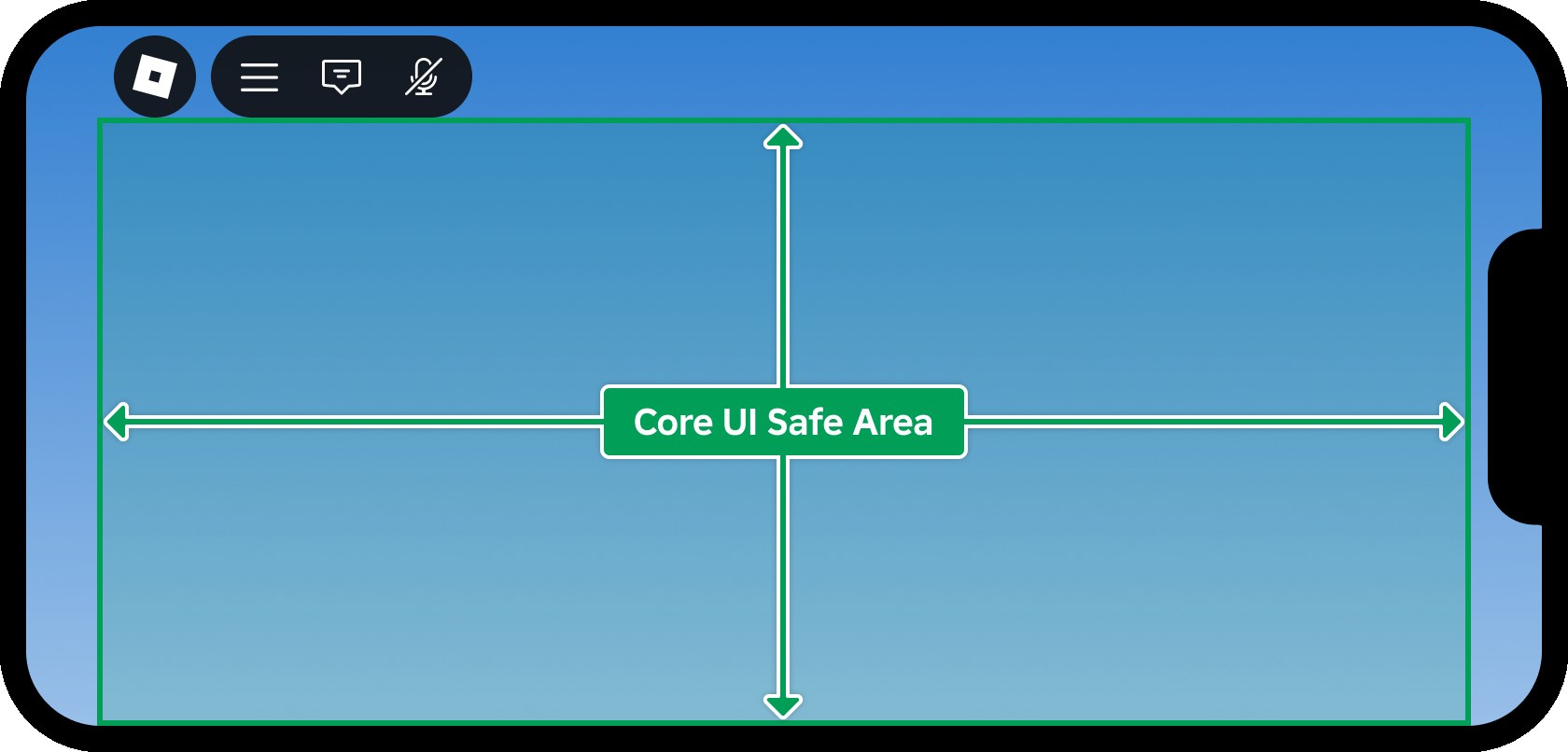
If you set this property to None, UI objects may be obscured behind core UI objects or device cutouts like the camera notch. As a result, you should only use None for a ScreenGui that contains noninteractive content like background images.
See On-Screen UI Containers for alternative examples.
| Field | Value |
|---|---|
| type | ScreenInsets |
| security | {"read":"None","write":"None"} |
| thread safety | ReadSafe |
| category | Appearance |
| serialization | {"can_load":true,"can_save":true} |
| capabilities | ["UI"] |
Methods
Inherited from LayerCollector
| Name | Type / Returns | Description |
|---|---|---|
| LayerCollector:GetLayoutNodeTree | Dictionary |
Inherited from Instance
| Name | Type / Returns | Description |
|---|---|---|
| Instance:AddTag | () | Applies a tag to the instance. |
| Instance:children | Instances | Returns an array of the object's children. |
| Instance:ClearAllChildren | () | This method destroys all of an instance's children. |
| Instance:Clone | Instance | Create a copy of an instance and all its descendants, ignoring instances that are not Archivable. |
| Instance:clone | Instance | |
| Instance:Destroy | () | Sets the Instance.Parent property to nil, locks the Instance.Parent property, disconnects all connections, and calls Destroy() on all children. |
| Instance:destroy | () | |
| Instance:FindFirstAncestor | Instance? | Returns the first ancestor of the Instance whose Instance.Name is equal to the given name. |
| Instance:FindFirstAncestorOfClass | Instance? | Returns the first ancestor of the Instance whose Object.ClassName is equal to the given className. |
| Instance:FindFirstAncestorWhichIsA | Instance? | Returns the first ancestor of the Instance for whom Object:IsA() returns true for the given className. |
| Instance:FindFirstChild | Instance? | Returns the first child of the Instance found with the given name. |
| Instance:findFirstChild | Instance | |
| Instance:FindFirstChildOfClass | Instance? | Returns the first child of the Instance whose ClassName is equal to the given class name. |
| Instance:FindFirstChildWhichIsA | Instance? | Returns the first child of the Instance for whom Object:IsA() returns true for the given className. |
| Instance:FindFirstDescendant | Instance? | Returns the first descendant found with the given Instance.Name. |
| Instance:GetActor | Actor? | Returns the Actor associated with the Instance, if any. |
| Instance:GetAttribute | Variant | Returns the value which has been assigned to the given attribute name. |
| Instance:GetAttributeChangedSignal | RBXScriptSignal | Returns an event that fires when the given attribute changes. |
| Instance:GetAttributes | Dictionary | Returns a dictionary of the instance's attributes. |
| Instance:GetChildren | Instances | Returns an array containing all of the instance's children. |
| Instance:getChildren | Instances | |
| Instance:GetDebugId | string | Returns a coded string of the debug ID used internally by Roblox. |
| Instance:GetDescendants | Instances | Returns an array containing all of the descendants of the instance. |
| Instance:GetFullName | string | Returns a string describing the instance's ancestry. |
| Instance:GetStyled | Variant | Returns the styled or explicitly modified value of the specified property, or else the default property value if it hasn't been styled/modified. |
| Instance:GetStyledPropertyChangedSignal | RBXScriptSignal | Returns an event that fires when the given style property changes on the instance. |
| Instance:GetTags | Array | Gets an array of all tags applied to the instance. |
| Instance:HasTag | boolean | Check whether the instance has a given tag. |
| Instance:IsAncestorOf | boolean | Returns true if an Instance is an ancestor of the given descendant. |
| Instance:IsDescendantOf | boolean | Returns true if an Instance is a descendant of the given ancestor. |
| Instance:isDescendantOf | boolean | |
| Instance:IsPropertyModified | boolean | Returns true if the value stored in the specified property is not equal to the code-instantiated default. |
| Instance:QueryDescendants | Instances | Returns an array containing all descendants of the instance that match the selector string. |
| Instance:Remove | () | Sets the object's Parent to nil, and does the same for all its descendants. |
| Instance:remove | () | |
| Instance:RemoveTag | () | Removes a tag from the instance. |
| Instance:ResetPropertyToDefault | () | Resets a property to its default value. |
| Instance:SetAttribute | () | Sets the attribute with the given name to the given value. |
| Instance:WaitForChild | Instance | Returns the child of the Instance with the given name. If the child does not exist, it will yield the current thread until it does. |
Inherited from Object
| Name | Type / Returns | Description |
|---|---|---|
| Object:GetPropertyChangedSignal | RBXScriptSignal | Get an event that fires when a given property of the object changes. |
| Object:IsA | boolean | Returns true if an object's class matches or inherits from a given class. |
| Object:isA | boolean |
Events
Inherited from GuiBase2d
| Name | Type / Returns | Description |
|---|---|---|
| GuiBase2d.SelectionChanged | Fires when the gamepad selection moves to, leaves, or changes within the connected GuiBase2d or any descendant GuiObjects. |
Inherited from Instance
| Name | Type / Returns | Description |
|---|---|---|
| Instance.AncestryChanged | Fires when the Instance.Parent property of this object or one of its ancestors is changed. | |
| Instance.AttributeChanged | Fires whenever an attribute is changed on the Instance. | |
| Instance.ChildAdded | Fires after an object is parented to this Instance. | |
| Instance.childAdded | ||
| Instance.ChildRemoved | Fires after a child is removed from this Instance. | |
| Instance.DescendantAdded | Fires after a descendant is added to the Instance. | |
| Instance.DescendantRemoving | Fires immediately before a descendant of the Instance is removed. | |
| Instance.Destroying | Fires immediately before (or is deferred until after) the instance is destroyed via Instance:Destroy(). | |
| Instance.StyledPropertiesChanged | Fires whenever any style property is changed on the instance, including when a property is set to nil. |
Inherited from Object
| Name | Type / Returns | Description |
|---|---|---|
| Object.Changed | Fires immediately after a property of the object changes, with some limitations. |