
Source: Roblox Creator Hub · CC BY 4.0 · View source · Code samples: MIT Imported 2026-10-03. Formatting adapted for this site.
UIStroke
Inherits from: UIComponent → UIBase → Instance → Object
UIStroke applies an outline to text or a UI border. Some properties may require enabling the Improved UIStrokes beta.
Key features include:
- Adjust the
ColorandThicknessof the stroke outline. - Change the stroke
Transparencyindependently from the text or UI object. - Choose the
LineJoinModeof the stroke (round, bevel, or miter). - Specify the
BorderStrokePositionon its parent's border and/or an additionalBorderOffsetto the stroke's position. - Add a gradient to the stroke via the
UIGradientinstance. - Use rich text tags to add stroke to inline text segments.
For more details on the UIStroke object, see Appearance Modifiers.
Inherits from: UIComponent
Memory category: Instances
Properties
| Name | Type / Returns | Description |
|---|---|---|
| UIStroke.ApplyStrokeMode | ApplyStrokeMode | Determines whether to apply the stroke to the object's border instead of the text itself. |
| UIStroke.BorderOffset | UDim | Specifies an additional offset to the stroke's position, relative to the parent's minimum height or width. |
| UIStroke.BorderStrokePosition | BorderStrokePosition | Determines the stroke's position on its parent's border. |
| UIStroke.Color | Color3 | Determines the stroke color. |
| UIStroke.Enabled | boolean | Determines whether the stroke in visible. |
| UIStroke.LineJoinMode | LineJoinMode | Determines how corners are interpreted. |
| UIStroke.StrokeSizingMode | StrokeSizingMode | Determines whether the stroke's Thickness will be measured in pixels or be relative to the parent. |
| UIStroke.Thickness | float | Determines the stroke's thickness. |
| UIStroke.Transparency | float | Sets the stroke opacity independently of the parent object's BackgroundTransparency or TextTransparency. |
| UIStroke.ZIndex | int | Determines the order in which the stroke renders relative to sibling UIStroke instances. |
Inherited from Instance
| Name | Type / Returns | Description |
|---|---|---|
| Instance.Archivable | boolean | Determines if an Instance and its descendants can be cloned using Instance:Clone(), and can be saved/published. |
| Instance.archivable | boolean | |
| Instance.Capabilities | SecurityCapabilities | The set of capabilities allowed to be used for scripts inside this container. |
| Instance.IsInSandbox | boolean | Indicates whether the instance is inside a sandboxed container. |
| Instance.Name | string | A non-unique identifier of the Instance. |
| Instance.Parent | Instance | Determines the hierarchical parent of the Instance. |
| Instance.PredictionMode | PredictionMode | Reflects the client-side prediction mode applied to the instance under server-authoritative physics. |
| Instance.RobloxLocked | boolean | A deprecated property that used to protect CoreGui objects. |
| Instance.Sandboxed | boolean | When enabled, the instance can only access abilities in its Capabilities list. |
| Instance.UniqueId | UniqueId | A unique identifier for the instance. |
Inherited from Object
| Name | Type / Returns | Description |
|---|---|---|
| Object.ClassName | string | A read-only string representing the class this Object belongs to. |
| Object.className | string |
UIStroke.ApplyStrokeMode
When a UIStroke instance is applied to a text object, this property determines whether to apply the stroke to the object's border instead of the text itself.
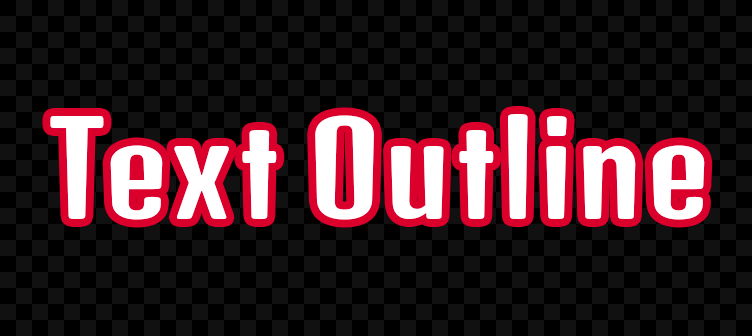
ApplyStrokeMode = Enum.ApplyStrokeMode.Contextual|Contextual
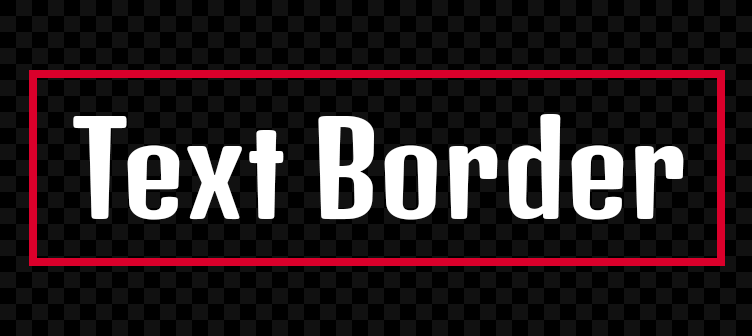
ApplyStrokeMode = Enum.ApplyStrokeMode.Border|Border
| Field | Value |
|---|---|
| type | ApplyStrokeMode |
| security | {"read":"None","write":"None"} |
| thread safety | ReadSafe |
| category | Appearance |
| serialization | {"can_load":true,"can_save":true} |
| capabilities | ["UI"] |
UIStroke.BorderOffset
This property specifies an additional offset (UDim) to the stroke's position, relative to the parent's minimum height or width.
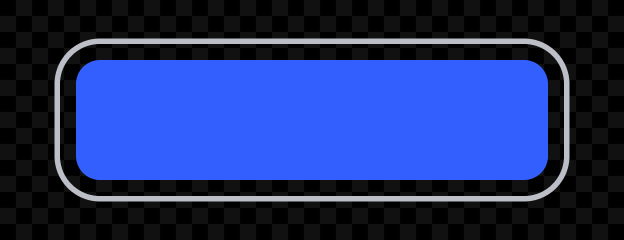
BorderOffset = (0.15, 0)
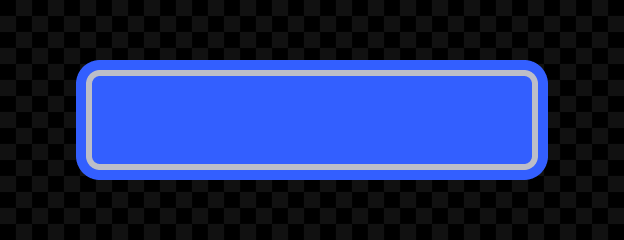
BorderOffset = (0, -16)
| Field | Value |
|---|---|
| type | UDim |
| security | {"read":"None","write":"None"} |
| thread safety | ReadSafe |
| category | Appearance |
| serialization | {"can_load":true,"can_save":true} |
| capabilities | ["UI"] |
UIStroke.BorderStrokePosition
This property determines the stroke's position on its parent's border as an BorderStrokePosition value.
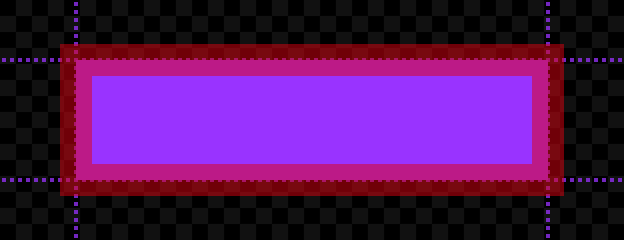
BorderStrokePosition = Enum.BorderStrokePosition.Center|Center
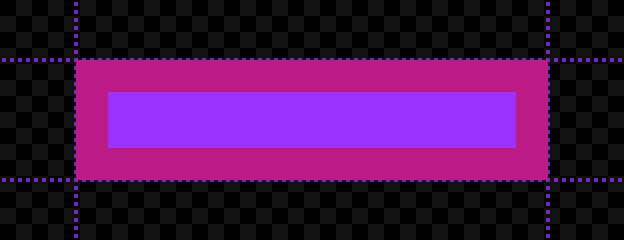
BorderStrokePosition = Enum.BorderStrokePosition.Inner|Inner
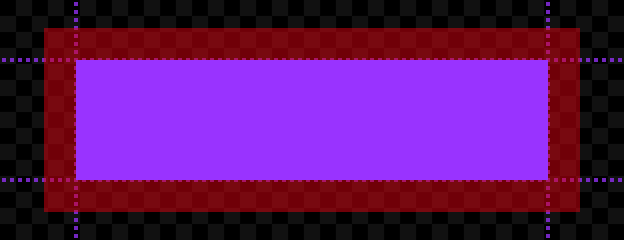
BorderStrokePosition = Enum.BorderStrokePosition.Outer|Outer
| Field | Value |
|---|---|
| type | BorderStrokePosition |
| security | {"read":"None","write":"None"} |
| thread safety | ReadSafe |
| category | Appearance |
| serialization | {"can_load":true,"can_save":true} |
| capabilities | ["UI"] |
UIStroke.Color
Determines the UIStroke color. You can also insert a UIGradient instance as a child to create gradient strokes.

Color = (0, 95, 225)

UIStroke with Class.UIGradient child
| Field | Value |
|---|---|
| type | Color3 |
| security | {"read":"None","write":"None"} |
| thread safety | ReadSafe |
| category | Appearance |
| serialization | {"can_load":true,"can_save":true} |
| capabilities | ["UI"] |
UIStroke.Enabled
This property determines whether the UIStroke is visible. When set to false, the stroke will not be rendered. Defaults to true.
| Field | Value |
|---|---|
| type | boolean |
| security | {"read":"None","write":"None"} |
| thread safety | ReadSafe |
| category | Data |
| serialization | {"can_load":true,"can_save":true} |
| capabilities | ["UI"] |
UIStroke.LineJoinMode
This property determines how corners are interpreted. It accepts an LineJoinMode value of either Round (default), Bevel, or Miter.

LineJoinMode = Enum.LineJoinMode.Round|Round

LineJoinMode = Enum.LineJoinMode.Bevel|Bevel

LineJoinMode = Enum.LineJoinMode.Miter|Miter
| Field | Value |
|---|---|
| type | LineJoinMode |
| security | {"read":"None","write":"None"} |
| thread safety | ReadSafe |
| category | Appearance |
| serialization | {"can_load":true,"can_save":true} |
| capabilities | ["UI"] |
UIStroke.StrokeSizingMode
This property determines whether the stroke's Thickness will be measured in pixels or be scaled relative to the parent. See StrokeSizingMode for further details.
| Field | Value |
|---|---|
| type | StrokeSizingMode |
| security | {"read":"None","write":"None"} |
| thread safety | ReadSafe |
| category | Appearance |
| serialization | {"can_load":true,"can_save":true} |
| capabilities | ["UI"] |
UIStroke.Thickness
This property determines the stroke's thickness, measured in pixels (default) or scaled relative to the parent, depending on StrokeSizingMode.

Thickness = 4

Thickness = 12
Be mindful of tweening this UIStroke property when applied to text objects. This renders and stores many glyph sizes each frame, potentially causing performance issues or text flickering.
| Field | Value |
|---|---|
| type | float |
| security | {"read":"None","write":"None"} |
| thread safety | ReadSafe |
| category | Appearance |
| serialization | {"can_load":true,"can_save":true} |
| capabilities | ["UI"] |
UIStroke.Transparency
This property sets the stroke opacity independently of the parent object's BackgroundTransparency or TextTransparency. This allows you to render text and borders that are "hollow" (consisting of only an outline).

Transparency = 0.5 · Class.TextLabel.TextTransparency = 0

Transparency = 0 · Class.TextLabel.TextTransparency = 1
| Field | Value |
|---|---|
| type | float |
| security | {"read":"None","write":"None"} |
| thread safety | ReadSafe |
| category | Appearance |
| serialization | {"can_load":true,"can_save":true} |
| capabilities | ["UI"] |
UIStroke.ZIndex
This property determines the order in which the stroke renders relative to sibling UIStroke instances. Those with a lower ZIndex render under (behind) those with a higher ZIndex.
Note that the rendering order for UIStroke instances with the same ZIndex is undefined. Do not apply multiple UIStroke instances with the same ZIndex if their rendering order matters.
| Field | Value |
|---|---|
| type | int |
| security | {"read":"None","write":"None"} |
| thread safety | ReadSafe |
| category | Appearance |
| serialization | {"can_load":true,"can_save":true} |
| capabilities | ["UI"] |
Methods
Inherited from Instance
| Name | Type / Returns | Description |
|---|---|---|
| Instance:AddTag | () | Applies a tag to the instance. |
| Instance:children | Instances | Returns an array of the object's children. |
| Instance:ClearAllChildren | () | This method destroys all of an instance's children. |
| Instance:Clone | Instance | Create a copy of an instance and all its descendants, ignoring instances that are not Archivable. |
| Instance:clone | Instance | |
| Instance:Destroy | () | Sets the Instance.Parent property to nil, locks the Instance.Parent property, disconnects all connections, and calls Destroy() on all children. |
| Instance:destroy | () | |
| Instance:FindFirstAncestor | Instance? | Returns the first ancestor of the Instance whose Instance.Name is equal to the given name. |
| Instance:FindFirstAncestorOfClass | Instance? | Returns the first ancestor of the Instance whose Object.ClassName is equal to the given className. |
| Instance:FindFirstAncestorWhichIsA | Instance? | Returns the first ancestor of the Instance for whom Object:IsA() returns true for the given className. |
| Instance:FindFirstChild | Instance? | Returns the first child of the Instance found with the given name. |
| Instance:findFirstChild | Instance | |
| Instance:FindFirstChildOfClass | Instance? | Returns the first child of the Instance whose ClassName is equal to the given class name. |
| Instance:FindFirstChildWhichIsA | Instance? | Returns the first child of the Instance for whom Object:IsA() returns true for the given className. |
| Instance:FindFirstDescendant | Instance? | Returns the first descendant found with the given Instance.Name. |
| Instance:GetActor | Actor? | Returns the Actor associated with the Instance, if any. |
| Instance:GetAttribute | Variant | Returns the value which has been assigned to the given attribute name. |
| Instance:GetAttributeChangedSignal | RBXScriptSignal | Returns an event that fires when the given attribute changes. |
| Instance:GetAttributes | Dictionary | Returns a dictionary of the instance's attributes. |
| Instance:GetChildren | Instances | Returns an array containing all of the instance's children. |
| Instance:getChildren | Instances | |
| Instance:GetDebugId | string | Returns a coded string of the debug ID used internally by Roblox. |
| Instance:GetDescendants | Instances | Returns an array containing all of the descendants of the instance. |
| Instance:GetFullName | string | Returns a string describing the instance's ancestry. |
| Instance:GetStyled | Variant | Returns the styled or explicitly modified value of the specified property, or else the default property value if it hasn't been styled/modified. |
| Instance:GetStyledPropertyChangedSignal | RBXScriptSignal | Returns an event that fires when the given style property changes on the instance. |
| Instance:GetTags | Array | Gets an array of all tags applied to the instance. |
| Instance:HasTag | boolean | Check whether the instance has a given tag. |
| Instance:IsAncestorOf | boolean | Returns true if an Instance is an ancestor of the given descendant. |
| Instance:IsDescendantOf | boolean | Returns true if an Instance is a descendant of the given ancestor. |
| Instance:isDescendantOf | boolean | |
| Instance:IsPropertyModified | boolean | Returns true if the value stored in the specified property is not equal to the code-instantiated default. |
| Instance:QueryDescendants | Instances | Returns an array containing all descendants of the instance that match the selector string. |
| Instance:Remove | () | Sets the object's Parent to nil, and does the same for all its descendants. |
| Instance:remove | () | |
| Instance:RemoveTag | () | Removes a tag from the instance. |
| Instance:ResetPropertyToDefault | () | Resets a property to its default value. |
| Instance:SetAttribute | () | Sets the attribute with the given name to the given value. |
| Instance:WaitForChild | Instance | Returns the child of the Instance with the given name. If the child does not exist, it will yield the current thread until it does. |
Inherited from Object
| Name | Type / Returns | Description |
|---|---|---|
| Object:GetPropertyChangedSignal | RBXScriptSignal | Get an event that fires when a given property of the object changes. |
| Object:IsA | boolean | Returns true if an object's class matches or inherits from a given class. |
| Object:isA | boolean |
Events
Inherited from Instance
| Name | Type / Returns | Description |
|---|---|---|
| Instance.AncestryChanged | Fires when the Instance.Parent property of this object or one of its ancestors is changed. | |
| Instance.AttributeChanged | Fires whenever an attribute is changed on the Instance. | |
| Instance.ChildAdded | Fires after an object is parented to this Instance. | |
| Instance.childAdded | ||
| Instance.ChildRemoved | Fires after a child is removed from this Instance. | |
| Instance.DescendantAdded | Fires after a descendant is added to the Instance. | |
| Instance.DescendantRemoving | Fires immediately before a descendant of the Instance is removed. | |
| Instance.Destroying | Fires immediately before (or is deferred until after) the instance is destroyed via Instance:Destroy(). | |
| Instance.StyledPropertiesChanged | Fires whenever any style property is changed on the instance, including when a property is set to nil. |
Inherited from Object
| Name | Type / Returns | Description |
|---|---|---|
| Object.Changed | Fires immediately after a property of the object changes, with some limitations. |