
Source: Roblox Creator Hub · CC BY 4.0 · View source · Code samples: MIT Imported 2026-10-03. Formatting adapted for this site.
Skills
Learn how to create, manage, and use skills to teach Assistant your workflows and conventions.
A skill is a Markdown document that teaches Assistant how to perform a specific task or follow a particular workflow. Each skill includes a short description that tells Assistant what it does and when to use it, along with a set of instructions for Assistant to follow. When your request matches a skill's description, Assistant automatically loads the skill and follows its instructions.
Assistant includes several built-in Roblox-authored skills, and you can create your own to customize how Assistant works.
How skills work
A skill is a single Markdown document with two parts: frontmatter that identifies the skill, and a body containing instructions for Assistant to follow.
---
name: luau-style
description: Apply my Luau naming and formatting conventions when writing or editing scripts.
enabled: true
---

Use PascalCase for ModuleScript names and camelCase for local variables.
Prefer early returns over deeply nested conditionals.
Annotate public functions with types.
The frontmatter defines how Assistant identifies and loads the skill:
| Field | Description |
|---|---|
name | A short, unique, lowercase name for the skill. It can't use the rbx- prefix, which is reserved for Roblox-authored skills. Assistant and the **Skills** tab use it to identify the skill. |
description | One or two sentences describing what the skill does and when to apply it. Assistant matches your request against this text to determine whether to load the skill, so writing a clear description is the most important part of creating a reliable skill that triggers at the right time. |
enabled | Whether the skill is active. Defaults to true. Toggling the skill in the **Skills** tab updates this field. |
Assistant can load a skill in one of two ways:
- Automatically, when your request matches the description of an enabled skill.
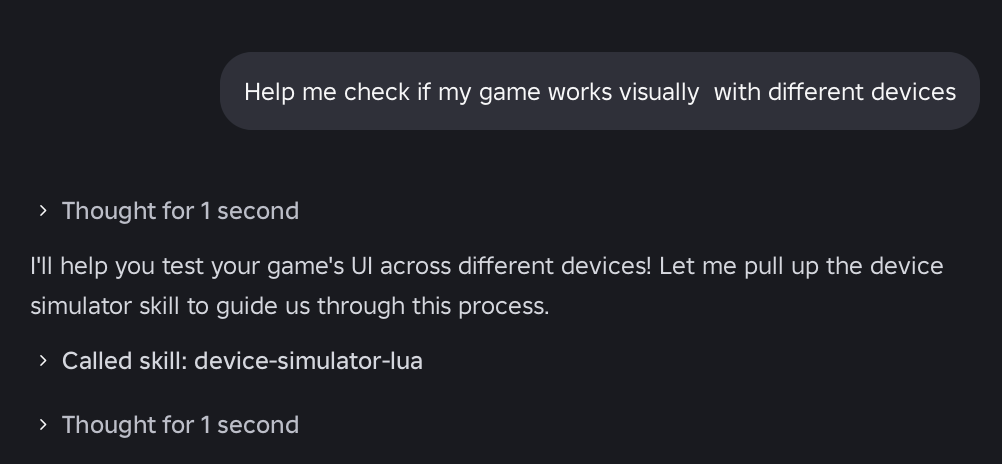
- Manually, when you explicitly invoke the skill from the composer.

Whenever a skill is loaded, a Loaded skill indicator appears inline with Assistant's response. The indicator remains with previous responses in the chat so you can see which skills were used.
Note
Skills are associated with your Roblox account, so any skill you create or enable is available in every place you open in Studio.
Roblox-authored skills
Assistant includes a set of built-in skills maintained by Roblox. These appear in the Skills tab with a Roblox badge. Their names use the reserved rbx- prefix, which is reserved and can't be used for your own skills.
| Skill | Description |
|---|---|
rbx-create-skill | Walks you through authoring a new skill: gathers the intent, chooses a valid name, writes a clear description of what the skill does and when to apply it, and produces the markdown body. Also handles editing and renaming existing skills. Use it to author or update a skill without writing the frontmatter yourself. |
rbx-debug | Runs a programmatic debugging workflow: sets breakpoints and inspects call stacks, local variables, and thread state at runtime. Use it to understand why code misbehaves, confirm that a code path runs, or check values mid-execution instead of adding print statements. |
rbx-device-simulator-lua | Drives the Studio Device Simulator to switch device presets (phone, tablet, console, PC), toggle orientation, and capture the UI at each form factor. Use it to check that a UI adapts across screen sizes and safe areas, or to compare a GUI before and after a change. |
rbx-docs-search | Retrieves authoritative Roblox documentation, including the Engine API reference, Creator documentation, and Cloud API docs. Use it when you need accurate API signatures, property or enum details, or how-to guidance. |
rbx-perf-profiling | Interprets MicroProfiler traces to find CPU and GPU bottlenecks, causes of frame-time spikes (physics, rendering, scripts, network), and per-subsystem memory allocation. Use it to diagnose lag, stutters, or memory growth with real profiling data. |
rbx-scene-analysis | Audits a place with SceneAnalysisService: rendering cost, memory usage, instance composition, unparented-instance leaks, and animation and audio asset inventory. Use it for scene health checks, such as hunting leaks or finding what dominates memory in a large place. |
rbx-unit-test | Guides writing, running, and debugging Luau unit tests for ModuleScript objects, including framework detection (Jest-Lua, TestEZ) with a built-in fallback harness. Emphasizes testing the contract rather than the implementation, isolating dependencies with stubs, and running tests in Play. Use it to add coverage, run the suite, or diagnose failing tests. |
You can use these skills as they are, disable any you don't need, or duplicate one to customize it for your own workflow.
View and manage your skills
To view and manage your skills:
- Open Assistant.
- Click ... > Assistant Settings.
- Select the Skills tab.
The Skills tab lists every available skill, grouped by source (Roblox or your own). From there, you can:
- Search and filter skills by name or description.
- View a skill's description and instructions.
- Enable or disable a skill.
- Create, edit, duplicate, or delete skills.
Create a skill
You can create a skill manually in the Skills tab, or have Assistant generate one for you.
Create a skill manually
- Open the Skills tab.
- Click Add.
- Enter a name and description. Make sure to keep each to a single line.
- Write the skill's instructions in the editor.
The new skill is enabled by default and is available the next time you message Assistant.
Have Assistant generate a skill
- Open the Skills tab.
- Click Create New.
- Describe what you want the skill to do. Assistant asks a few clarifying questions, then generates a properly formatted skill, including its frontmatter, and adds it to the Skills tab.
You can also type rbx-create-skill in the Assistant window followed by what the skill should do.
Note
Assistant decides when to load a skill based on its description, so be as specific as possible about both what the skill does and when it should be used.
Use a skill in a conversation
Enabled skills load automatically when your request matches their description. You can also apply one or more skills explicitly:
- In the composer, type
/to open the slash menu. - Select a skill. It attaches to your message as a chip.
- Optionally, type
/again to attach additional skills. - Enter your request and send it.
A Loaded skill indicator appears with Assistant's response so you can see which skills were used. Disabled skills don't load automatically and don't appear in the slash menu.
Customize a Roblox-authored skill
Roblox-authored skills are read-only, but you can duplicate one and customize your copy.
- Open the Skills tab and select a Roblox-authored skill.
- Click Duplicate.
- Edit the copy's description or instructions.
When you duplicate a Roblox-authored skill, Assistant automatically disables the original so it uses your customized copy instead. To switch back, disable your copy and re-enable the original.
When Roblox updates the original skill, your copy doesn't receive those updates. If you want the latest version of the skill, duplicate the updated Roblox-authored skill again.
Update a skill
You can update a skill you own in one of the following ways:
- Edit the skill's description or instructions directly in the Skills tab.
- Ask Assistant to update it in plain language. For example, "Update my
luau-styleskill to always use PascalCase for module names."
Changes take effect the next time you message Assistant.