
Source: Roblox Creator Hub · CC BY 4.0 · View source · Code samples: MIT Imported 2026-10-03. Formatting adapted for this site.
Deferred engine events
The Workspace.SignalBehavior property controls whether event handlers are fired immediately or deferred. The SignalBehavior.Deferred option is recommended which helps improve the performance and correctness of the engine. The event handlers for deferred events are resumed at the next resumption point, along with any newly triggered event handlers.
Note
The SignalBehavior.Default value of Workspace.SignalBehavior is currently equivalent to SignalBehavior.Immediate, but will eventually switch to being equivalent to SignalBehavior.Deferred. Template places are directly set to SignalBehavior.Deferred by default.
The following diagram compares the Immediate event behavior and the Deferred event behavior.
- With the
Immediatebehavior, if an event triggers another event, the second event handler fires immediately. - With the
Deferredbehavior, the second event is added to the back of a queue and run later.
The total time taken does not change, but the ordering is different.
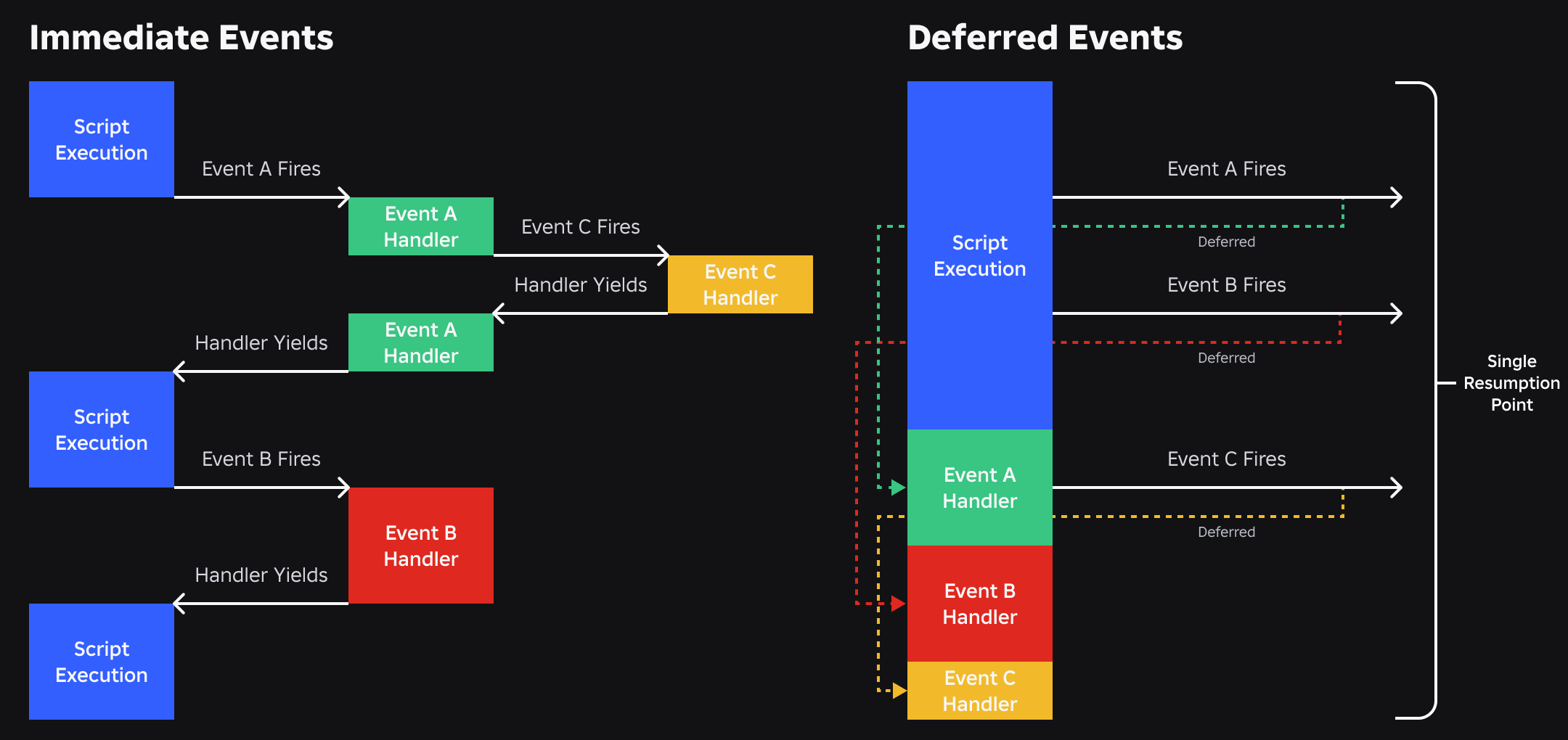
"Re-entrancy" prevents events from continuously firing one another when they reach a certain depth. The current limit for this is 10.
Deferred event benefits
The Immediate behavior has some disadvantages. For every instance added to your game, property that changes, or some other trigger that is invoked, the engine needs to run Luau code before anything else happens.
- To change 1,000 properties, 1,000 snippets of code potentially need to run after each change.
- Strange, hard-to-diagnose bugs can occur, such as a removing event firing before something was even added.
- Performance-critical systems can fire events requiring them to yield back and forth to Luau.
- Event handlers can make changes to the place or trigger other events any time an event is fired.
- An event can fire multiple times despite being redundant, such as a property changing twice.
By having specific portions of the engine life cycle in which Luau can run, the engine can gain improved performance by using a number of assumptions:
- Performance-critical systems don't need to yield to Luau, which leads to performance gains.
- Unless the engine itself changes it, the place never changes outside of a resumption point.
Resumption points
After being deferred, an event handler is resumed at the next resumption point. Currently, the set of resumption points includes:
- Input processing (resumes once per input to be processed, see
UserInputService) RunService.PreRender- Legacy waiting script resumption such as
wait(),spawn(), anddelay() RunService.PreAnimationRunService.PreSimulationRunService.PostSimulation- Waiting script resumption such as
task.wait(),task.spawn(), andtask.delay() RunService.HeartbeatDataModel.BindToClose
Common affected code patterns
With remote events, the following examples either stop working correctly or have subtly different behavior; they rely on events being resumed immediately.
Trigger and catch events mid-execution
In this example, false is always returned when deferred events are enabled because the callback has not run. To work correctly, the thread must yield until at least when the event should have fired.
local success = false
event:Connect(function ()
   success = true
end)
doSomethingToTriggerEvent() -- Causes `event` to fire
return success
Listen for the first occurrence of an event
connection = event:Connect(function ()
   connection:Disconnect()
   -- do something
end)
With deferred events enabled, multiple event handler invocations can be queued before you disconnect from the event. Calling Disconnect() drops all pending event handler invocations—the same behavior that exists for immediate events.
Note
Any other method of disconnection besides Disconnect(), such as calling Destroy() on the Instance, disconnects the signal immediately, but runs the associated event handler for any events that are still pending.
Alternatively, use Once() as a more convenient method for connecting to an event that you only need the first invocation of.
Events that change ancestry or properties
Deferred events cause events that handle a change in ancestry or a property to fire after the ancestry or property is changed:
local part = Instance.new("Part", workspace)

local function onPartDestroying()
	print("In signal:", part:GetFullName(), #part:GetChildren())
end

part.Destroying:Connect(onPartDestroying)
part:Destroy()
Because Destroy() works immediately after the script that called it yields, the instance has already been destroyed by the time onPartDestroying() is called. For more examples, see Instance.Destroying.