
Source: Roblox Creator Hub · CC BY 4.0 · View source · Code samples: MIT Imported 2026-10-03. Formatting adapted for this site.
Script types and locations
For many developers, the fundamental challenge of adapting to Roblox scripting is the importance of file location and the Script.RunContext property. Depending on script type, location in the Explorer, and run context, scripts can behave very differently. Certain method calls might fail, objects in your game might be inaccessible, or scripts might not run at all.
The reason for this complexity is that Roblox games are multiplayer by default. Scripts need the ability to only run on the server, only run on the client, or be shared across both. The evolution of the Roblox platform over time has further complicated the situation.
Script types
Roblox has three types of scripts:
Script- Code that runs on either the server or the client, depending on its location andScript.RunContextproperty.LocalScript- Code that runs only on the client. Does not have a run context.ModuleScript- Code that you can reuse in other scripts. Does not have a run context.
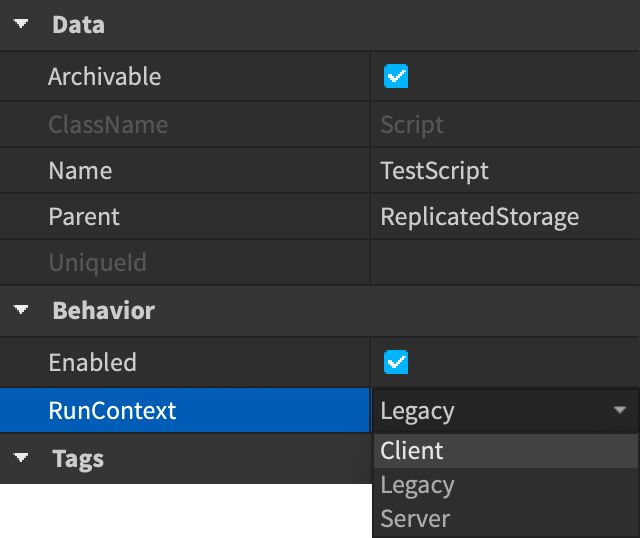
When you create a Script, its default run context is Legacy, meaning that it a) is a server-side script and b) only runs if it is in a server container, such as ServerScriptService or Workspace.
- If you change the script's run context to
Server, it can now also run inReplicatedStorage, but we don't recommend it. The contents of that location are replicated to clients, so it's a poor location for server-side scripts. - If you change the script's run context to
Client, it can run inReplicatedStorage. It can also run inStarterCharacterScriptsandStarterPlayerScripts. Starter containers are copied to clients, though, so the original script and the copy run, which isn't desirable.
To change a script run context, select it in the Explorer and change the value in the Properties window.
Recommendations
Put a single
Scriptwith aRunContextofClientintoReplicatedStorage.Put a single
Scriptwith aRunContextofServerintoServerScriptService.Use
ModuleScriptsfor as much client and server code as possible. Require these modules from your client script and your server script.This approach gives your code a single entry point on the client and server sides, which simplifies organization and makes it easy to isolate or disable problematic modules. Add a
start()function to eachModuleScriptso that all modules can load before you begin executing their code:--!strict local ServerScriptService = game:GetService("ServerScriptService") local SampleModule = require(ServerScriptService.SampleModule) local AnotherSampleModule = require(ServerScriptService.AnotherSampleModule) SampleModule.start() AnotherSampleModule.start()--!strict local CollectionService = game:GetService("CollectionService") local NPC_TAG = "npc" local SampleModule = {} local function setUpNpc(npc: Instance) -- initialize each NPC end local function cleanUpNpc(npc: Instance) -- run when event fires end function SampleModule.start() -- add the function to the table -- example loop for setup based on tags for _, npc in CollectionService:GetTagged(NPC_TAG) do setUpNpc(npc) end -- run functions when events fire CollectionService:GetInstanceAddedSignal(NPC_TAG):Connect(setUpNpc) CollectionService:GetInstanceRemovedSignal(NPC_TAG):Connect(cleanUpNpc) end return SampleModuleTo share code, use
ModuleScriptsinReplicatedStorageand require them in both your client script and your server script.If necessary for your game, repeat the same pattern in
ReplicatedFirstwith a single client script and a minimal number ofModuleScriptsto implement a loading screen. To learn more aboutReplicatedFirst, see Replication order.Use
LocalScriptssparingly. If you must use them, put them inStarterCharacterScripts,StarterPlayerScripts,StarterGui, orStarterPack.Scripts in these containers clone to player containers rather than running from one location, which can complicate debugging. Using
ReplicatedStoragefor client code lets you click lines in the Output window and go toReplicatedStorage.YourScript(the stable location of the script) rather thanPlayers.YourName.PlayerScripts.YourLocalScript(the ephemeral location that the script was copied to at runtime).Avoid attaching scripts directly to instances in
Workspace. Instead, tag instances and useCollectionServiceto work with them from a singleModuleScript.The key exception is if you distribute models or packages on the Creator Store. In that case, you might need to include scripts within the instance hierarchy; specify a
RunContextfor each script to remove ambiguity from how it runs. Explicitly setting this property makes models and packages more likely to work properly from a variety of locations.
Example project structure
The Plant reference project shows how you might organize your code in a large, complex game. It stores the vast majority of its code as reusable ModuleScripts.
Script locations
| Location | Description |
|---|---|
Workspace | Represents the game's 3D world. Can run server scripts that attach directly to objects and control their behavior. |
ReplicatedFirst | Contains objects that replicate to the client before anything else. This location is ideal for the absolute minimum set of objects and client scripts necessary to display a loading screen. |
ReplicatedStorage | Contains objects that are replicated to both the client and the server. This location is ideal for Scripts with a RunContext of Client, client ModuleScripts, and ModuleScripts that you want to use on both the server and the client. LocalScripts do not run from this location. |
ServerScriptService | Contains server scripts. This location is ideal for scripts that need to access server-side functionality or objects, such as game logic and cloud storage. |
ServerStorage | Contains server-side objects. This location is ideal for large objects that don't need to be immediately replicated to clients when they join a game. Scripts do not run from this location, but you can store server-side ModuleScripts here. |
StarterPlayer ⟩ StarterCharacterScripts | Contains LocalScripts that run when the character spawns. |
StarterPlayer ⟩ StarterPlayerScripts | Contains LocalScripts that run when the player joins the game. |
StarterGui | Contains GUI elements that the client displays when it loads the game. LocalScripts can run from this location. |
StarterPack | Generally only contains Tools, but can also include LocalScripts for setting up player backpacks. |
This image shows which Explorer window locations can contain client scripts. Remember, ReplicatedFirst and ReplicatedStorage can contain Scripts with a RunContext of Client, whereas the Starter[] containers should use LocalScripts.
