
Source: Roblox Creator Hub · CC BY 4.0 · View source · Code samples: MIT Imported 2026-10-03. Formatting adapted for this site.
Intro to Roblox

This module serves as an introduction to how Roblox supports education. You'll learn what Roblox is as a platform, and how it can be used to promote creativity and 21st century skills.
By the end of this article, you will:
- Understand how Roblox is a platform that hosts games and virtual learning games.
- Know what it means to run Roblox, such as costs and hardware.
- Be able to articulate the unique advantages compared to other digital learning tools.
What is Roblox?
You're probably here because you've heard about Roblox, and you have some questions. Such as, what is Roblox and how does it fit into my classroom?
Overview
To start, Roblox is not a single game. It's a platform that hosts millions of user-generated games. Some examples include historical roleplaying games, or virtual labs to simulate physics experiments. Games are designed by Roblox users, who may be individual students or professional studios.
Three examples of games are included below.
<img src="https://prod.docsiteassets.roblox.com/assets/education/legacy/plane-crazy.jpg" width="100%" /><img src="https://prod.docsiteassets.roblox.com/assets/education/legacy/module1-gameExamples-ocean.jpg" width="100%" /><img src="https://prod.docsiteassets.roblox.com/assets/education/legacy/module1-gameExamples-normalCurve.jpg" width="100%" />In addition to playing games, students can create their own using Roblox Studio. Using project-based learning, students can collaborate with peers to design a historically accurate city, or learn computer science principles as they create their own 3D world.
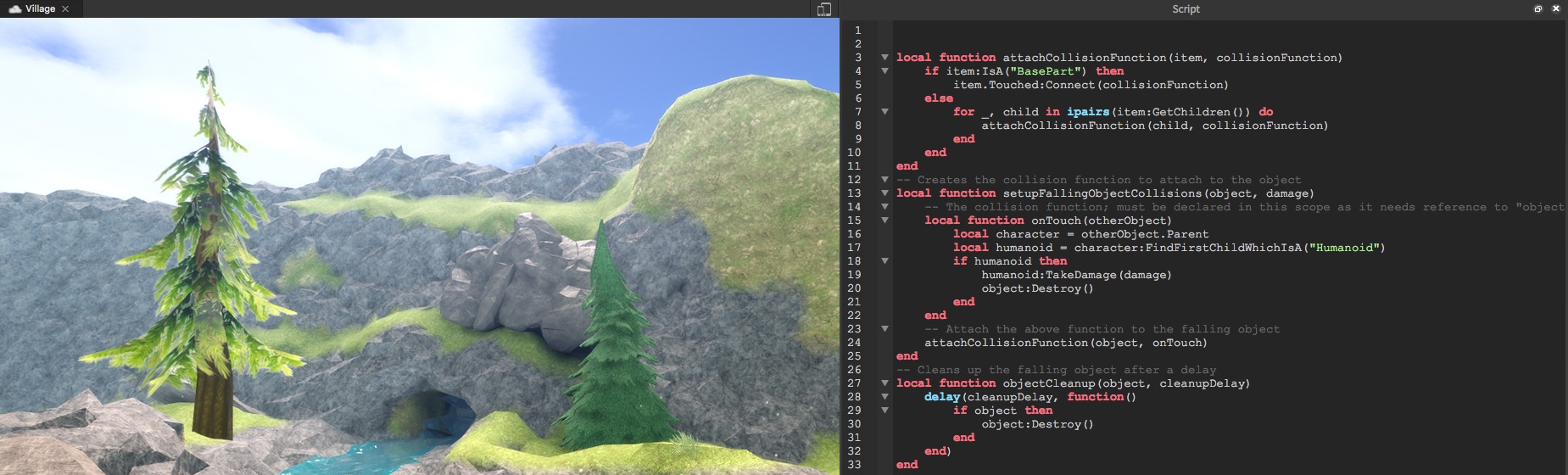
Whether a class is playing or designing games, we have free lesson plans to support you. Our lesson plans are flexible, with many options for different ages, subjects, or time periods, such as a 45 minute workshop or a semester. Additionally, teaching with Roblox is accessible to all educators. You don't need prior experience in coding or game development to design or play games on Roblox.
Costs
On Roblox, it's free to play, create, and publish games. You don't need to pay licensing fees to use Roblox or to publish a student's project.
There are a few optional features which are available for small fees paid in Robux, the currency used in all Roblox games. The most common expense for educators is a private server for playing online, which often averages about $1 (USD) per month. More information on private servers is covered later in the training.
Note
Purchasing Robux
Robux can be purchased on Roblox.com or using physical gift cards found in grocery stores. Do not trust any other sources.
Software
Roblox is actually two software packages with different hardware requirements.
| Software | Use case | Hardware requirements |
|---|---|---|
| Roblox Client | Visit games as a classroom | PC, Mac, Chromebook, mobile, and tablet devices. |
| Roblox Studio | Create or code your own games | PC or Mac, with recommended 2-button mouse with a scroll-wheel |
Common questions about software
Roblox client plays all games Installing the Roblox client allows you to play any game on Roblox. Game do not have their own installations.
More detail on hardware specifications For more details such as supported graphics cards or unique mobile device questions, see the Hardware Requirements page.
Software Updates Both the Roblox client and Studio require consistent internet access. Regular updates occur on a weekly basis. When the software does update, changes are often minor and do not disrupt curriculum.
Recommended ages
Roblox offers educational opportunities and challenges for all ages.
- For students under 10, there are virtual learning games, such as games to improve math skills or roleplay as dinosaurs.
- Older students can find learning games for content such as physics or history. Additionally, they can work in Roblox Studio for project-based learning.
Use Roblox to learn

Students can primarily use Roblox to play or create. One method is using virtual learning games where students play on Roblox. They can go on virtual field trips, explore natural settings, and interact with simulations of real-world phenomena.
Additionally, Roblox can be used for code and creation with Roblox Studio. In Studio, students can design virtual environments or learn computer science with Luau, a text-based coding language similar to Python and Lua.
Advantages of Roblox
Roblox is free, accessible, and trusted by educators
All the software and content for Roblox is free, whether you're a small coding camp or a large school district.
Engage students and practice skills
Widely popular among K-12 students, Roblox has unique opportunities for boosting classroom engagement.
- Engage students in subject-matter content such as history, or experience real-world concepts such as physics and the natural sciences.
- Support creativity by allowing students to design their own projects, or further skill building as they improve critical thinking abilities.
- Promote teamwork and communication as students interact in a multiplayer game world, or collaborate simultaneously on projects in Roblox Studio.
We prioritize safety and privacy
Roblox works with parents, educators, and digital safety experts to promote a welcoming environment for everyone. Our software includes features such as chat filters, private servers, and extensive content moderation. To learn more, and see information on compliance such as COPPA, see our Safety page.
Now that you've learned a bit about what Roblox is, in the next section, you'll visit an online Roblox game. It'll be an interactive opportunity to learn more about Roblox, and become comfortable navigating a virtual world.