
Source: Roblox Creator Hub · CC BY 4.0 · View source · Code samples: MIT Imported 2026-10-03. Formatting adapted for this site.
Spawn With Friends
It can be challenging to locate friends in-game. The SpawnWithFriends developer module automatically moves spawning players near one of their friends present in the game. This module can also be configured to teleport a player on command instead of automatically.
Note
Before spawning occurs, in order to avoid spawning a character inside the map's geometry, the system confirms that there is enough space. Thus, this module might work better in games with large, open spaces.Module Usage
Installation
To use the SpawnWithFriends module in a game:
From Studio's Window menu or Home tab toolbar, open the Toolbox and select the Creator Store tab.
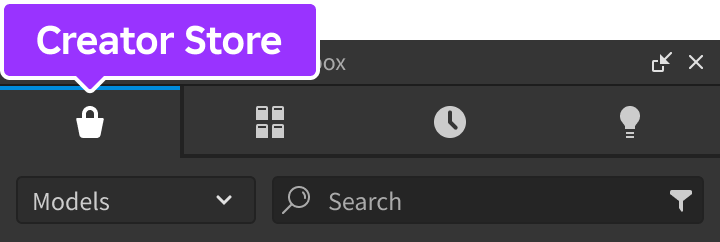
Make sure the Models sorting is selected, then click the See All button for Categories.

Locate and click the Packages tile.
Locate the Spawn With Friends module and click it, or drag-and-drop it into the 3D view.

In the Explorer window, move the entire SpawnWithFriends model into
ReplicatedStorage. Upon running the game the module will begin running.
Restricted Spawn Areas
This module may result in players spawning in restricted areas like VIP rooms, access-only spaces, etc. To prevent players from teleporting to these areas:
Fill the restricted area with invisible
Anchoredblocks. Make sureCanCollide,CanTouch, andCanQueryare disabled for all blocks.
Block filling the entire prison room to prevent players from spawning inside
Using the Tags section of each block's properties, apply the tag
RestrictedSpawnAreaso thatCollectionServicedetects them.Paste the following code into a
Scriptwithin ServerScriptService.local ReplicatedStorage = game:GetService("ReplicatedStorage") local CollectionService = game:GetService("CollectionService") local SpawnWithFriends = require(ReplicatedStorage.SpawnWithFriends) local function validator(playerToTeleport, destinationPlayer, teleportationPoint) -- Iterate through all tagged parts for _, area in CollectionService:GetTagged("RestrictedSpawnArea") do local relativePosition = area.CFrame:PointToObjectSpace(teleportationPoint.Position) local size = area.Size local inXBounds = relativePosition.X < size.X / 2 and relativePosition.X > -size.X / 2 local inZBounds = relativePosition.Z < size.Z / 2 and relativePosition.Z > -size.Z / 2 if inXBounds and inZBounds then return false -- Spawn destination is within restricted area; abort teleportation end end return true -- Spawn destination doesn't overlap any restricted area; proceed with teleportation end SpawnWithFriends.setTeleportationValidator(validator)
API Reference
Functions
configure
configure(config: table)
Overrides default configuration options through the following keys/values in the config table. This function can only be called from a Script.
| Key | Description | Default |
|---|---|---|
| `teleportToFriendOnRespawn` | If set to `false`, teleportation to a friend will only happen manually via [teleportToRandomFriend](#teleporttorandomfriend). | true |
| `teleportDistance` | How far away players should spawn from each other, measured in studs. | 5 |
| `maxCharacterVelocity` | Characters moving faster than this value won't be picked as teleportation candidates, for instance those in moving vehicles. | 48 |
| `bypassFriendshipCheck` | If set to true, **all** players will be candidates for teleportation, not just friends. | false |
| `showLogs` | Whether or not to display log messages in the output. | false |
local ReplicatedStorage = game:GetService("ReplicatedStorage")

local SpawnWithFriends = require(ReplicatedStorage.SpawnWithFriends)

SpawnWithFriends.configure({
	teleportToFriendOnRespawn = true,
	teleportDistance = 5,
	maxCharacterVelocity = 48,
	bypassFriendshipCheck = false,
	showLogs = false
})
teleportToRandomFriend
teleportToRandomFriend(playerToTeleport: Player): boolean
Manually triggers teleportation of a player to one of their friends in the game. Returns a boolean indicating whether or not teleportation succeeded; failure to teleport can be caused by the absence of friends in the server or the inability to find an unobstructed teleportation point. This function can only be called from a Script.
setTeleportationValidator
setTeleportationValidator(validator: function)
Allows you to perform custom pre-teleportation checks by hooking up a validator callback function. The callback receives three parameters:
| Parameter | Description |
|---|---|
| `playerToTeleport` | Reference to the [`Player`](/docs/player) that is being teleported. |
| `destinationPlayer` | Reference to the target [`Player`](/docs/player) that `playerToTeleport` is being teleported to. |
| `teleportationPoint` | [`CFrame`](/docs/cframe) where `playerToTeleport` is teleporting to. |
This function and its callback can only be used in a Script and the callback returns a boolean indicating whether teleportation should proceed. For example, the return logic in the following validator function ensures that the spawning player and destination player are on the same team.
local ReplicatedStorage = game:GetService("ReplicatedStorage")

local SpawnWithFriends = require(ReplicatedStorage.SpawnWithFriends)

-- Teleports players only if they are on the same team
local function validator(playerToTeleport, destinationPlayer, teleportationPoint)
	return playerToTeleport.Team == destinationPlayer.Team
end

SpawnWithFriends.setTeleportationValidator(validator)