
Source: Roblox Creator Hub · CC BY 4.0 · View source · Code samples: MIT Imported 2026-10-03. Formatting adapted for this site.
CCL quick start
In the Character Controller Library (CCL), traditional character abilities (run, climb, jump, swim, etc.) are easily configurable through scripting. For custom character mechanics such as dashing, aiming, wall‑jumping, and more, see custom abilities.
Enable CCL
The CCL is opt-in through Studio's Avatar Settings window. To enable it:
Enable the CCL beta through File ⟩ Beta Features ⟩ AvatarAbilities Character Controller Library.
From the Avatar tab, open Avatar Settings.

Select the Movement tab on the left side of the window and, in the Abilities section, select Character Controller Library.

All of the standard abilities like Running, Jumping, and Climbing are enabled by default. To disable any of them at runtime, uncheck the associated box.
Note
It's not recommended to disable **Running**, as doing so will prevent characters from moving along the ground. Additionally, you should always keep **Getting Up** enabled if **Falling Down** is enabled, as a mismatch will allow characters to fall down (trip) but never get back up.Configuration
Through a script that runs from ServerScriptService, you can experiment with the built‑in ability attributes. You can also modify specific controllers to adjust the physical simulation of the character and its interaction with the environment, such as the character's base movement speed.
Attributes
At runtime, CCL exposes each built-in ability as a Configuration in the character's Abilities folder. This folder usually lives under AbilityManagerActor, but it can live directly under the character in setups without an actor. Use AvatarAbilities.getAbilityConfigurationForCharacter() to access an ability configuration from either setup.
Each ability contains easy-to-configure attributes such as those noted in the table below. Some attributes correspond to legacy Humanoid properties. This relationship identifies equivalent settings, not bidirectional synchronization. The compatibility layer copies changes from these Humanoid properties to the corresponding ability attributes. Jumping attributes initially use the corresponding StarterPlayer character properties.

Note
The abilities in a character's `Abilities` folder may vary, depending on which abilities you [enabled/disabled](#enable-ccl). Confirm available abilities and their valid attributes before you attempt to configure them via scripting.| Ability | Attributes |
|---|---|
| `Climbing` | - `SpeedMultiplier` — Multiplier to the [`ClimbController.MoveSpeedFactor`](/docs/climbcontroller) property when character is climbing. |
| `Crouching` | - `SpeedMultiplier` — Multiplier to the [`GroundController.MoveSpeedFactor`](/docs/groundcontroller) property when character is crouching. |
| `Dead` | - `BreakJointsOnDeath` — Corresponds to [`Humanoid.BreakJointsOnDeath`](/docs/humanoid#humanoid-breakjointsondeath). - `Health` — Corresponds to [`Humanoid.Health`](/docs/humanoid#humanoid-health). - `MaxHealth` — Corresponds to [`Humanoid.MaxHealth`](/docs/humanoid#humanoid-maxhealth). - `RequiresNeck` — Corresponds to [`Humanoid.RequiresNeck`](/docs/humanoid#humanoid-requiresneck). |
| `FallingDown` | |
| `Freefall` | - `SpeedMultiplier` — Multiplier to the [`AirController.MoveSpeedFactor`](/docs/aircontroller) property when character is free‑falling. Note that the effect may be subtle when the character free‑falls for a very short duration. |
| `GettingUp` | |
| `Jumping` | - `JumpHeight` — Corresponds to [`Humanoid.JumpHeight`](/docs/humanoid#humanoid-jumpheight) and initializes from [`StarterPlayer.CharacterJumpHeight`](/docs/starterplayer#starterplayer-characterjumpheight). - `JumpPower` — Corresponds to [`Humanoid.JumpPower`](/docs/humanoid#humanoid-jumppower) and initializes from [`StarterPlayer.CharacterJumpPower`](/docs/starterplayer#starterplayer-characterjumppower). - `UseJumpPower` — Corresponds to [`Humanoid.UseJumpPower`](/docs/humanoid#humanoid-usejumppower) and initializes from [`StarterPlayer.CharacterUseJumpPower`](/docs/starterplayer#starterplayer-characterusejumppower). |
| `NoLocomotion` | |
| `Running` | - `SpeedMultiplier` — Multiplier to the [`GroundController.MoveSpeedFactor`](/docs/groundcontroller) property when character is running. |
| `Sitting` | |
| `Slipping` | - `MaxSlopeAngle` — Corresponds to [`Humanoid.MaxSlopeAngle`](/docs/humanoid#humanoid-maxslopeangle). |
| `Sprinting` | - `SpeedMultiplier` — Multiplier to the [`GroundController.MoveSpeedFactor`](/docs/groundcontroller) and [`AirController.MoveSpeedFactor`](/docs/aircontroller) properties when character is sprinting. |
| `Swimming` | - `EnableFastRise` — Rise to surface more quickly by holding the jump input. - `SpeedMultiplier` — Multiplier to the [`SwimController.MoveSpeedFactor`](/docs/swimcontroller) property when character is swimming. |
| `Turning` | - `UseLookDirectionInput` — Uses look-direction input instead of movement input to determine the character's facing direction. |
To set ability configurations for all characters through a script:
Create a new server-side
ScriptwithinServerScriptServiceand rename it toAbilitiesScript.Copy and paste the following code into the new script. This example multiplies the base movement speed for the
Runningability by2. Feel free to adjust other ability attributes such as those described in the table above.```lua title="Script in ServerScriptService" local Players = game:GetService("Players") local AvatarAbilities = require("@rbx/AvatarAbilities") local function waitForAbilityConfiguration(character, abilityName, timeout) local deadline = time() + timeout while character.Parent and time() < deadline do local ability = AvatarAbilities.getAbilityConfigurationForCharacter(character, abilityName) if ability then return ability end task.wait() end return nil end local function onCharacterAdded(character) local running = waitForAbilityConfiguration(character, "Running", 10) if running then -- Double base movement speed running:SetAttribute("SpeedMultiplier", 2) end end local function onPlayerAdded(player) if player.Character then onCharacterAdded(player.Character) end player.CharacterAdded:Connect(onCharacterAdded) end Players.PlayerAdded:Connect(onPlayerAdded) for _, player in Players:GetPlayers() do onPlayerAdded(player) end ```
Controllers
In the CCL, a core ControllerManager instance within the character model, alongside child controllers such as a GroundController, handle the physical simulation of the character and its interaction with the environment. Abilities then interact with the ControllerManager and its descendants to modify controller behaviors or switch between controllers.
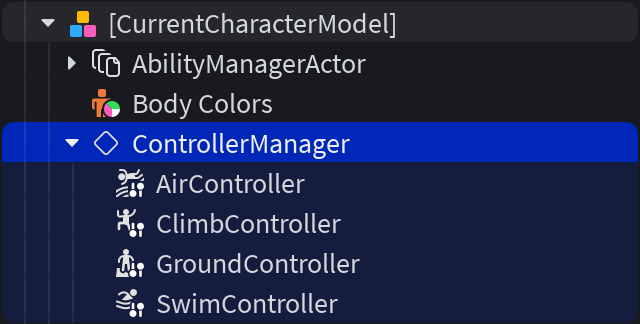
Properties for the ControllerManager and its controller descendants are summarized in the tables below, although these tables are not exhaustive; please consult the API classes documentation for additional property options.
ControllerManager
| Property | Description |
|---|---|
| [`BaseMoveSpeed`](/docs/controllermanager#controllermanager-basemovespeed) | The **base** linear movement speed used by all controllers. Controllers individually customize movement speed through their `MoveSpeedFactor` property. |
| [`BaseTurnSpeed`](/docs/controllermanager#controllermanager-baseturnspeed) | The **base** angular turning speed used by all controllers to align the character to face the desired direction. Some controllers individually customize turn speed through their `TurnSpeedFactor` property. |
| [`UpDirection`](/docs/controllermanager#controllermanager-updirection) | [`Vector3`](/docs/vector3) which indicates the upward-facing vector for the [`ControllerManager.RootPart`](/docs/controllermanager#controllermanager-rootpart). |
Individual Controllers
| Controller | Properties |
|---|---|
| [`GroundController`](/docs/groundcontroller) | - [`MoveSpeedFactor`](/docs/groundcontroller) — Multiplier factor for the [`ControllerManager.BaseMoveSpeed`](/docs/controllermanager#controllermanager-basemovespeed) property while character is on the ground. - [`AccelerationTime`](/docs/groundcontroller#groundcontroller-accelerationtime) and [`DecelerationTime`](/docs/groundcontroller#groundcontroller-decelerationtime) — Time in seconds for character to accelerate to full speed and decelerate to full stop, respectively. - [`TurnSpeedFactor`](/docs/groundcontroller#groundcontroller-turnspeedfactor) — Multiplier factor for the [`ControllerManager.BaseTurnSpeed`](/docs/controllermanager#controllermanager-baseturnspeed) property (max angular velocity of a turn while character is on the ground). |
| [`AirController`](/docs/aircontroller) | - [`MoveSpeedFactor`](/docs/aircontroller) — Multiplier factor for the [`ControllerManager.BaseMoveSpeed`](/docs/controllermanager#controllermanager-basemovespeed) property while character is in the air. - [`MoveMaxForce`](/docs/aircontroller#aircontroller-movemaxforce) and [`TurnMaxTorque`](/docs/aircontroller#aircontroller-turnmaxtorque) — How quickly the character can accelerate and change direction in the air. - [`TurnSpeedFactor`](/docs/aircontroller#aircontroller-turnspeedfactor) — Multiplier factor for the [`ControllerManager.BaseTurnSpeed`](/docs/controllermanager#controllermanager-baseturnspeed) property (max angular velocity of a turn while character is in the air). |
| [`ClimbController`](/docs/climbcontroller) | - [`MoveSpeedFactor`](/docs/climbcontroller) — Multiplier factor for the [`ControllerManager.BaseMoveSpeed`](/docs/controllermanager#controllermanager-basemovespeed) property while character is climbing. |
| [`SwimController`](/docs/swimcontroller) | - [`MoveSpeedFactor`](/docs/swimcontroller) — Multiplier factor for the [`ControllerManager.BaseMoveSpeed`](/docs/controllermanager#controllermanager-basemovespeed) property while character is swimming. - [`PitchMaxTorque`](/docs/swimcontroller#swimcontroller-pitchmaxtorque) — The maximum torque used to rotate on the local **X** axis to the desired pitch orientation. - [`RollMaxTorque`](/docs/swimcontroller#swimcontroller-rollmaxtorque) — The maximum torque applied to rotate on the local **Z** axis to the desired roll orientation. |
To set controller configurations for all characters through a script:
- Create a new server-side
ScriptwithinServerScriptServiceand rename it toControllerScript. - Copy and paste the following code into the new script. This example increases ground‑based moving/turning speed as well adds a slight acceleration and deceleration time. Feel free to adjust other properties such as those described in the tables above or for each class as documented (
ControllerManager;GroundController;AirController;ClimbController;SwimController).
local Players = game:GetService("Players")
local AvatarAbilities = require("@rbx/AvatarAbilities")

local function waitForAbilityConfiguration(character, abilityName, timeout)
	local deadline = time() + timeout
	while character.Parent and time() < deadline do
		local ability = AvatarAbilities.getAbilityConfigurationForCharacter(character, abilityName)
		if ability then
			return ability
		end
		task.wait()
	end
	return nil
end

local function waitForChildOfClass(parent, className, timeout)
	local deadline = time() + timeout
	local child = parent:FindFirstChildOfClass(className)
	while not child and parent.Parent and time() < deadline do
		task.wait()
		child = parent:FindFirstChildOfClass(className)
	end
	return child
end

local function onCharacterAdded(character)
	-- Running provisions the ground controller when it registers
	if not waitForAbilityConfiguration(character, "Running", 10) then
		return
	end

	local controllerManager = waitForChildOfClass(character, "ControllerManager", 10)
	if controllerManager then
		local groundController = waitForChildOfClass(controllerManager, "GroundController", 10)
		if groundController then
			-- Double the move and turn speeds
			groundController.MoveSpeedFactor *= 2
			groundController.TurnSpeedFactor *= 2
			-- Add slight acceleration and deceleration
			groundController.AccelerationTime = 0.2
			groundController.DecelerationTime = 0.4
		end
	end
end

local function onPlayerAdded(player)
	if player.Character then
		onCharacterAdded(player.Character)
	end
	player.CharacterAdded:Connect(onCharacterAdded)
end

Players.PlayerAdded:Connect(onPlayerAdded)
for _, player in Players:GetPlayers() do
	onPlayerAdded(player)
end