
Source: Roblox Creator Hub · CC BY 4.0 · View source · Code samples: MIT Imported 2026-10-03. Formatting adapted for this site.
Makeup specifications
Makeup requires a specific set of components and configuration standards to ensure it displays properly on avatar faces of all shapes and sizes. Before you start the export process, verify that your makeup meets the following specifications and guidelines for proper Studio compatibility.
When you're ready to export your makeup, reference all export setting requirements for Blender and Maya.
Note
For other types of 3D models:
- [General mesh](/docs/roblox-art-modeling-specifications) specifications.
- [Rigid accessory](/docs/roblox-avatar-rigid-accessories-specifications) specifications.
- [Layered accessory](/docs/roblox-avatar-layered-accessories-specifications) specifications.
General
If you are following the best practice creation process, ensure that your template file submission includes the following objects that are correctly configured and named in their respective third-party modeling software:
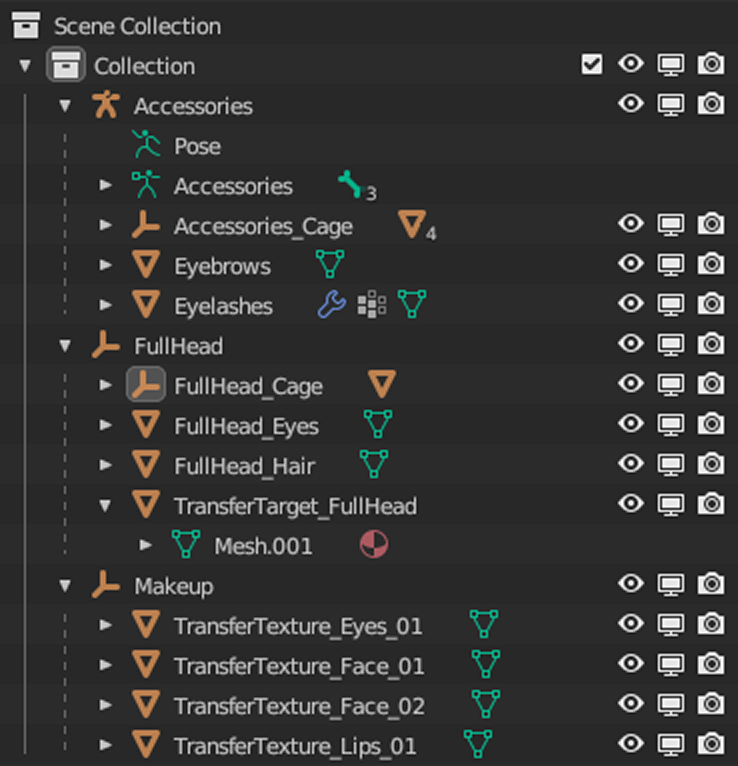
- A head mesh object and associated cage mesh object.
- These two objects must include the prefix "TransferTarget_" in their name.
- TransferTexture mesh objects for each region:
Eyes,Face,Lips.- These three objects must follow the following naming conventions.
TransferTexture_Eyes_01TransferTexture_Lips_01TransferTexture_Face_01- Any for multiple regions, increment the affix number:
TransferTexture_Face_02
- These three objects must follow the following naming conventions.
- Optional eyebrows and eyelashes.
Note
The provided Roblox makeup template head should already be properly configured with the correct objects and naming conventions. To prevent issues with import, avoid renaming or deleting the data model of the template head when creating your own makeup.
Decals and textures
All accessory textures must meet Roblox's texture specifications, but makeup textures include two additional considerations:
- There is a 4K texture limit for in-game makeup creation.
- There is a 1K texture limit for makeup that you upload to the Marketplace.
For additional information on PBR textures, see PBR textures.
Eyebrows and eyelashes
Eyebrows and eyelashes are optional layered accessories for makeup looks. If you choose to include them in your creations, they must meet all layered accessory requirements, notably:
Cage data - Eyebrows and eyelashes each require their own inner and outer cage.
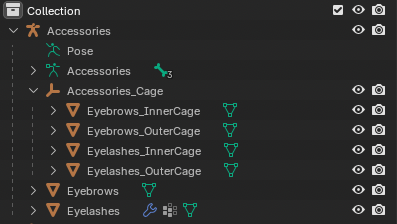
- Eyebrows and eyelashes can also take advantage of automatic skinning, specifically with special skinning joints.
Geometry size - Eye accessories can't exceed the maximum dimensions for their asset type.
Budgets - Eye accessories can't exceed 4k triangles each.