
Source: Roblox Creator Hub · CC BY 4.0 · View source · Code samples: MIT Imported 2026-10-03. Formatting adapted for this site.
Engagement-based payouts
Note
Effective July 24, 2025, the Engagement-Based Payouts program is deprecated and has been replaced by the Creator Rewards program.
Automatic engagement-based payouts let you earn Robux based on the share of time that Premium members engage in a game, regardless of the game's size. These payouts are in addition to earnings from other monetization methods such as Passes.
To encourage Premium subscriber growth and increase your potential to earn engagement-based payouts, you can add the Premium Purchase Modal directly into a game. Keep in mind, users from some countries may not have access to Premium subscriptions.
Access payout data
Payout data can provide vital feedback to help you understand what factors drive Premium subscribers to your games.
To access payout data:
- Navigate to your Creations page on Creator Dashboard and select your game.
- Navigate to the Monetization tab and select Engagement Payouts.
Engagement payouts
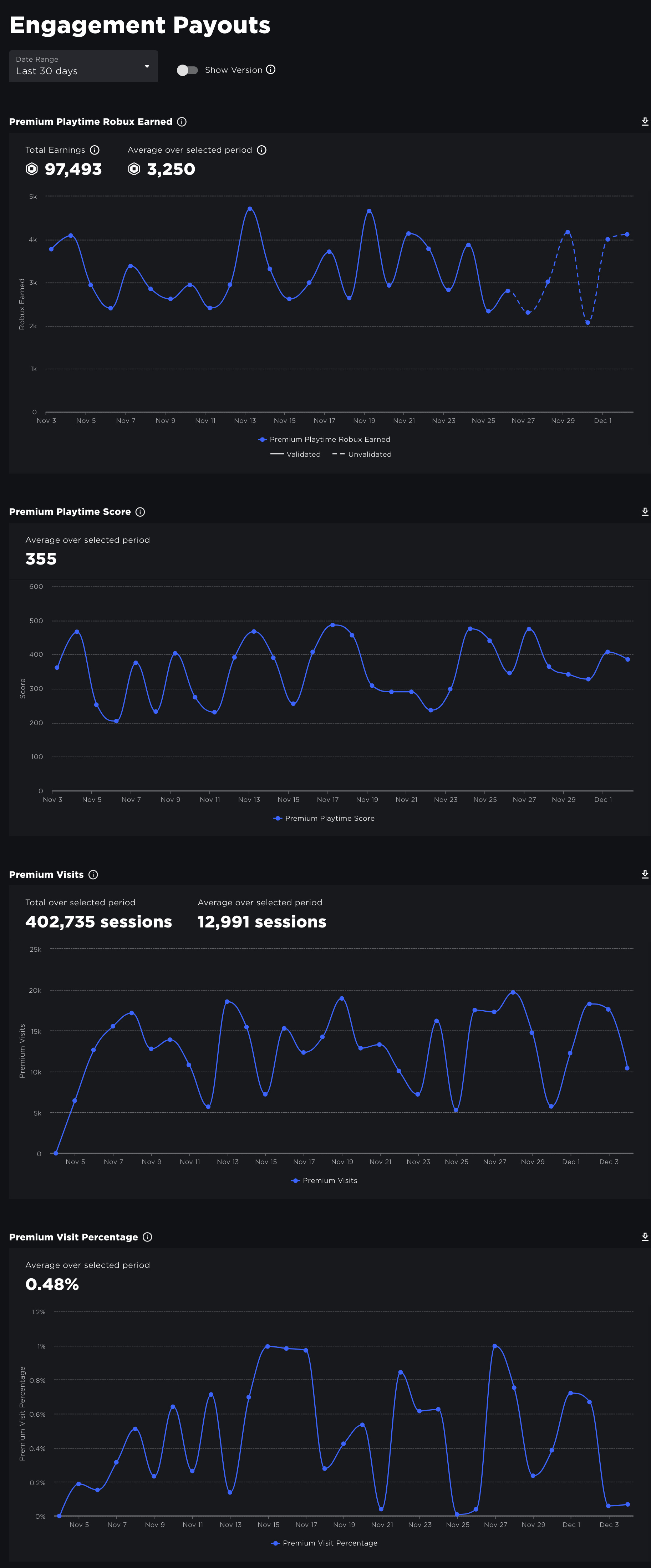
The Engagement-Based Payouts charts track payout data based on the following metrics:
Premium Playtime Robux Earned: The amount you can expect to earn for Premium subscriber engagement. This is not based on the daily time Premium subscribers spend engaging with the game; instead, this metric aggregates each user's behavior over the past 28 days. As such, even though they have similar trends, this metric has no direct mathematical relationship with the Premium Playtime Score.
Premium Playtime Score: The amount of time Premium subscribers engage with the game per day. This metric can provide immediate feedback on the impact of new features you release.
Premium Visits: How many visits are from Premium members.
Note
Note that the dotted "projected earnings" line becomes solid after the payout amount is final, at which point Roblox adds the payout to your Pending Robux amount here.
Premium purchase modal
One strategy to increase engagement-based payouts is to encourage Premium upgrade through the purchase modal. Players can complete the purchase entirely within the game and immediately receive both Premium status and their initial stipend of Robux.

Premium purchase modal within a game
Remember that Premium membership should not be a "requirement" to enjoy a game. When implementing incentives for Premium members, it's highly recommended that you follow these best practices:
- Honestly and accurately describe the benefits of upgrading within the game's description.
- Do not promise Robux or other out-of-game rewards that you don't control.
- Do not show the modal as a "paywall" when non-Premium members enter the game.
- Consider offering exclusive merch to Premium members, but do not give them a tactical gameplay advantage over others, such as an array of ultra-powerful weapons that non-Premium members can't compete against.
Check membership
Before scripting any logic related to Premium membership or triggering the modal, check a user's MembershipType property to determine if they're already subscribed.
local Players = game:GetService("Players")

local player = Players.LocalPlayer

if player.MembershipType == Enum.MembershipType.Premium then
	-- Take some action specifically for Premium members
end
Trigger the modal
You can trigger the purchase modal with the PromptPremiumPurchase() method. For example, the following code prompts users to purchase Premium when their character touches the part that its containing Script is attached to, such as a teleporter that allows access to an exclusive area.
local MarketplaceService = game:GetService("MarketplaceService")
local Players = game:GetService("Players")

local teleporter = script.Parent
local showModal = true

local TELEPORT_POSITION = Vector3.new(1200, 200, 60)

-- Teleport character to exclusive area
local function teleportPlayer(player)
	-- Request streaming around target location
	player:RequestStreamAroundAsync(TELEPORT_POSITION)

	-- Teleport character
	local character = player.Character
	if character and character.Parent then
		local currentPivot = character:GetPivot()
		character:PivotTo(currentPivot * CFrame.new(TELEPORT_POSITION))
	end
end

-- Detect character parts touching teleporter
teleporter.Touched:Connect(function(otherPart)
	local player = Players:GetPlayerFromCharacter(otherPart.Parent)
	if not player then return end

	if not player:GetAttribute("CharacterPartsTouching") then
		player:SetAttribute("CharacterPartsTouching", 0)
	end
	player:SetAttribute("CharacterPartsTouching", player:GetAttribute("CharacterPartsTouching") + 1)

	if player.MembershipType == Enum.MembershipType.Premium then
		-- User has Premium; teleport character to exclusive area within game
		teleportPlayer(player)
	else
		-- Show purchase modal, using debounce to show once every few seconds at most
		if not showModal then return end
		showModal = false
		task.delay(5, function()
			showModal = true
		end)
		MarketplaceService:PromptPremiumPurchase(player)
	end
end)

-- Detect character parts exiting teleporter
teleporter.TouchEnded:Connect(function(otherPart)
	local player = Players:GetPlayerFromCharacter(otherPart.Parent)
	if player and player:GetAttribute("CharacterPartsTouching") then
		player:SetAttribute("CharacterPartsTouching", player:GetAttribute("CharacterPartsTouching") - 1)
	end
end)

-- Handle membership changed event
Players.PlayerMembershipChanged:Connect(function(player)
	warn("User membership changed; new membership is " .. tostring(player.MembershipType))

	-- Teleport character if membership type is Premium and character is on teleporter
	if player.MembershipType == Enum.MembershipType.Premium and player:GetAttribute("CharacterPartsTouching") > 0 then
		teleportPlayer(player)
	end
end)