
Source: Roblox Creator Hub · CC BY 4.0 · View source · Code samples: MIT Imported 2026-10-03. Formatting adapted for this site.
Server authority model
In a server authority model, the server is the single source of truth for the entire game state, and clients are only trusted to report their own inputs. This architecture is the core netcode foundation of a fair, competitive game because it prevents entire classes of cheating like flyhacks or speedhacks by never trusting a client to report its own position or state.
Advantages
In a naive server-owned system, clients would simply send their inputs to the server and display the results of the game sent back by the server. While technically correct, such a system would face significant input latency because every player action would have to travel to the server, be processed, and have the result sent back to the client before it could be displayed. For most games, especially those fast‑paced, that round‑trip delay would cause gameplay to feel laggy, unresponsive, and unplayable.
In Roblox's server authority model, latency is compensated for by having clients instantly predict the effects of their inputs in addition to sending them to the server. For example, when a player presses a key, the client doesn't wait for the server to respond; instead it predicts a few frames ahead of the last known server state. This allows the client to show the result of the input action instantly, effectively hiding network latency and making the game feel responsive.
Sometimes the client will get its prediction wrong (misprediction) and, because of network latency, the client will not know that it has made a mistake for a few frames. For example:
Note
Your client predicts that you've moved forward, but on the server another player used a stun ability that stopped you from moving. The client and server now have different states.
When a misprediction is detected, the client must correct its prediction based on the server's authoritative state. If the authoritative state is different from the client's predicted state, the client must roll back and resimulate its predicted frames. This system of client‑side prediction, rollback, and resimulation is known as "latency compensation" and helps make server‑authoritative multiplayer games feel smooth and responsive.
Note
Mispredictions are a normal and expected part of the server authority architecture because clients inherently cannot predict other players' inputs, so actions by other players will always trigger some amount of misprediction. When tuned correctly, the resulting corrections are small and should be imperceptible to players. Read further on advanced techniques to smooth out and mask network artifacts.
Setup
The server authority model requires certain other engine technologies to function correctly. Confirm the following property settings on the Workspace object in the Explorer:
Workspace.AuthorityModemust beServer(setting this automatically sets the following five).Workspace.NextGenerationReplicationmust be enabled.Workspace.PlayerScriptsUseInputActionSystemmust be enabled.Workspace.SignalBehaviormust beDeferred.Workspace.UseFixedSimulationmust be enabled.Workspace.StreamingEnabledmust be enabled.
Concepts
The server authority system runs on a few core concepts as follows.
Client prediction
Through client prediction, the client simulates a few frames ahead of the last known server state to predict the effects of player inputs immediately. This hides input latency, but the prediction may later turn out to be incorrect (client misprediction) and thus require correction. The client tries to simulate just far enough ahead of the last known authoritative server state so that its inputs arrive on the server at the intended frame. The number of frames the client will predict ahead of the known server state is based on the latency behind the client and server.
Client misprediction
When the client receives the authoritative state from the server, it checks that state against a historical record of what it predicted locally for that frame. When there is a difference between what the client predicted and what the server actually did, this is a misprediction. Mispredictions can occur for several reasons, including shifts in network latency, other players acting in ways the client didn't anticipate, the game running certain logic exclusively on the server, etc.
If the authoritative state is different from the client's predicted state, the client must roll back and resimulate.
Rollback and resimulation
When a client detects a misprediction, it must reset to the server's authoritative state and then resimulate to jump back to its predicted frame. Based on the network latency, the client tries to simulate just far enough ahead of the last known authoritative server state so that its inputs arrive on the server at the intended frame.
block-beta
columns 1
block:Client
columns 7
ClientHeader("<span style="color:white;"><b>Client</b> </span>")
space:6
C1["3"]
C2["4"]
C3["5"]
C4["6"]
C5["<span style="font-size:80%">3 4 5 6</span> 7"]
C6["8"]
C7["9"]
end
block:Middle
columns 10
TimeStart("<span style="color:Grey; font-size:80%;">TIME</span>")
space:8
TimeEnd(" ")
space:10
end
block:Server
columns 7
ServerHeader(["<span style="color:white;"><b>Server</b> </span>"])
space:6
S1["1"]
S2["2"]
S3["3"]
S4["4"]
S5["5"]
S6["6"]
S7["7"]
end
TimeStart --> TimeEnd
C1 --"<span style="color:white; background-color:RoyalBlue;"> Input (Frame 3) </span>"--> S3
S3 --"<span style="color:white; background-color:SeaGreen;"> Server State (Frame 3) </span>"--> C5
style Client fill:RoyalBlue
style ClientHeader stroke-opacity:0, fill-opacity:0
style Middle fill-opacity:0, stroke-opacity:0
style TimeStart fill-opacity:75%, stroke-opacity:75%
style TimeEnd display:none
style Server fill:SeaGreen
style ServerHeader stroke-opacity:0, fill-opacity:0
In the above diagram, the client is simulating 2 frames ahead of the server. It sends its inputs for frame 3 which arrive at the intended frame (3) on the server. The server sends the authoritative state for frame 3 and the client receives it on frame 7. The client discovers it mispredicted frame 3 so it resets to the server's frame 3 and resimulates frames 4, 5 and 6 before it simulates frame 7. Players may see a noticeable network artifact such as a sudden movement.
In summary, the client:
- Receives the authoritative state from the server and compares it against its own predicted state.
- If the client's prediction was incorrect:
- Client rolls back to the last known authoritative state received from the server.
- Client resimulates from the authoritative state to its predicted state, re-applying any local inputs.
Implementation
Network ownership and prediction
In the server authority model, you're able to keep the core gameplay objects server‑owned without incurring the input latency cost normally associated with server ownership. Things like cars, player characters, or other gameplay‑critical objects can remain server‑owned, even when interacting with other players.
By default, Roblox will automatically predict properties with simulation access near the local player Character, but if you want more fine‑grained control, you can explicitly force an instance's prediction on or off with RunService:SetPredictionMode().
Simulation sync
In the server authority model, the client and the server must both run the core simulation, and the client's simulation needs to be able to roll back and resimulate when a misprediction occurs. To enable this, write your core logic inside functions bound through RunService:BindToSimulation() in a ModuleScript that's initialized on both the client and server.

During a resimulation, Roblox will re-run the functions bound to the simulation via BindToSimulation(). Processing player inputs, interacting with synchronized physics objects, and updating the core game state should live inside those bound functions.
Use RobloxGlobals.time() for any time-based logic inside a bound simulation function, such as driving an animation speed or oscillating a value over time. When Workspace.AuthorityMode is AuthorityMode.Server, time() is synchronized between the client and the server and uses fixed-step simulation time. During resimulation, it rewinds to the authoritative frame and advances as the client replays frames, so it returns a consistent value each time a frame is simulated.
Note
Other time functions don't share this behavior. RobloxGlobals.tick() and os.time() read the local device clock, while os.clock() measures elapsed time from an arbitrary local baseline. They aren't synchronized between the client and the server and don't roll back during resimulation, so avoid them for simulation-affecting logic.
Simulation
ModuleScript named Simulation in ReplicatedStorage:
local RunService = game:GetService("RunService")
local Players = game:GetService("Players")

local Simulation = {}

Simulation.Initialize = function()
	RunService:BindToSimulation(function(deltaTime)
		-- Read player inputs
		-- Update game state
	end)
end

return Simulation
ServerLoader
Script named ServerLoader as child of the Simulation ModuleScript:
local Simulation = require(script.Parent)

Simulation:Initialize()
ClientLoader
LocalScript named ClientLoader as child of the Simulation ModuleScript:
local Simulation = require(script.Parent)

Simulation:Initialize()
State sync with attributes
Roblox automatically synchronizes all properties with simulation access on predicted instances. For custom data, attributes are the primary way to synchronize instances marked as predicted; on such instances, any mismatch in attribute values between the server's source of truth and the client's prediction will trigger a full rollback and resimulation.
Note
Use attributes to store game data that affects your core simulation, including player health, ammunition, inventory, or custom rules (see limitations).
Note
Only write to attributes on predicted instances from within functions bound through BindToSimulation() to ensure that Roblox can fully track relevant game states and resimulate properly.
Attribute limits
In order to be replicated, an attribute must meet all of the following criteria:
- It is among the first 64 attributes on its
Instance. - Its name contains at most 50 characters.
- If a string type attribute, its value contains at most 50 characters.
Simulation access
Many properties and methods in the engine API reference include the Simulation Access label, for example BasePart.CFrame. Properties with this label will be predicted by the server authority system. Additionally, only properties and methods with this label can be accessed inside functions bound with RunService:BindToSimulation().
Input actions
In a server-authoritative game, the primary way for a client to affect the game's state is through the Input Action System. These inputs are sent to the server and are replayed during resimulation on the client. As a result, InputActions should be used for all inputs that affect the core simulation and they should be checked for sanity before they're processed.
Note
To reiterate, do not use traditional events like UserInputService.InputBegan in the core simulation of a server-authoritative game.
Note that InputContexts must be a descendent of a Player so that the engine knows who has ownership over the InputContext. One approach is to add your InputContexts to a folder under ReplicatedStorage and use a Script under ServerScriptService to clone the InputContexts per player:
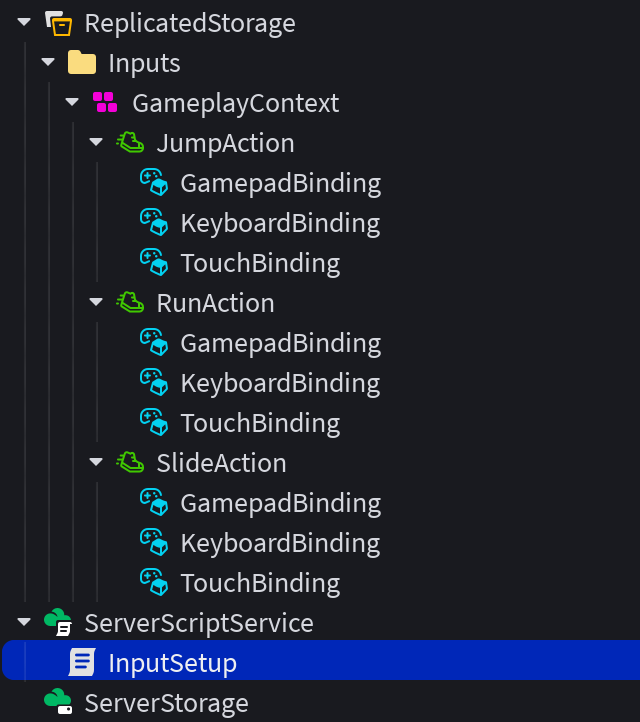
local Players = game:GetService("Players")
local ReplicatedStorage = game:GetService("ReplicatedStorage")

local InputsFolder = ReplicatedStorage:WaitForChild("Inputs")

local function onPlayerAdded(player)
	local clone = InputsFolder:Clone()
	clone.Parent = player
end

Players.PlayerAdded:Connect(onPlayerAdded)

for _, player in Players:GetPlayers() do
	onPlayerAdded(player)
end
Using this pattern, you can read InputActions for all players in RunService:BindToSimulation() on both client and server to receive the same data for a given frame and record the previous frame's input in an attribute, for example to trigger a character run when a RunAction input action is triggered.
Remote events
Remote events can still be used within the server authority model to facilitate discrete communication between client and server. For example, servers can use remote events to broadcast data about players scoring points or picking up objects, and clients can use remote events as an alternative API for sending inputs to the server, such as for button presses or tapping objects in the 3D world.
Note
RemoteEvents might not be consistently ordered with property and attribute updates over the network. For example, if you change a property before firing a remote event on a client, the server might receive the property change after the remote event. To learn more, see replication order.
Animations, sounds, and effects
Client-side effects like animations and sounds must be written knowing that the client simulation is merely a prediction of the authoritative server state. BindToSimulation() limits what properties and methods can be called from within bound functions to help guide you in writing only to the synchronized simulation state. Displaying the results of this simulation, triggering effects and sounds, etc. should be done in a separate function connected to RenderStepped that reads the results of the simulation and triggers the desired effects.
Further guidance around rendering a predicted simulation is covered in the advanced techniques guide.
Example projects
In addition to this documentation, the following templates can help you get started:
<a href="https://www.roblox.com/games/134686834388911/Racing-Server-Authority-Template"><img src="https://prod.docsiteassets.roblox.com/assets/misc/SA-Icon-Racing.jpg" /></a>Racing
<a href="https://www.roblox.com/games/110687099504272/Soccer-Server-Authority-Template"><img src="https://prod.docsiteassets.roblox.com/assets/misc/SA-Icon-Soccer.jpg" /></a>Soccer
<a href="https://www.roblox.com/games/90572444221193/Laser-Tag-Server-Authority-Template"><img src="https://prod.docsiteassets.roblox.com/assets/misc/SA-Icon-Laser-Tag.jpg" /></a>Laser Tag