
Source: Roblox Creator Hub · CC BY 4.0 · View source · Code samples: MIT Imported 2026-10-03. Formatting adapted for this site.
Timers and events
During the course of a round, the scripts will need to track time and send signals between different scripts. Time will be managed using a time script, while events, a concept in Roblox coding, will signal changes such as the end of a match.
Send signals with events
With players now in the arena, events can be used to signal the start of the match and the code for the timer can begin. Later, an event can also be used to signal the end of the match, and that it's time to transition players back to the lobby.
These events aren't prebuilt, so custom event objects called bindable events will need to be created. Bindable events are often used for player-fired actions and are similar to events like Touched or Changed.
Multiple scripts can listen for the same bindable events. This keeps your code organized and makes it easier to add additional code for the start or end of the match later if needed.
Create bindable events
Start by creating bindable event objects for the start and end of the match. Since bindable events don't interact with the client, they can be stored in Server Storage.
In ServerStorage, create a new folder named Events. In that folder, create two BindableEvents named MatchStart and MatchEnd.

Use events
Right now, when players enter the arena, the intermission keeps restarting rather than beginning the timer. The main game loop needs to be told to stop and wait until the MatchEnd event fires before moving on to the next part of the code.
Events have two built-in functions: Connect() and Wait(). Instead of using Connect() like previously, call Wait() on MatchEnd to pause the game manager script until MatchEnd is fired. In this case, the wait function pauses the code until the game manager receives a signal that the match ended.
In GameManager, create variables for the
Eventsfolder andMatchEndevent.-- Module Scripts local moduleScripts = ServerStorage:WaitForChild("ModuleScripts") local matchManager = require(moduleScripts:WaitForChild("MatchManager")) local gameSettings = require(moduleScripts:WaitForChild("GameSettings")) -- Events local events = ServerStorage:WaitForChild("Events") local matchEnd = events:WaitForChild("MatchEnd")Have the script wait for the match end event to fire before moving on. In the loop, at the end, type:
matchEnd.Event:Wait()while true do repeat task.wait(gameSettings.intermissionDuration) print("Restarting intermission") until #Players:GetPlayers() >= gameSettings.minimumPlayers print("Intermission over") task.wait(gameSettings.transitionTime) matchManager.prepareGame() -- Placeholder wait for the length of the game. matchEnd.Event:Wait() endTest the game. Confirm that once players are in the arena, the intermission loop does not continue. The script is now waiting for the
matchEndsignal to fire.
Troubleshooting tips
At this point, the code doesn't work as expected, try one of the following below.
- Double check the usage of the dot or colon operators in
matchEnd.Event:Wait(). - Make sure that MatchEnd is a BindableEvent, and not another type, such as a RemoteEvent.
Use a timer
One of the conditions that will cause the end of the match is a timer running out, which will be handled through the script.
Set up the timer
To add a timer into the game, use the premade module script in the steps below. It includes functions to start and end a timer, as well as return the amount of time left.
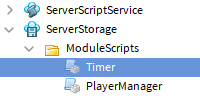
In ServerStorage > ModuleScripts, create a new module script named Timer.
Replace the code with the code below.
local Timer = {} Timer.__index = Timer function Timer.new() local self = setmetatable({}, Timer) self._finishedEvent = Instance.new("BindableEvent") self.finished = self._finishedEvent.Event self._running = false self._startTime = nil self._duration = nil return self end function Timer:start(duration) if not self._running then task.spawn(function() self._running = true self._duration = duration self._startTime = tick() while self._running and tick() - self._startTime < duration do task.wait() end local completed = self._running self._running = false self._startTime = nil self._duration = nil self._finishedEvent:Fire(completed) end) else warn("Warning: timer could not start again as it is already running.") end end function Timer:getTimeLeft() if self._running then local now = tick() local timeLeft = self._startTime + self._duration - now if timeLeft < 0 then timeLeft = 0 end return timeLeft else warn("Warning: could not get remaining time, timer is not running.") end end function Timer:isRunning() return self._running end function Timer:stop() self._running = false end return TimerIn MatchManager, require the GameSettings and Timer modules.
local MatchManager = {} -- Services local ServerStorage = game:GetService("ServerStorage") -- Module Scripts local moduleScripts = ServerStorage:WaitForChild("ModuleScripts") local playerManager = require(moduleScripts:WaitForChild("PlayerManager")) local gameSettings = require(moduleScripts:WaitForChild("GameSettings")) local timer = require(moduleScripts:WaitForChild("Timer"))Below the variables, create a new timer object by setting a variable named
myTimerequal totimer.new(). This object will be used to call functions that start and stop the timer.local gameSettings = require(moduleScripts:WaitForChild("GameSettings")) local timer = require(moduleScripts:WaitForChild("Timer")) -- Creates a new timer object to be used to keep track of match time. local myTimer = timer.new()
Note
The timer module script can be called by other scripts to create more timers as needed, like if you wanted to have traps appear after a specific time. To use the timer in more than one situation, create a new Timer object, like myTrapTimer = timer.new(). Timer objects should only be used for a single purpose, rather than reused.
Start and stop
Now that a timer is created, use the included functions start() and stop() during a match. Below is a description of each function and the parameter it accepts.
start(time)- Starts the timer, with time in seconds as the parameter.finished:Connect(functionName)- When the timer finishes, runs the function passed as a parameter.
In MatchManager, create a new function named
timeUp()to run whenever the timer has finished. Include a test print statement.local myTimer = timer.new() -- Local Functions local function timeUp() print("Time is up!") end -- Module Functions function MatchManager.prepareGame() playerManager.sendPlayersToMatch() end return MatchManagerBelow
timeUp(), add a function namedstartTimer()with a print statement. You'll display the timer in-game later.-- Local Functions local function timeUp() print("Time is up!") end local function startTimer() print("Timer started") endTo start and stop the timer, in
startTimer():- Call
myTimer.start(). Pass ingameSettings.matchDuration. - Call
myTimer.finished:Connect(). Pass intimeUp().
-- Local Functions local function startTimer() print("Timer started") myTimer:start(gameSettings.matchDuration) myTimer.finished:Connect(timeUp) end- Call
Start the timer
The timer can be triggered at the start of a match using the Match Start event.
In MatchManager, under the module variables, create variables to store the Events folder, MatchStart, and MatchEnd (which is used in a future lesson).
-- Module Scripts local moduleScripts = ServerStorage:WaitForChild("ModuleScripts") local playerManager = require(moduleScripts:WaitForChild("PlayerManager")) local gameSettings = require(moduleScripts:WaitForChild("GameSettings")) local timer = require(moduleScripts:WaitForChild("Timer")) -- Events local events = ServerStorage:WaitForChild("Events") local matchStart = events:WaitForChild("MatchStart") local matchEnd = events:WaitForChild("MatchEnd") --Creates timer local myTimer = timer.new()Above
return MatchManager, connect the match start event tostartTimer().-- Module Functions function MatchManager.prepareGame() playerManager.sendPlayersToMatch() end matchStart.Event:Connect(startTimer) return MatchManagerTo fire the match start event, in
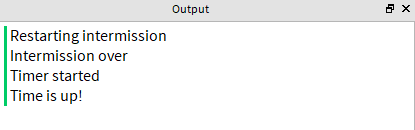
prepareGame(), typematchStart:Fire().-- Module Functions function MatchManager.prepareGame() playerManager.sendPlayersToMatch() matchStart:Fire() endTest the game. In the Output window, confirm that you can see the print statements for the timer's start and stop functions.
Completed scripts
Below are completed scripts to double check your work.
MatchManager script
local MatchManager = {}
-- Services
local ServerStorage = game:GetService("ServerStorage")
-- Module Scripts
local moduleScripts = ServerStorage:WaitForChild("ModuleScripts")
local playerManager = require(moduleScripts:WaitForChild("PlayerManager"))
local gameSettings = require(moduleScripts:WaitForChild("GameSettings"))
local timer = require(moduleScripts:WaitForChild("Timer"))
-- Events
local events = ServerStorage:WaitForChild("Events")
local matchStart = events:WaitForChild("MatchStart")
local matchEnd = events:WaitForChild("MatchEnd")
-- Creates a new timer object to be used to keep track of match time.
local myTimer = timer.new()
-- Local Functions
local function timeUp()
print("Time is up!")
end
local function startTimer()
print("Timer started")
myTimer:start(gameSettings.matchDuration)
myTimer.finished:Connect(timeUp)
end
-- Module Functions
function MatchManager.prepareGame()
playerManager.sendPlayersToMatch()
matchStart:Fire()
end
matchStart.Event:Connect(startTimer)
return MatchManagerGameManager script
-- Services
local ServerStorage = game:GetService("ServerStorage")
local Players = game:GetService("Players")
-- Module Scripts
local moduleScripts = ServerStorage:WaitForChild("ModuleScripts")
local matchManager = require(moduleScripts:WaitForChild("MatchManager"))
local gameSettings = require(moduleScripts:WaitForChild("GameSettings"))

-- Events
local events = ServerStorage:WaitForChild("Events")
local matchEnd = events:WaitForChild("MatchEnd")
while true do
    repeat
        task.wait(gameSettings.intermissionDuration)
        print("Restarting intermission")
    until #Players:GetPlayers() >= gameSettings.minimumPlayers

    print("Intermission over")
    task.wait(gameSettings.transitionTime)

    matchManager.prepareGame()
    -- Placeholder wait for the length of the game.
    matchEnd.Event:Wait()
end