
Source: Roblox Creator Hub · CC BY 4.0 · View source · Code samples: MIT Imported 2026-10-03. Formatting adapted for this site.
Selfie Mode
Players already take screenshots to commemorate fun moments in games. The SelfieMode developer module lets players capture a cleaner memory of that moment without the chat window or player list, while also supporting filter effects, hiding of other characters, and posing.
Module Usage
Installation
To use the SelfieMode module in a game:
From Studio's Window menu or Home tab toolbar, open the Toolbox and select the Creator Store tab.
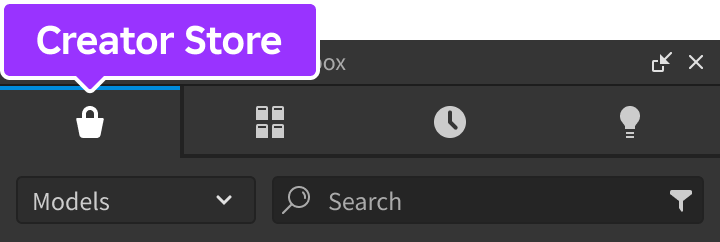
Make sure the Models sorting is selected, then click the See All button for Categories.

Locate and click the Packages tile.
Locate the Selfie Mode module and click it, or drag-and-drop it into the 3D view.

In the Explorer window, move the entire SelfieMode package into
ReplicatedStorage. Upon running the game the module will begin running.
Configuration
The module is preconfigured to work for most use cases, but you can easily customize it through the configure function.
In StarterPlayerScripts, create a new
LocalScriptand rename it to ConfigureSelfieMode.Paste the following code into the new script.
local ReplicatedStorage = game:GetService("ReplicatedStorage")

local SelfieMode = require(ReplicatedStorage.SelfieMode)

SelfieMode.configure({
    disableCharacterMovement = true
})
Character Movement
It may be advantageous to prevent the player's character from moving while in selfie mode. You can achieve this by setting disableCharacterMovement to true in a configure call.
local ReplicatedStorage = game:GetService("ReplicatedStorage")

local SelfieMode = require(ReplicatedStorage.SelfieMode)

SelfieMode.configure({
	disableCharacterMovement = true
})
Selfie Mode Actions
SelfieMode comes with the following actions, each of which you can use with the activateAction, deactivateAction, and toggleAction functions, or detect through the actionActivated and actionDeactivated events.
Depth-of-Field
By default, SelfieMode shows a generic depth‑of‑field effect (subtle blur of the background) when a player toggles the action.
Off
<img src="https://prod.docsiteassets.roblox.com/assets/developer-modules/selfie-mode/Depth-Of-Field-Off.jpg" width="90%" />On
<img src="https://prod.docsiteassets.roblox.com/assets/developer-modules/selfie-mode/Depth-Of-Field-On.jpg" width="90%" />Note
This effect does not render on mobile devices such as phones and tablets. As such, it will not be offered as an action on those devices.
On non-mobile devices, the player's graphics quality must be eight or higher to render depth‑of‑field. If their graphics quality is less than eight, they'll be prompted to increase it.
To change the default depth‑of‑field effect, set depthOfFieldEffect to your own DepthOfFieldEffect instance in a configure call.
local ReplicatedStorage = game:GetService("ReplicatedStorage")

local SelfieMode = require(ReplicatedStorage.SelfieMode)

local customDepthOfField = Instance.new("DepthOfFieldEffect")
customDepthOfField.NearIntensity = 0
customDepthOfField.FarIntensity = 1
customDepthOfField.FocusDistance = 5
customDepthOfField.InFocusRadius = 5

SelfieMode.configure({
	depthOfFieldEffect = customDepthOfField
})
Lock Gaze
The Lock Gaze toggle causes the player's character to look at the camera while setting up the selfie pose, within a realistic range of how far their neck can turn.
Hide Others
By default, other characters are visible alongside the player's character. Players can obtain a perfect solo shot by clicking the Hide Others button. When toggled on, other characters fade out of view and remain invisible until the action is toggled off.
Filter
The Filter action lets the player apply a preset filter from the options Pop, Soft, Antique, Cute, Dramatic, and Monochrome.
Soft
<img src="https://prod.docsiteassets.roblox.com/assets/developer-modules/selfie-mode/Filters-Soft.jpg" width="90%" />Dramatic
<img src="https://prod.docsiteassets.roblox.com/assets/developer-modules/selfie-mode/Filters-Dramatic.jpg" width="90%" />Monochrome
<img src="https://prod.docsiteassets.roblox.com/assets/developer-modules/selfie-mode/Filters-Monochrome.jpg" width="90%" />Pose
The Pose action lets the player select a preset pose from the options Cheer, Clapping, Dolphin, Flossing, Guitar, Jump Wave, Louder, Top Rock, Twirl, and Wave.
Flossing
<img src="https://prod.docsiteassets.roblox.com/assets/developer-modules/selfie-mode/Poses-Flossing.jpg" width="90%" />Louder
<img src="https://prod.docsiteassets.roblox.com/assets/developer-modules/selfie-mode/Poses-Louder.jpg" width="90%" />Twirl
<img src="https://prod.docsiteassets.roblox.com/assets/developer-modules/selfie-mode/Poses-Twirl.jpg" width="90%" />API Reference
Types
Action
Each action is represented by a dictionary with the following key-value pairs:
| Key | Type | Description |
|---|---|---|
| `name` | string | Name of the action, shown first in tooltips. |
| `description` | string | Description of the action, shown after **name** in tooltips. |
| `icon` | string | Asset ID for the action's icon. |
| `activeIcon` | string | Asset ID for the action's icon in "active" state. Can only be used on parent actions, not sub-actions. |
| `actions` | table | Optional list of sub-actions. This allows you to create submenus of various other actions. |
| `parent` | [Action](#action) | The parent of the action; this only applies to a sub-action and points to the action that contains it. |
| `onActivated` | function | Optional callback function that runs when a player activates an action or sub-action. Typically, if an action contains sub-actions, only the sub-actions will need a callback defined as a means of knowing that the player activated the sub-action and did not simply "expand" the parent action. |
local ReplicatedStorage = game:GetService("ReplicatedStorage")

local SelfieMode = require(ReplicatedStorage.SelfieMode)

SelfieMode.actionActivated:Connect(function(action)
	print(action.name, "activated")
end)

SelfieMode.actionDeactivated:Connect(function(action)
	print(action.name, "deactivated")
end)
Enums
SelfieMode.Action
SelfieMode comes with several actions. You can use this enum with the activateAction, deactivateAction, and toggleAction functions.
| Name | Summary |
|---|---|
| `DepthOfField` | Reference to the [Depth‑of‑Field](#depth-of-field) action. |
| `LockGaze` | Reference to the [Lock Gaze](#lock-gaze) action. |
| `HideOthers` | Reference to the [Hide Others](#hide-others) action. |
| `Filter` | Reference to the [Filter](#filter) action. |
| `Pose` | Reference to the [Pose](#pose) action. |
local ReplicatedStorage = game:GetService("ReplicatedStorage")

local SelfieMode = require(ReplicatedStorage.SelfieMode)

-- Activate "Filter" action
SelfieMode.activateAction(SelfieMode.Action.Filter)
Functions
configure
configure(config: table)
Overrides default configuration options through the following keys/values in the config table. This function can only be called from a LocalScript.
| Key | Description | Default |
|---|---|---|
| `disableCharacterMovement` | If true, prevents character from moving while selfie mode is open. | false |
| `depthOfFieldEffect` | Optional custom [`DepthOfFieldEffect`](/docs/depthoffieldeffect) instance that appears when the player toggles the [Depth of Field](#depth-of-field) action. |
local ReplicatedStorage = game:GetService("ReplicatedStorage")

local SelfieMode = require(ReplicatedStorage.SelfieMode)

SelfieMode.configure({
	disableCharacterMovement = true
})
openSelfieMode
openSelfieMode()
A player will typically open selfie mode with the "camera" button on the right side of the screen, but this function lets you open it through code. When implementing a custom button as shown below, you should disable the default button through setHudButtonEnabled. This function can only be called from a LocalScript.
local ReplicatedStorage = game:GetService("ReplicatedStorage")

local SelfieMode = require(ReplicatedStorage.SelfieMode)

local button = script.Parent

-- Remove the default button
SelfieMode.setHudButtonEnabled(false)

-- Connect the custom button
button.Activated:Connect(function()
	SelfieMode.openSelfieMode()
end)
closeSelfieMode
closeSelfieMode()
A player will typically close selfie mode with the ⊗ button at the bottom of the screen, but this function lets you close it through code. Can only be called from a LocalScript.
local ReplicatedStorage = game:GetService("ReplicatedStorage")

local SelfieMode = require(ReplicatedStorage.SelfieMode)

SelfieMode.closeSelfieMode()
isSelfieModeOpen
isSelfieModeOpen(): boolean
Returns true if selfie mode is open as a result of player action or through openSelfieMode. This function can only be called from a LocalScript.
local ReplicatedStorage = game:GetService("ReplicatedStorage")

local SelfieMode = require(ReplicatedStorage.SelfieMode)

SelfieMode.openSelfieMode()

print(SelfieMode.isSelfieModeOpen())
setHudButtonEnabled
setHudButtonEnabled()
Sets whether the default button to enter selfie mode is shown. Useful when implementing openSelfieMode through a custom UI button. This function can only be called from a LocalScript.
local ReplicatedStorage = game:GetService("ReplicatedStorage")

local SelfieMode = require(ReplicatedStorage.SelfieMode)

local button = script.Parent

-- Remove the default button
SelfieMode.setHudButtonEnabled(false)

-- Connect the custom button
button.Activated:Connect(function()
	SelfieMode.openSelfieMode()
end)
getAction
getAction(action: SelfieMode.Action): Action
Gets an Action type through a SelfieMode.Action enum.
local ReplicatedStorage = game:GetService("ReplicatedStorage")

local SelfieMode = require(ReplicatedStorage.SelfieMode)

local lockGazeAction = SelfieMode.getAction(SelfieMode.Action.LockGaze)
activateAction
activateAction(action: SelfieMode.Action)
Programmatically activates one of the default actions. This is the same as when a player toggles the action on from the action bar. Can only be called from a LocalScript.
local ReplicatedStorage = game:GetService("ReplicatedStorage")

local SelfieMode = require(ReplicatedStorage.SelfieMode)

-- Activate "Filter" action
SelfieMode.activateAction(SelfieMode.Action.Filter)
deactivateAction
deactivateAction(action: SelfieMode.Action)
Programmatically deactivates one of the default actions. This is the same as when a player toggles the action off from the action bar. Can only be called from a LocalScript.
local ReplicatedStorage = game:GetService("ReplicatedStorage")

local SelfieMode = require(ReplicatedStorage.SelfieMode)

-- Deactivate "Filter" action
SelfieMode.deactivateAction(SelfieMode.Action.Filter)
toggleAction
toggleAction(action: SelfieMode.Action): boolean
Toggles an action on if it's off, or toggles it off if it's on. This is the same as when a player clicks the action from the action bar. Returns the new "is toggled on" state as a boolean. Can only be called from a LocalScript.
local ReplicatedStorage = game:GetService("ReplicatedStorage")

local SelfieMode = require(ReplicatedStorage.SelfieMode)

local lockGazeAction = SelfieMode.getAction(SelfieMode.Action.LockGaze)

local isEnabled = SelfieMode.toggleAction(lockGazeAction)

if isEnabled then
	print("Activated", lockGazeAction.name)
else
	print("Deactivated", lockGazeAction.name)
end
setTheme
setTheme(theme: table)
Configures the selfie mode theme, including text size, font, button/tooltip colors, and more. This function can only be called from a LocalScript.
General
| Key | Description | Default |
|---|---|---|
| `textSize` | Size of all text. | 16 |
| `font` | Font used across all UI ([`Font`](/docs/enum-font)). | [`GothamMedium`](/docs/enum-font) |
| `padding` | Main padding used for laying out UI elements ([`UDim`](/docs/udim)). | (0, 12) |
| `paddingSmall` | Smaller padding used for applying subtle margins between elements ([`UDim`](/docs/udim)). | (0, 6) |
| `paddingScreen` | Padding used around the screen edges to give selfie mode some breathing room ([`UDim`](/docs/udim)). | (0, 24) |
| `backgroundColor` | Background color used for the bar that displays the actions ([`Color3`](/docs/color3)). | [0, 0, 0] |
| `scrollBarColor` | Color of the scrollbar used in [`ScrollingFrame`](/docs/scrollingframe) elements of the module ([`Color3`](/docs/color3)). | [255, 255, 255] |
Buttons and Tooltips
| Key | Description | Default |
|---|---|---|
| `openButtonBackgroundColor` | Background color of the HUD button on the right side of the screen used to open selfie mode ([`Color3`](/docs/color3)). | [255, 255, 255] |
| `openButtonIconColor` | Color of the HUD button's camera icon ([`Color3`](/docs/color3)). | [0, 0, 0] |
| `closeButtonBackgroundColor` | Background color of the "close" button ([`Color3`](/docs/color3)). | [0, 0, 0] |
| `closeButtonIconColor` | Icon color for the "close" button ([`Color3`](/docs/color3)). | [255, 255, 255] |
| `actionButtonBackgroundColor` | Background color of the various action buttons used for toggling actions ([`Color3`](/docs/color3)). | [255, 255, 255] |
| `actionButtonIconColor` | Icon color for the various action buttons ([`Color3`](/docs/color3)). | [0, 0, 0] |
| `tooltipBackgroundColor` | Background color of tooltips and notifications ([`Color3`](/docs/color3)). | [0, 0, 0] |
| `tooltipNameColor` | Text color of tooltip names ([`Color3`](/docs/color3)). Also used as the text color for notifications. | [255, 255, 255] |
| `tooltipDescriptionColor` | Color of tooltip descriptions, slightly faded to give focus to tooltip names ([`Color3`](/docs/color3)). Not used for notifications. | [169, 169, 169] |
local ReplicatedStorage = game:GetService("ReplicatedStorage")

local SelfieMode = require(ReplicatedStorage.SelfieMode)

SelfieMode.setTheme({
	textSize = 20,
	font = Enum.Font.Michroma,
	backgroundColor = Color3.fromRGB(0, 40, 75),
})
setEnabled
setEnabled(isEnabled: boolean)
Sets whether selfie mode is enabled or not. When disabled, all UI for the module is removed and all events are disconnected. This function can only be called from a LocalScript.
local ReplicatedStorage = game:GetService("ReplicatedStorage")

local SelfieMode = require(ReplicatedStorage.SelfieMode)

SelfieMode.setEnabled(false)
Events
selfieModeOpened
Fires when the player opens selfie mode or when openSelfieMode is called. This event can only be connected in a LocalScript.
local ReplicatedStorage = game:GetService("ReplicatedStorage")

local SelfieMode = require(ReplicatedStorage.SelfieMode)

SelfieMode.selfieModeOpened:Connect(function()
	print("Selfie mode open")
end)
selfieModeClosed
Fires when the player closes selfie mode or when closeSelfieMode is called. This event can only be connected in a LocalScript.
local ReplicatedStorage = game:GetService("ReplicatedStorage")

local SelfieMode = require(ReplicatedStorage.SelfieMode)

SelfieMode.selfieModeClosed:Connect(function()
	print("Selfie mode closed")
end)
actionActivated
| Parameters | |
|---|---|
| action: [SelfieMode.Action](#action) | The activated [Action](#action). |
Fires when an action is activated; this may be one of the primary actions like Depth of Field, Lock Gaze, or Hide Others; alternatively it may be a sub-action like a filter or pose. The connected function receives the activated Action. This event can only be connected in a LocalScript.
local ReplicatedStorage = game:GetService("ReplicatedStorage")

local SelfieMode = require(ReplicatedStorage.SelfieMode)

SelfieMode.actionActivated:Connect(function(action)
	print(action.name, "activated")
end)
actionDeactivated
| Parameters | |
|---|---|
| action: [SelfieMode.Action](#action) | The deactivated [Action](#action). |
Fires when a primary action or sub-action is deactivated. The connected function receives the deactivated Action. This event can only be connected in a LocalScript.
local ReplicatedStorage = game:GetService("ReplicatedStorage")

local SelfieMode = require(ReplicatedStorage.SelfieMode)

SelfieMode.actionDeactivated:Connect(function(action)
	print(action.name, "deactivated")
end)
filterChanged
| Parameters | |
|---|---|
| newFilter: [`string`](/docs/string) | The new filter. |
| oldFilter: [`string`](/docs/string) | The previous filter. |
Fires when a filter is applied or removed. The connected function receives the new filter name and the old filter name. This event can only be connected in a LocalScript.
local ReplicatedStorage = game:GetService("ReplicatedStorage")

local SelfieMode = require(ReplicatedStorage.SelfieMode)

SelfieMode.filterChanged:Connect(function(newFilter, oldFilter)
	print("Filter changed from", oldFilter, "to", newFilter)
end)
poseChanged
| Parameters | |
|---|---|
| newPose: [`string`](/docs/string) | The new pose. |
| oldPose: [`string`](/docs/string) | The previous pose. |
Fires when a pose is applied or removed. The connected function receives the new pose name and the old pose name. This event can only be connected in a LocalScript.
local ReplicatedStorage = game:GetService("ReplicatedStorage")

local SelfieMode = require(ReplicatedStorage.SelfieMode)

SelfieMode.poseChanged:Connect(function(newPose, oldPose)
	print("Pose changed from", oldPose, "to", newPose)
end)