
Source: Roblox Creator Hub · CC BY 4.0 · View source · Code samples: MIT Imported 2026-10-03. Formatting adapted for this site.
Characters
Characters are the figures that players control or interact with, and they help drive the game forward, provide challenges, and make the world feel alive. On Roblox, a character is any Model, humanoid or otherwise, that moves, communicates, and interacts with the environment. They can be as simple as a glowing orb that offers key information for a quest or as rich as a fully rigged dragon with facial animations that can attach rigid and layered accessories.
The platform supports a spectrum of character types you can build for your game's specific design requirements, such as lightweight non-player characters for ambient life, standardized avatar characters with built-in functionality to wear cosmetics and play animations, or custom rigs that can access universal animation libraries. Let's explore your options.
Types
Broadly speaking, there are two main types of characters: player characters and non-player characters. While both types of characters can look the same visually, their internal configurations can vary significantly according to what each character needs to do in your game.
Player characters
Player characters are characters that the player controls to play a game. While some game developers create custom player characters from scratch that match their game design aesthetics, many choose to allow players to keep their platform avatar as their player character.
<img src="https://prod.docsiteassets.roblox.com/assets/characters/overview/bird-example.png" alt="" />In BIRD, all players join the game as a custom bird character.
<img src="https://prod.docsiteassets.roblox.com/assets/avatar/AvatarSample.png" alt="" width="89%"/>In The Mystery of Duvall Drive, all players join the game as their avatar.
For players, avatars are deeply personal because they symbolize one's digital identity, uniquely crafted by individual purchases on the Marketplace and in games, or from giveaways. For game developers, avatars offer a standardized, feature-complete character that unlocks platform compatibility for:
- Body and facial animations
- Rigid accessories, layered accessories, classic clothing, and makeup assets
- Core character behavior and properties, like a display name, health bar, and basic movement states
Avatars are able to offer this functionality because they must include the following system of components in order for creators to upload them to the Marketplace:
| Component | Functionality |
|---|---|
| 15 [`MeshPart`](/docs/meshpart) body parts with standardized naming conventions | Consistent amount of limbs for each character with a uniform partition for accessories, cosmetics, and animations. |
| Rigging armature with standardized naming conventions and a joint hierarchy | Consistent amount of poseable joints for animation support. There are 15 required poseable joints for [standard R15 rigs](/docs/roblox-avatar-character-bodies-specifications#standard-r15-rigs), but you can add up to 37 additional joints for [advanced R15 rigs](/docs/roblox-avatar-character-bodies-specifications#advanced-r15-rigs). |
| [`Humanoid`](/docs/humanoid) object | Consistent character behavior and properties, such as:
|
| [`FaceControls`](/docs/facecontrols) object with at least 17 standardized facial base poses | Consistent facial expressions. |
| 15 [`WrapTarget`](/docs/wraptarget) objects | Consistent deformation targets for layered accessories that stretch, fit, and layer on the character's body. |
| 19 [`Attachment`](/docs/attachment) points | Consistent targets for rigid accessories and in-game equipable objects to attach to the character's body. |
What are advanced R15 rigs?
Standard avatar rigs require 15 poseable joints to articulate the character's 15 body parts. However, if you want to create higher-fidelity characters with a greater level of realism, there are up to 37 additional optional joints for advanced R15 rigs you can create for articulated hands, shoulders, and spine movements.
These optional joints include:
- Spine:
SpineandChestsubdivisions - Clavicles:
LeftClavicleandRightClaviclefor shoulder articulation - Head:
HeadBaseparented under theHeadbody part for neck and facial articulation - Fingers: Up to 15 joints per hand (3 phalanges × 5 fingers)
- Toes:
LeftToeBaseandRightToeBasefor foot articulation
For more information, see Body specifications - Advanced R15 rigs.
What is AvatarJointUpgrade?
When you enable StarterPlayer.AvatarJointUpgrade, the upgrade automatically introduces force- and torque-limited AnimationConstraint objects to every character's joints, replacing Motor6D objects. This allows you to create realistic, physics-driven movements and interactions, such as fully simulated limbs and powered ragdolls.
Non-player characters
Non-player characters (NPCs) are characters that systems within the game control to support or challenge the player, such as allies or enemies, or otherwise fill the environment to make it feel immersive. Unlike player characters that require a wide variety of attributes and functionality to complete game objectives, non-player characters often only need to perform one or two simple tasks, such as walking a path, taking damage, or reacting to the player's actions.
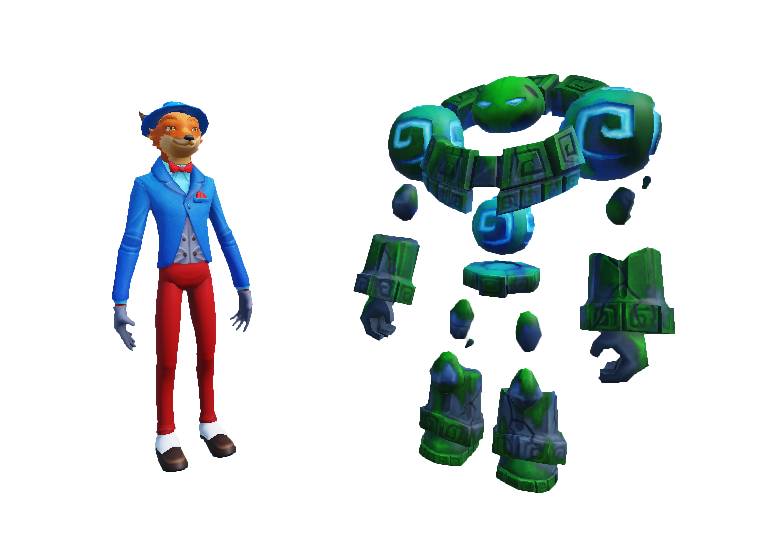
In Mansion of Wonder, players can interact with a fox NPC to acquire prizes and a rock creature to teleport to the main gameplay area.
Because they don't require the same component set, rigging armature, or feature depth of player characters, the most basic non-player characters only need a Model with geometry and some scripts to fulfill their purpose for your game design requirements. In fact, many game developers opt to create their NPCs as a Model with only a child mesh or two and a Humanoid object to implement and access basic character behavior and properties.
Creation tools
The tools and process you use to create your characters can look different depending on the type and complexity of each character you're creating, but in general, many game developers get started by creating at least a raw mesh in a third-party modeling tool for the character's body. The following are examples of popular third-party software that creators commonly use to create custom character bodies, as well as textures, rigging armatures, accessories, and animations.
 |  |  |
| [Blender](https://www.blender.org/) is a free, open-source 3D creation suite with a broad range of modeling, sculpting, texturing, rigging, and animation tools. | [Autodesk Maya](https://www.autodesk.com/products/maya/overview) is a subscription-based industry standard professional toolset that covers the entire 3D production pipeline. | [GNU Image Manipulation Program](https://www.gimp.org/) (GIMP) is a free, open-source image editor that supports 2D asset creation. |
Once you have the basis of your character, you can import your creations into Studio and access all first-party tooling that Roblox has to offer, including a full pipeline to convert a raw mesh to a character that also meets platform policies and technical standards to be ready for the Marketplace. The following details all major tools you can use to create, configure, and test character assets for game developers of all skill levels.
Supporting features
The following features provide support for different stages of the character creation process:
| Tool | Description |
|---|---|
| [Avatar Settings](/docs/roblox-studio-avatar-settings) | Enable global game-level avatar behavior, collision, animation packs, and Character Controller Library toggles. |
| [Importer](/docs/roblox-studio-importer) | Import your custom meshes with PBR textures, rigging, skinning, and animation data for your characters. |
| [Animation Editor](/docs/roblox-animation-editor) | Import, design, and publish animations for your characters, such as gestures and reactions. |
| [Accessory Fitting Tool](/docs/roblox-avatar-accessory-fitting-tool) | Test your custom models on multiple combinations of character bodies, animations, and accessories. |
| [Automatic Skinning Transfer](/docs/roblox-avatar-automatic-skinning-transfer) | Transfer or generate skinning data to your layered and facial accessories so that they deform along the character body they're attached to. |
Avatar Setup
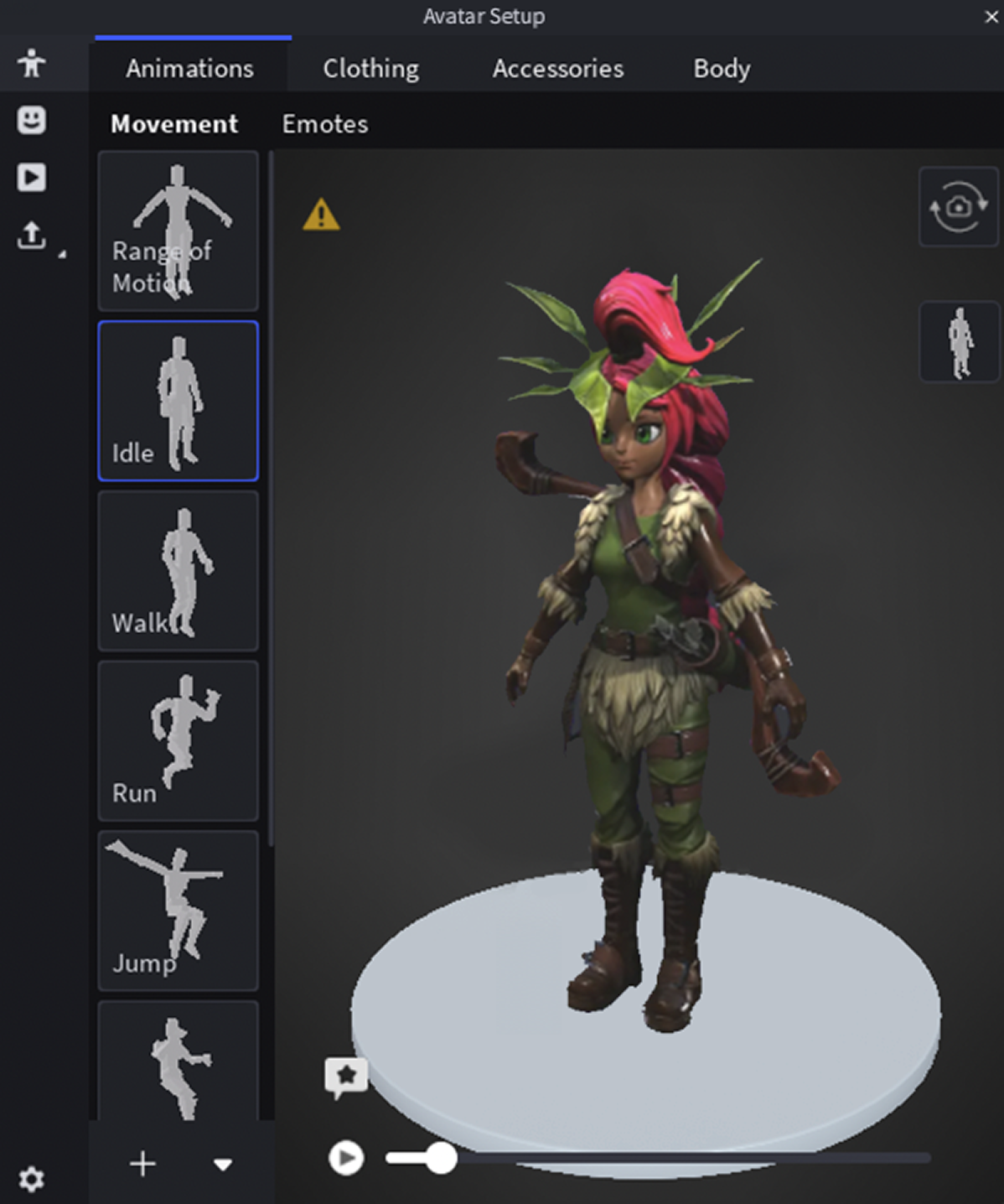
Avatar Setup is the fastest path from a raw mesh to a player character as it automatically processes custom models into avatar character assets. If your characters don't have all of the components they need to move, animate, and wear accessories, Avatar Setup can generate all missing components, such as:
- Partitions - Separates the character's body into the standard 15 body parts.
- Rigging data - Adds a R15 rigging armature to your character's body to enable movement and animation.
- Skinning data - Adds weights and influences to various surfaces of your character's body, ensuring an organic and natural flexibility during movement.
- Facial animations - Generates the FACS poses, facial rigging, skinning, and animation data required for facial animations.
- Cages - Adds the required inner and outer cages to your character's body parts so that it can wear layered accessories.
- Attachment points - Adds the appropriate attachment points to your character's body so that it can wear rigid accessories.
For game developers seeking to upload their characters to the Marketplace, Avatar Setup collapses what used to be a multi-tool, multi-iteration workflow into a single pass:

Note
For information on configuration standards to ensure all Avatar Setup features work as expected, see Avatar Setup specifications.
Adaptive Animation
Adaptive Animation solves a difficult problem: how to make one animation library work across significantly different body types. Using HumanoidRigDescription and DigitsRigDescription objects, Adaptive Animation lets you map your character's joints to Roblox's standardized rigging armature specifications. This works bidirectionally:
- Avatar requirements > Custom rig - Your custom rigs can instantly use the full animation library of emotes and movement states.
- Custom rig > Avatar requirements - The animations you create on your custom rigs can instantly retarget to avatars with standard rigging armatures.
This also applies to hands and fingers in advanced R15 rigs; when you assign your character's hand joints using the Adaptive Animation system, finger animations for one hand's proportions instantly adapt to different hand geometries.

Animation Graph Editor
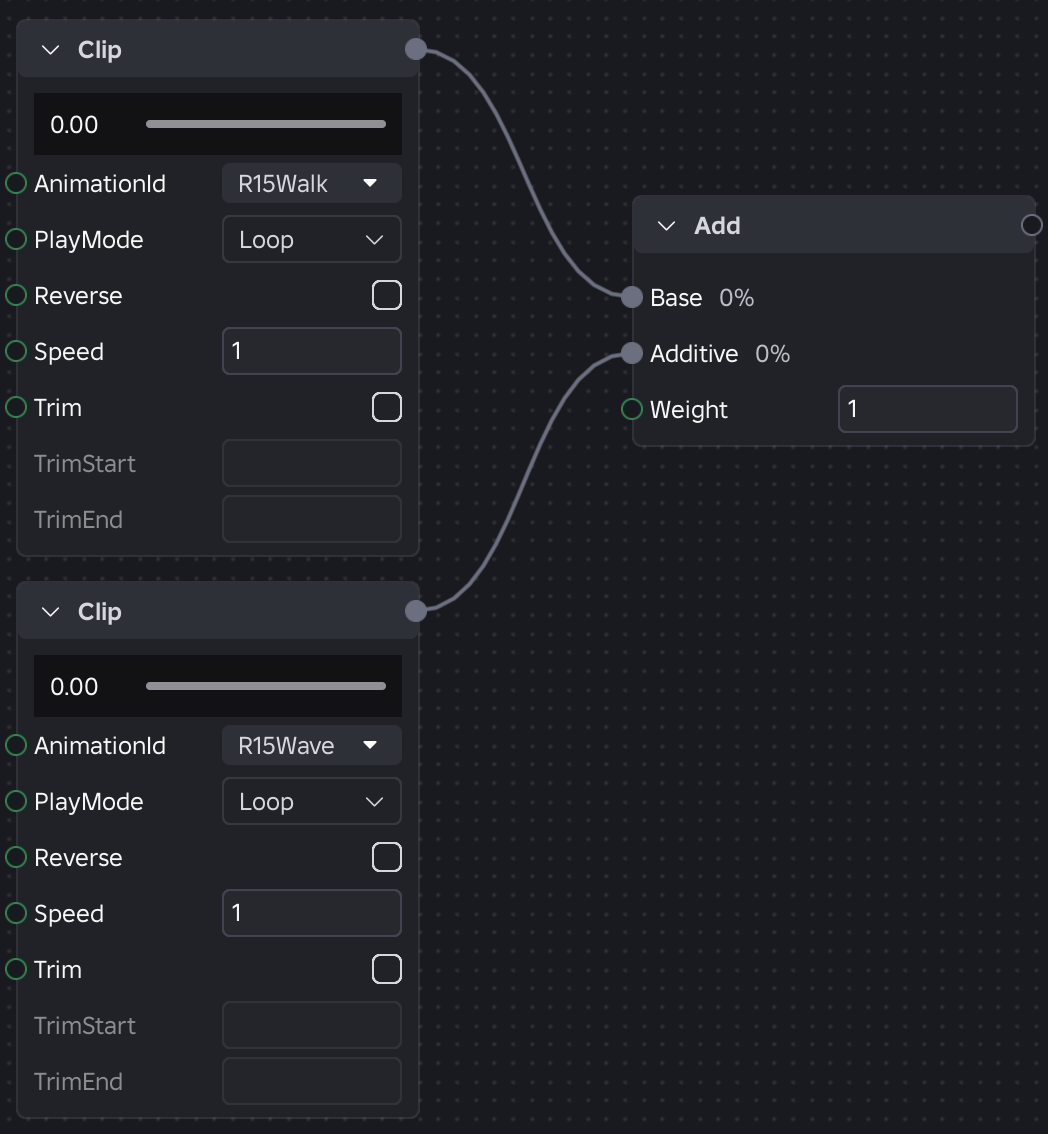
Animation Graph Editor is a visual, node-based tool that composes individual animation clips into runtime logic without the need to handwrite animation controller scripts. You can build blend trees, state machines, and parametrized animation behavior for your characters while still being able to access animation graph nodes programmatically for direct control.
Character optimization
As your games grow with more players, expansive environments, and rich animations, your character systems require architecture to support optimization. There are two systems that address this directly: the Character Controller Library for character movement and behavior, and SLIM for rendering performance.
Character Controller Library
The default Humanoid object inside of player characters offers a state machine that functions, but it is rigid. It contains hard-coded states that you can only trigger one at a time with fixed transition logic, it's difficult to compose, and it's hard to configure at scale.
To address these challenges, the Character Controller Library (CCL) offers a replacement with an ability-driven architecture:
- Abilities dynamically determine what a character can do, such as run, jump, climb, and swim.
- Controllers dynamically handle how that character's movement is simulated, such as ground friction, acceleration curves, and realistic conservation of linear and angular momentum when characters jump.
When you opt in to CCL in Avatar Settings, you can experiment with ability configurations as your game is running and modify specific controllers to adjust the physical simulation of the character and its interaction with the environment, such as the character's base movement speed.

SLIM for rendering
Characters can be expensive to render, especially for high-resolution characters with layered accessories and physically based rendering (PBR) textures. For games that include many models and characters, such as a lively town full of NPCs, buildings, props, and vehicles, players can experience low frame rates and poor performance.
To address these challenges for rendering performance, Scalable Lightweight Interactive Models (SLIM) offers an automatic optimization system to generate lightweight, optimized representations of avatar characters and models using cloud-based transcoding. At runtime, the engine selects the best representation based on distance, device capability, and streaming state.
<img src="https://prod.docsiteassets.roblox.com/assets/optimization/streaming/SLIM-Disabled.jpg" />Without SLIM — streamed-out models are invisible
<img src="https://prod.docsiteassets.roblox.com/assets/optimization/streaming/SLIM-Enabled.jpg" />With SLIM — optimized stand-ins remain visible
SLIM provides three key benefits:
- Visual quality - Distant models appear more detailed than the legacy model level‑of‑detail system, maintaining closer fidelity to the original.
- Consistent transitions - All parts within a model switch detail levels simultaneously, eliminating jarring per-part transitions.
- Performance - Composite meshes dramatically reduce draw calls, triangle counts, and memory usage, enabling richer scenes across all device tiers.
In addition, when you configure SLIM for avatar characters, the engine:
- Renders a SLIM version when an actual avatar model streams out.
- Swaps between SLIM and full-resolution representations based on available resources, even inside the streaming radius.
- Throttles SLIM animations based on scene importance and available bandwidth.
Audience in Far Distance
<img src="https://prod.docsiteassets.roblox.com/assets/optimization/streaming/SLIM-Avatars-Enabled-Far.jpg" />Note
SLIM Enabled
<img src="https://prod.docsiteassets.roblox.com/assets/optimization/streaming/SLIM-Avatars-Disabled-Far.jpg" />Note
SLIM Disabled
Audience in Near Proximity
<img src="https://prod.docsiteassets.roblox.com/assets/optimization/streaming/SLIM-Avatars-Enabled-Near.jpg" />Note
SLIM Enabled
<img src="https://prod.docsiteassets.roblox.com/assets/optimization/streaming/SLIM-Avatars-Disabled-Near.jpg" />Note
SLIM Disabled
Note
SLIM requires you to enable instance streaming, which allows the Roblox engine to dynamically load and unload 3D content and related instances in the Workspace.