
Source: Roblox Creator Hub · CC BY 4.0 · View source · Code samples: MIT Imported 2026-10-03. Formatting adapted for this site.
Make final touches
Make your explosion feel more unique by customizing more properties.
Size and speed
Start by changing these two properties to achieve your vision.
In the explosion properties, change Size to a number between
1and10for best results. Different particle textures may work better with different sizes.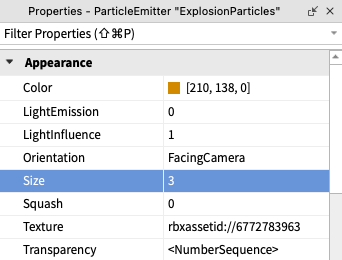
Some example sizes can be seen in the video below.
Particles can burst out quickly, or creep out slowly. To experiment with this speed, scroll down to the Emission section and find Speed. We recommend trying a number between
10(slow) and100(fast).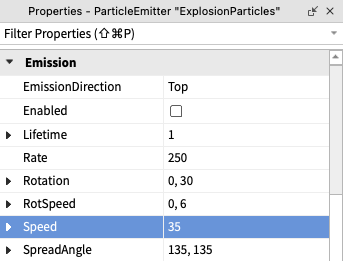
When finished, run the project to test the particle. Make changes to the design until it looks right to you.
Additional properties
You've experimented with basic properties of the magic blast and the explosion from your blaster, but there are a few more properties to personalize your work. Try changing the properties below, or experiment with one that isn't listed.
LightEmission
Makes particles glow and can be a range from 0 (opaque) to 1 (glowing).
<img src="https://prod.docsiteassets.roblox.com/assets/education/build-it-play-it-mansion-of-wonder/make-final-touches/light-emission-0.jpeg" />0
<img src="https://prod.docsiteassets.roblox.com/assets/education/build-it-play-it-mansion-of-wonder/make-final-touches/light-emission-0.5.jpeg" />0.5
<img src="https://prod.docsiteassets.roblox.com/assets/education/build-it-play-it-mansion-of-wonder/make-final-touches/light-emission-1.0.jpeg" />1.0
RotSpeed
Makes particles rotate over time. Notice how the rotation of the texture below (straight lines) changes as the RotSpeed changes.
Lifetime
This property is how long particles exist in seconds. Depending on your explosion, you may want a short lifetime (e.g. 0.5 seconds) for a quick, snappy blast, or a longer number (e.g. 2 seconds) for something that lingers.
Randomized numbers
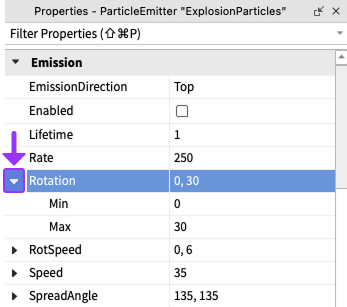
Randomizing properties can make particles feel less repetitive. You can add randomization to some particles properties, such as Lifetime and Rotation, by inputting a minimum and maximum value.
To use a randomized property, click the small arrow next to the property name. Once the property expands, you can enter a min and max value.
Note
Using your new knowledge with explosions, take some time to also improve the blast particle. Experiment with properties like Lifetime. Remember, the blast emitter can be found by searching for BlastParticles in the Explorer window.