
Source: Roblox Creator Hub · CC BY 4.0 · View source · Code samples: MIT Imported 2026-10-03. Formatting adapted for this site.
Else/if practice with giving points
This project will use conditional statements to create a part that will give or subtract points on a leaderboard depending on what color the part is when touched. If blue, then it'll give players a few points. If green, then it'll give a lot of points. Finally, if red, then it'll take away points.
Set up the project
The point giving part can be added into any project where points are relevant. For instance, an adventure game where players collect points.
Point tracking
To setup this project, you'll need a leaderboard to track the points and a part that changes colors. Code for the leaderboard will be provided.
Create a new script in ServerScriptService named Leaderboard. Copy and paste the code below into the script.
--In ServerScriptService, create a script named PlayerSetup with the contents below.

local Players = game:GetService("Players")

local function onPlayerJoin(player)
    local leaderstats = Instance.new("Folder")
    leaderstats.Name = "leaderstats"
    leaderstats.Parent = player

    -- Example of an IntValue
    local points = Instance.new("IntValue")
    points.Name = "Points"
    points.Value = 0
    points.Parent = leaderstats
end

-- Run onPlayerJoin when the PlayerAdded event fires
Players.PlayerAdded:Connect(onPlayerJoin)
Color changing part
The script will cycle through three different colors for the part. Each color will have a variable to store it's RGB value, a data type that includes a set of three numbers (red, green, blue) that create colors.
Create a part named PointPart with an attached script named PointScript.
In PointScript, use
script.Parentto refer to the part.local pointPart = script.ParentCreate variables to store the different colors. Each variable should be set to
Color3.fromRGB(), which creates a color value.- Blue (Some Points): (0, 0, 255)
- Green (Many Points): (0, 255, 0)
- Red (Lose Points): (255, 0, 0)
local pointPart = script.Parent

-- Colors
local blue = Color3.fromRGB(0, 0, 255)
local green = Color3.fromRGB(0, 255, 0)
local red = Color3.fromRGB(255, 0, 0)
Add variables for a small amount of points, a larger amount of points, and a third for removing points.
-- Colors
local blue = Color3.fromRGB(0, 0, 255)
local green = Color3.fromRGB(0, 255, 0)
local red = Color3.fromRGB(255, 0, 0)

-- Points values
local smallPoints = 10
local largePoints = 50
local losePoints = 100
Add the players service
To award points, you'll need to get access to the player's information which is stored in the Explorer under Players, and is separate from the character object. This is where information like leaderboard stats can be found.
You can do so by adding the Players service to your script. Services are additional sets of pre-built functions made by Roblox engineers to save you time.
Get the Players service by typing:
local Players = game:GetService("Players")-- Points values local smallPoints = 10 local largePoints = 50 local losePoints = 100 -- Services needed local Players = game:GetService("Players")
Functions and events
PointsScript will need two functions. The first function will give and subtract parts. The second function will check if a player has touched the part. These functions will then be connected with a touch event, which runs whenever that part is touched.
Create a new function named
givePoints()and a parameter namedplayer. Inside, add a print statement to use for testing.local Players = game:GetService("Players") -- Gives or subtracts points local function givePoints(player) print("Giving player points") endUnder that, create a second function named
partTouched()with a parameter namedotherPart.-- Gives or subtracts points local function givePoints(player) print("Giving player points") end -- Checks if player touched the part local function partTouched(otherPart) endInside the function, use the function
GetPlayerFromCharacter()to check if there's a player in the otherPart variable.-- Checks if player touched the part local function partTouched(otherPart) local player = Players:GetPlayerFromCharacter(otherPart.Parent) endIf a player touched the part, it'll be stored inside the player variable. If not, the variable will stay empty. On your own:
- Inside the function, check if player has a value. If there is, then call
givePoints(player). - Beneath the function, connect
partTouched()to the Touched event ofpointPart.
-- Checks if player touched the part local function partTouched(otherPart) -- Gets the player if one touched the part local player = Players:GetPlayerFromCharacter(otherPart.Parent) if player then givePoints(player) end end pointPart.Touched:Connect(partTouched)- Inside the function, check if player has a value. If there is, then call
Run the project. Whenever a player touches the part, you should see a message in the Output window saying:
"Giving player points"
Troubleshooting Tips:
- Check that
"Players"ingame:GetService("Players")is capitalized and in quotations. partTouched()should be connected to pointPart'sTouchedevent.
Create Looping Colors
To loop through colors, the script will use a while =loop that changes the part's color every few seconds. The condition for this loop will be true, so it can run indefinitely.
At the end of the script, create a new while loop where the condition is true, meaning the loop always runs.
-- Checks if player touched the part
local function partTouched(otherPart)
    -- Gets the player if one touched the part
    local player = Players:GetPlayerFromCharacter(otherPart.Parent)
    if player then
        givePoints(player)
    end
end

pointPart.Touched:Connect(partTouched)

-- Loops through colors
while true do

end
Note
If the while true do loop is not at the bottom of the script, any code below it will never be run. Since the while loop doesn't stop, it'll keep running the loop instead of any code below it.
On your own, code a while true do loop that changes pointPart to the color variables you've created. Don't forget to use
task.wait()between colors. When finished, check your code against the version below.-- Loops through 3 colors, waiting between each color while true do pointPart.Color = blue task.wait(3) pointPart.Color = green task.wait(2) pointPart.Color = red task.wait(1) endPlay-test and check that all three colors loop without stopping.
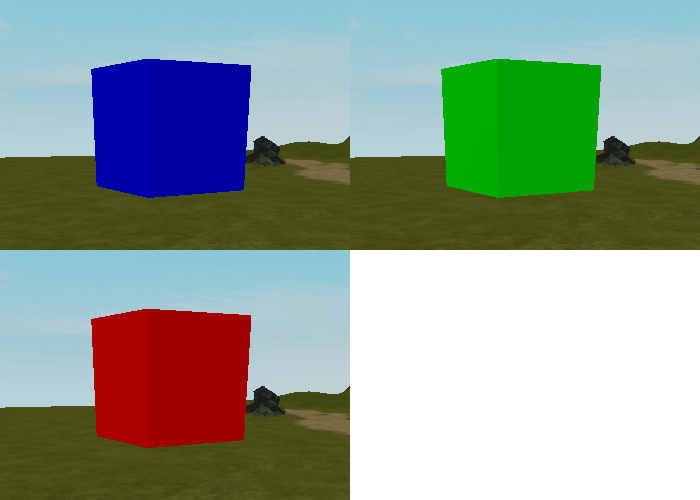
Troubleshooting tips
At this point, if the color looping doesn't work as intended, try one of the following below.
- Check that the while loop is at the bottom of the script, below the Touched event. If the loop is not at the bottom, it'll keep other parts of the script from running correctly.
- Check that each color inside
Color3.fromRGB()is correctly written. There must be three numbers between 0 and 255 separated by commas, like(255, 50, 0).
Give players points
Players will be given points based on the current color of the part when they touch it.
Find the current color
Whenever a player touches the part, the script will need to know the current color of the part to award points later.
Find
givePoints(). Replace your testing message with a variable for the current color of pointPart. This variable will determine how many points the player gets (or loses).local function givePoints(player) local currentColor = pointPart.Color endTo affect a player's points, that function needs access to the player's leaderboard. Create a variable to store it.
local function givePoints(player)
    local currentColor = pointPart.Color

    local playerStats = player:WaitForChild("leaderstats")
end
Now add a variable to get the player's Points value, which is a child of their leaderboard.
local function givePoints(player)
    local currentColor = pointPart.Color

    local playerStats = player:WaitForChild("leaderstats")
    local playerPoints = playerStats:WaitForChild("Points")
end
Give or subtract points
Next, you'll use if and elseif to give or subtract points depending on the color of the part when touched. Remember that blue provides a small amount, green provides many, and red subtracts points.
Inside
givePoints(), beneath the variables, use an if statement to check if the current color is blue and if so then addsmallPointsto the player's current points value.local function givePoints(player) local currentColor = pointPart.Color local playerStats = player:WaitForChild("leaderstats") local playerPoints = playerStats:WaitForChild("Points") if currentColor == blue then playerPoints.Value += smallPoints end endTo check for green, add an else if condition. If green, then add the
largePointsvariable to the player's points.if currentColor == blue then playerPoints.Value += smallPoints elseif currentColor == green then playerPoints.Value += largePoints endUse an else statement to subtract points if pointsPart was neither blue nor green.
if currentColor == blue then
    playerPoints.Value += smallPoints
elseif currentColor == green then
    playerPoints.Value += largePoints
else
    playerPoints.Value -= losePoints
end
Lastly, destroy the part after the if statement so that the script can't keep giving out points.
if currentColor == blue then
    playerPoints.Value += smallPoints
elseif currentColor == green then
    playerPoints.Value += largePoints
else
    playerPoints.Value -= losePoints
end

pointPart:Destroy()
Playtest and check that each color gives points as expected. Be sure to test all three conditions.
Give players feedback
The PointPart works, but players might not notice something happened unless they happen to be looking at their leaderboard. Fix that by creating particles when the PointPart is destroyed.
Adding feedback when players use a part, like sounds, shakes, or particles, makes interactions with objects more satisfying to players.
Create a particle effect
The particle effect will be the same color as the part when touched. Since the colors were stored in variables, it's easy to reuse them.
In
givePoints()at the bottom, create a new ParticleEmitter instance. Make sure the instance name is spelled exactly as shown.local particle = Instance.new("ParticleEmitter") endParticleEmitters use color sequences to control their Color property. Create a new ColorSequence and pass in the current part color.
-- Destroy part
pointPart:Destroy()

-- Create particles
local particle = Instance.new("ParticleEmitter")
particle.Color = ColorSequence.new(currentColor)
The particle will need to be parented to player that touched it. Create a variable to get the player's Character model. Then, parent the particle to the player's head.
local particle = Instance.new("ParticleEmitter")
particle.Color = ColorSequence.new(currentColor)

local playerCharacter = player.Character
particle.Parent = playerCharacter:WaitForChild("Head")
Use
task.wait()for a quick second, then destroy the particles.local particle = Instance.new("ParticleEmitter") particle.Color = ColorSequence.new(currentColor) local playerCharacter = player.Character particle.Parent = playerCharacter:WaitForChild("Head") task.wait(1) particle:Destroy()Playtest the game and make sure particles briefly follow the player after touching each color.
Troubleshooting tips
At this point, if particles doesn't work as intended, try one of the following below.
- Make when creating a new instance that ParticleEmitter is spelled exactly as shown and inside quotations.
- When parenting the particles, make sure to use
:betweenplayerCharacterandWaitForChild()with no spaces between.
Complete PointScript
A finished version of the script can be referenced below.
local pointPart = script.Parent
--local storage = game:GetService("ServerStorage")

-- Gives some points
local blue = Color3.fromRGB(0, 0, 255)
-- Gives more points
local green = Color3.fromRGB(0, 255, 0)
-- Makes players lose points
local red = Color3.fromRGB(255, 0, 0)

-- gold given to players
local smallPoints = 10
local largePoints = 50
local losePoints = 100

local Players = game:GetService("Players")

local function givePoints(player)
	local currentColor = pointPart.Color

	local playerStats = player:WaitForChild("leaderstats")
	local playerPoints = playerStats:WaitForChild("Points")

	-- Gives player gold based on the color of the part
	if currentColor == blue then
		playerPoints.Value += smallPoints
	elseif currentColor == green then
		playerPoints.Value += largePoints
	else
		playerPoints.Value -= losePoints
	end

	-- Destroy the part, wait a second, and then destroy the particle
	pointPart:Destroy()

	-- Creates a sparkles effect and destroys it
	local playerCharacter = player.Character
	local particle = Instance.new("ParticleEmitter")
	particle.Color = ColorSequence.new(currentColor)
	particle.Parent = playerCharacter:WaitForChild("Head")
	task.wait(1)
	particle:Destroy()
end

local function partTouched(otherPart)
	local player = Players:GetPlayerFromCharacter(otherPart.Parent)

	if player then
		givePoints(player)
	end
end

pointPart.Touched:Connect(partTouched)

-- Changes the color of the part based on variables. Needs to be at bottom of script.
while true do
	pointPart.Color = blue
	task.wait(4)
	pointPart.Color = green
	task.wait(3)
	pointPart.Color = red
	task.wait(2)
end