
Source: Roblox Creator Hub · CC BY 4.0 · View source · Code samples: MIT Imported 2026-10-03. Formatting adapted for this site.
SLIM
SLIM (Scalable Lightweight Interactive Models) is an automatic optimization system that generates lightweight, optimized representations of Models and platform avatars using cloud-based transcoding (converting assets into more efficient formats). When enabled, SLIM combines multiple parts into fewer draw calls (rendering commands sent to the GPU) and generates multiple levels of detail, allowing the engine to intelligently select the best representation based on distance, device capability, and available resources.
<img src="https://prod.docsiteassets.roblox.com/assets/optimization/streaming/SLIM-Disabled.jpg" />Without SLIM — streamed-out models are invisible
<img src="https://prod.docsiteassets.roblox.com/assets/optimization/streaming/SLIM-Enabled.jpg" />With SLIM — optimized stand-ins remain visible
SLIM provides three key benefits:
— Distant models appear more detailed than the legacy model level‑of‑detail system, maintaining closer fidelity to the original.
— All parts within a model switch detail levels simultaneously, eliminating jarring per-part transitions.
— Composite meshes dramatically reduce draw calls, triangle counts, and memory usage, enabling richer scenes across all device tiers.
Explore SLIM in these published games:
[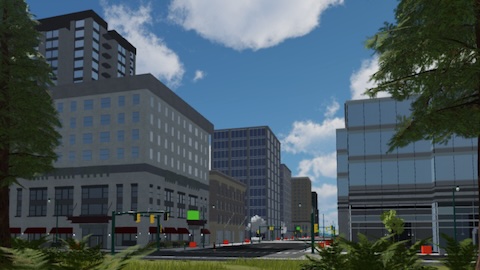](https://www.roblox.com/games/135885449743134/CPC-Slim-Template)City People Cars SLIM Template — World models with SLIM enabled
[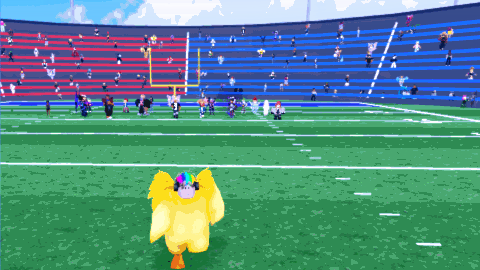](https://www.roblox.com/games/81704282913046/SLIM-Platform-Avatars)SLIM Platform Avatars — 200 animated avatars rendered with SLIM
Prerequisites
SLIM requires the following:
StreamingEnabledmust be enabled on theWorkspaceobject. See also streaming properties for related recommended settings.- The place must be saved to Roblox (not a local
.rbxlfile), as SLIM uses cloud transcoding to generate optimized assets. If you're testing locally, publish the place and then enable SLIM. - Team Create must be enabled for the game, as SLIM relies on associated properties for cloud asset generation.
Technical behavior
When you publish or playtest a game with SLIM-enabled models, the engine uploads model data to a cloud service that generates optimized composite meshes with multiple levels of detail. At runtime, clients fetch these assets from the CDN and the engine selects the appropriate detail level based on distance and device capability, classifying each SLIM model into rendering zones based on distance from the camera:
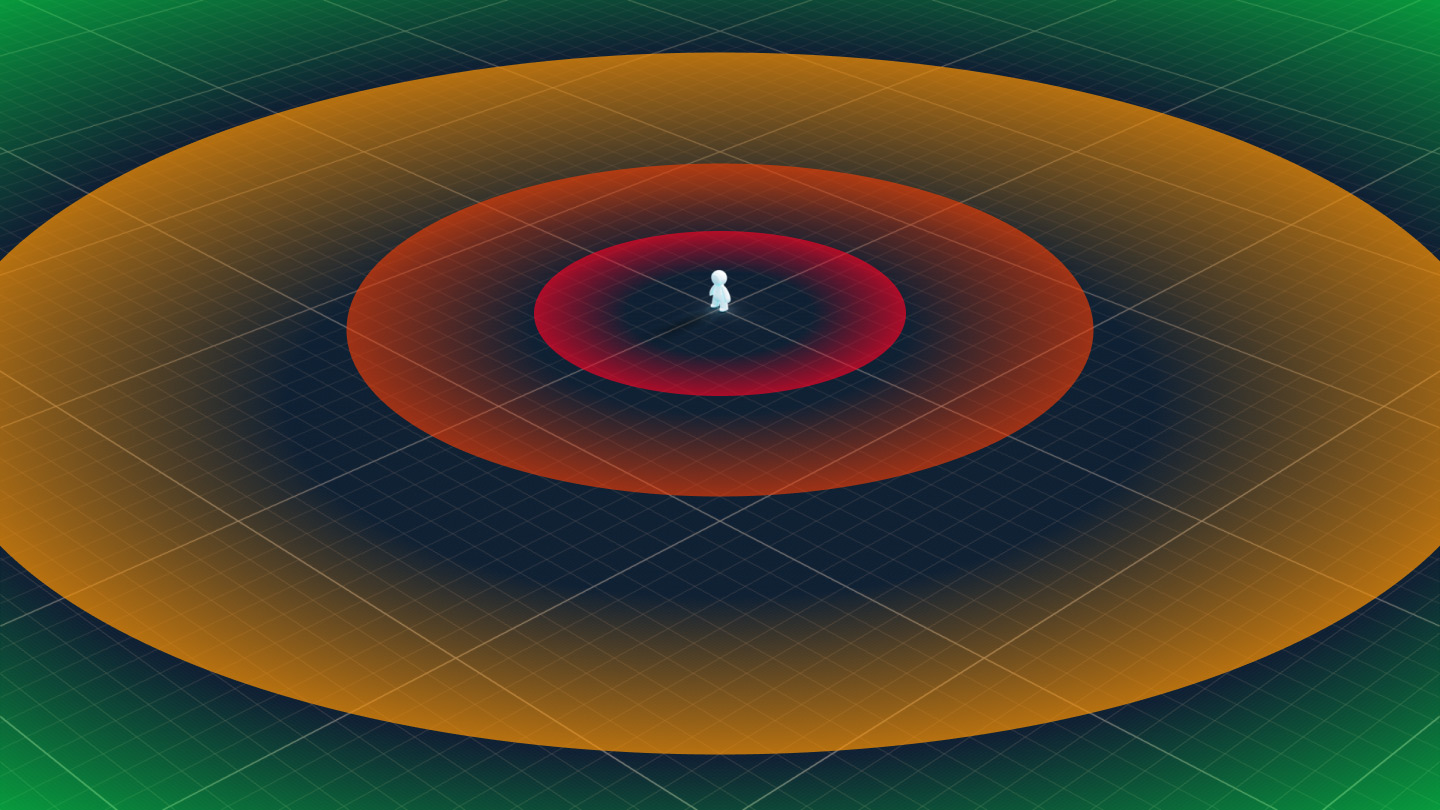
| Range | Behavior |
|---|---|
| Full instances streamed in; traditional part-by-part rendering. | |
| Full instances streamed in, but the engine renders the SLIM composite when more efficient. | |
| Instances streamed out (only a minimal placeholder exists in the [`DataModel`](/docs/datamodel), not the full model hierarchy), SLIM composite rendering. | |
| Minimal placeholder in the [`DataModel`](/docs/datamodel), not rendered. |
SLIM for models
SLIM works best on models that represent static world geometry — buildings, props, vehicles, terrain features, and other environment objects that don't change at/during runtime. Adding or removing parts, changing materials, or modifying geometry at runtime prevents SLIM from rendering the model correctly. See model structure for general model structure guidance and limitations for the full list of exclusions.
To enable SLIM on a model, set its LevelOfDetail property to SLIM in the Properties window.
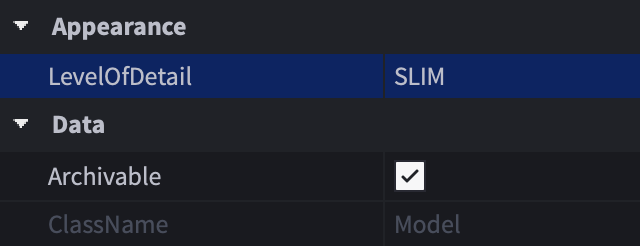
When SLIM is set on a model, the engine:
- Serializes the model's rendering-relevant properties (geometry, materials, textures, transforms) into a compact representation. Supported instance types within the model include
Part,MeshPart,Decal,Texture,SurfaceAppearance,PartOperation,NegateOperation, andSpecialMesh. - Uploads this data to the cloud transcoding service on first publish or play.
- The cloud service generates a composited mesh with multiple levels of detail, removing hidden internal geometry and optimizing textures.
- At runtime, clients fetch the optimized SLIM asset and render it when the engine streams out the original model or when SLIM is more efficient than the full model.
Note
Initial SLIM generation might take a few moments for complex models. The cloud service processes assets in the background, so if a model doesn't appear as SLIM immediately after enabling, wait 1–2 minutes and rejoin; the transcoded asset persists on the CDN and the client fetches it on the next session.
Converting from Streaming Mesh
If your game uses the legacy StreamingMesh setting for Model.LevelOfDetail, you can convert individual models by selecting them and changing the property in the Properties window, or you can batch-convert multiple models at once using a script like the following in the Command Bar. Note that some models which worked with StreamingMesh might need adjustments for SLIM, particularly those with overlapping parts or complex PartOperation hierarchies.
for _, descendant in workspace:GetDescendants() do
    if descendant:IsA("Model") and descendant.LevelOfDetail ==
        Enum.ModelLevelOfDetail.StreamingMesh then
        descendant.LevelOfDetail = Enum.ModelLevelOfDetail.SLIM
    end
end
SLIM for avatars
Platform avatars outside of the currently streamed area are not visible by default. Enabling SLIM avatars renders standard player characters — regardless of how many accessories or clothing layers they have — as lightweight, animated stand‑ins that maintain visual fidelity at a fraction of the rendering cost.
Audience in Far Distance
<img src="https://prod.docsiteassets.roblox.com/assets/optimization/streaming/SLIM-Avatars-Enabled-Far.jpg" />Note
SLIM Enabled
<img src="https://prod.docsiteassets.roblox.com/assets/optimization/streaming/SLIM-Avatars-Disabled-Far.jpg" />Note
SLIM Disabled
Audience in Near Proximity
<img src="https://prod.docsiteassets.roblox.com/assets/optimization/streaming/SLIM-Avatars-Enabled-Near.jpg" />Note
SLIM Enabled
<img src="https://prod.docsiteassets.roblox.com/assets/optimization/streaming/SLIM-Avatars-Disabled-Near.jpg" />Note
SLIM Disabled
The key SLIM-specific property for avatars is Workspace.EnableSLIMAvatars which should be set to Enabled in the Properties window, alongside LevelOfDetail set to SLIM on your non‑avatar world models.
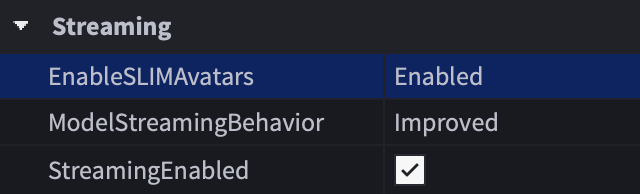
With EnableSLIMAvatars enabled, the engine:
- Renders a SLIM version when an actual avatar model streams out.
- Swaps between SLIM and full-resolution representations based on available resources, even inside the streaming radius.
- Throttles SLIM animations based on scene importance and available bandwidth.
Note
Supported Avatars
- R15 avatars with a body, dynamic head, [standard](/docs/roblox-avatar-character-bodies-specifications#standard-r15-rigs) or [advanced](/docs/roblox-avatar-character-bodies-specifications#advanced-r15-rigs) R15 rig, and rigid/layered accessories.
- Avatar changes made between the [`CharacterAdded`](/docs/player#player-characteradded) event and [`CharacterAppearanceLoaded`](/docs/player#player-characterappearanceloaded) event.
Note
Excluded Avatars
<ul>
<li>R6 avatars.</li>
<li>NPC characters (even those with a standard or advanced R15 rig).</li>
<li>Avatars with custom proportions, body scaling, or experience-applied avatar settings.</li>
<li>Avatar changes made after the [`CharacterAppearanceLoaded`](/docs/player#player-characterappearanceloaded) event (equipping tools, accessory changes, [`Highlight`](/docs/highlight) additions, etc.).</li>
</ul>
Testing SLIM Avatars
Unlike model SLIM which you can test alone by moving far from a model until it streams out, SLIM avatars require multiple players in the game to observe. Use one of these testing modes to test SLIM avatars:
- Team Test — Join with friends or alternate accounts to see SLIM avatars at distance.
- Server and Clients — Launch two or more client windows where each client displays avatar copies that the others render as SLIM when at distance.
Note that avatars must have been transcoded in a SLIM-enabled game before they appear as SLIM. If avatars don't render as SLIM in your first test, rejoin the game after a moment to allow transcoding to complete.
Limitations
| Limitation | Details |
|---|---|
| **Streaming required** | SLIM only functions with [`StreamingEnabled`](/docs/workspace#workspace-streamingenabled) set to `true`. Without streaming, SLIM‑eligible models fall back to traditional level‑of‑detail rendering. |
| **Static models only** | [Model SLIM](#slim-for-models) does not support models modified at runtime (parts added/removed, properties changed) or models that play animations. |
| **Humanoid instances** | The engine excludes models containing a [`Humanoid`](/docs/humanoid) from static [model SLIM](#slim-for-models) processing. Use [SLIM avatars](#slim-for-avatars) for animated player characters. |
| **Avatar restrictions** | [SLIM avatars](#slim-for-avatars) only support R15 player characters. R6 rigs, NPCs, and avatars with custom proportions fall back to default rendering. |
| **Cloud dependency** | The cloud service generates and stores SLIM assets on the CDN. Offline or local testing without a published place does not produce SLIM results. |
| **Zero-scale models** | The engine excludes models with a [`Scale`](/docs/model#model-scale) of `0` from SLIM processing. |
| **Platform availability** | On platforms where SLIM is not yet supported, models set to [`SLIM`](/docs/enum-modellevelofdetail#slim) fall back to [`Disabled`](/docs/enum-modellevelofdetail#disabled). |
Troubleshooting
SLIM model not appearing
- Verify that
StreamingEnabledistrue. - Confirm the place is published to Roblox and Team Create is enabled.
- Check that
LevelOfDetailis set toSLIMfor the model. - Wait 1–2 minutes after first publish for cloud transcoding to complete, then rejoin.
- Ensure the model doesn't contain a
Humanoidinstance.
Solid modeling operations not rendering correctly in SLIM
PartOperation instances for solid modeling (unions, intersections, negations) might not render correctly in some SLIM models. If a union appears missing or distorted in the SLIM representation, try separating the affected PartOperation into its own model or simplifying the CSG operation.
Z-fighting or flickering on SLIM models
Z-fighting can occur when parts in the original model have overlapping or coplanar faces. To resolve:
- Move overlapping parts slightly apart (even
0.01studs is sufficient). - Avoid perfectly flush surfaces between adjacent parts in the same model.
Texture or UV shifts on SLIM models
SLIM regenerates UV mappings (how textures are projected onto 3D surfaces) during transcoding. Default Roblox materials might show slightly different tiling patterns compared to the original. To mitigate:
- Use custom textures via
SurfaceAppearancefor important surfaces. - Group visually related parts into the same model to ensure consistent texturing.
SLIM avatars not rendering
- Verify
Workspace.EnableSLIMAvatarsis set toEnabled. - Test with multiple clients using Server and Clients test mode (requires at least 2 clients).
- Ensure the avatar uses a standard or advanced R15 rig without custom proportions.
- Confirm the game doesn't modify the avatar after the
Player.CharacterAppearanceLoadedevent.
Visual glitches on animated SLIM avatars
Full-body or finger animations might occasionally show visual artifacts due to bone replication timing. This is a known issue being actively improved. If the issue is severe, verify that animation scripts aren't modifying bone transforms outside of the standard animation pipeline.
Inaccurate triangle count in rendering stats
The rendering stats panel might report incorrect triangle counts when SLIM avatars are enabled. This is a known reporting bug and does not affect actual rendering performance.