
Source: Roblox Creator Hub · CC BY 4.0 · View source · Code samples: MIT Imported 2026-10-03. Formatting adapted for this site.
Add scripts
Time to bring all this work together! Now that you've created the beam and particle components, you'll add in three premade scripts. These scripts manage the tutorial by telling components when to do what. For example, the scripts will create beams for new players and emit particles whenever they interact with goals.
Note
While you can follow all these steps even if you haven't coded before, having that knowledge can help you adapt these scripts for your own game. To learn more, see the Coding Fundamentals tutorial.
Store beam and particles
Before adding the scripts, the beam and particles need to be moved to where the scripts will be able to make copies of them as needed.
Note
If you're using your own project, you may need to replace the values within some scripted variables to match your objects.
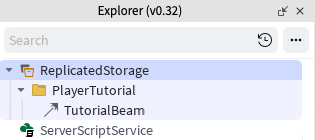
In ReplicatedStorage, create a new folder named PlayerTutorial. Move TutorialBeam out of TestPlayer, and into the new folder.
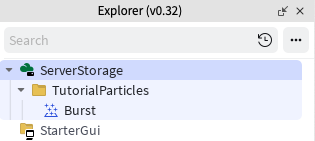
In ServerStorage, create a folder named TutorialParticles. Move the Burst particle out of TestPlayer into that folder.
Once the beam and particle emitter are moved, you no longer need TestPlayer since the script will work with real players when finished. Delete TestPlayer.
Create events
Each time players interact with a goal, the tutorial script will need to know so it can update that player's progress and emit the particle effect. To inform scripts, signals can be sent using events.
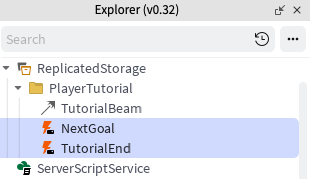
In ReplicatedStorage > PlayerTutorial, create two RemoteEvent objects. Name them NextGoal and TutorialEnd.
Add the scripts
The three scripts below will look for the particle emitter and beam objects created earlier and manage the tutorial system.
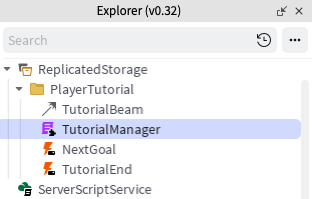
In ReplicatedStorage > PlayerTutorial > create a new ModuleScript named TutorialManager.
Replace the default code by copying and pasting the entire code below.
local TutorialManager = {}

local ReplicatedStorage = game:GetService("ReplicatedStorage")

local tutorialFolder = ReplicatedStorage:WaitForChild("PlayerTutorial")
local TutorialEndEvent = tutorialFolder:WaitForChild("TutorialEnd")
local NextGoalEvent = tutorialFolder:WaitForChild("NextGoal")

-- Note Goal parts must be ordered in the table, or else Goal order may be different in-game
local goalParts = {
 workspace.TutorialGoals.GoalPart1,
 workspace.TutorialGoals.GoalPart2
}

local function checkTutorialEnd(player, goalParts)
 local currentIndex = player:WaitForChild("GoalProgress")
 return currentIndex.Value >= #goalParts
end

local function finishTutorial(player)
 local playerBeam = player.Character.HumanoidRootPart:FindFirstChildOfClass("Beam")
 playerBeam:Destroy()

 print(player.Name .. " finished the tutorial")

 -- Placeholder for further code. E.g. if you wanted to send messages to the server to do other tasks

end

function TutorialManager.interactGoal(player)
 NextGoalEvent:FireServer()
end

function TutorialManager.getTutorialGoals()
 return goalParts
end

function TutorialManager.nextGoal(player, goalParts)
 if checkTutorialEnd(player, goalParts) then
   finishTutorial(player)
 else
   -- Increment the player's Goal tracker
   local currentGoalIndex = player:WaitForChild("GoalProgress")
   currentGoalIndex.Value += 1
 end
end

-- Creates an int value to locally track player's progress through the tutorial Goals
function TutorialManager.setupPlayerProgress(player)
 local currentGoalProgress = Instance.new("IntValue")
 currentGoalProgress.Name = "GoalProgress"
 currentGoalProgress.Value = 1
 currentGoalProgress.Parent = player
end

return TutorialManager
This script runs code for managing a player's progress in the tutorial. This includes tasks like running code for interacting with goals, or what happens when the tutorial is over.
In ServerScriptService, create a new Script named TutorialParticles.
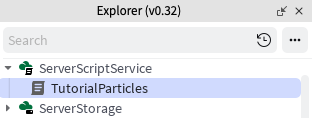
Paste the code below.
local Players = game:GetService("Players")
local ReplicatedStorage = game:GetService("ReplicatedStorage")
local ServerStorage = game:GetService("ServerStorage")

local tutorialFolder = ReplicatedStorage:WaitForChild("PlayerTutorial")
local NextGoalEvent = tutorialFolder:WaitForChild("NextGoal")

local EMIT_RATE = 50

local function playParticleBurst(player)
  local character = player.Character or player.CharacterAdded:Wait()
  local humanoidRootPart = character:WaitForChild("HumanoidRootPart")
  local particleAttachment = humanoidRootPart:WaitForChild("ParticleAttachment")

  -- Go through particles on the attachment and play them according to the type of particle
  for _, particle in particleAttachment:GetChildren() do
    if particle:IsA("ParticleEmitter") then
      particle:Emit(EMIT_RATE)
    end
  end
end

local function setupPlayerParticles(player)
  player.CharacterAdded:Connect(function(character)
    local humanoidRootPart = character:WaitForChild("HumanoidRootPart")
    local playerParticleAttachment = Instance.new("Attachment")
    playerParticleAttachment.Name = "ParticleAttachment"
    playerParticleAttachment.Parent = humanoidRootPart

    -- Clone particles in the folder, even if there are more than one and attach to player
    for _, emitter in ServerStorage.TutorialParticles:GetChildren() do
      emitter:Clone().Parent = playerParticleAttachment
    end
  end)
end

Players.PlayerAdded:Connect(setupPlayerParticles)
NextGoalEvent.OnServerEvent:Connect(playParticleBurst)
This script plays the burst particle whenever players interact with goals. There's also a variable named
EMIT_RATEthat determines how many particles spawn during an interaction.In StarterPlayer > StarterPlayerScripts, create a new LocalScript named TutorialScript.
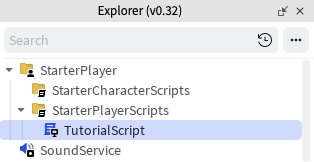
Then, paste the script below. This script creates and manages the beam used to guide players.
local Players = game:GetService("Players")
local ReplicatedStorage = game:GetService("ReplicatedStorage")

local tutorialFolder = ReplicatedStorage:WaitForChild("PlayerTutorial")
local TutorialManager = require(tutorialFolder:WaitForChild("TutorialManager"))
local TutorialEndEvent = tutorialFolder:WaitForChild("TutorialEnd")

local player = Players.LocalPlayer
local goalParts = TutorialManager.getTutorialGoals()
local playerBeam = nil
local goalIndex = nil

local function getTargetAttachment()
  local currentTarget = goalParts[goalIndex.Value]
  local interactionPart = currentTarget:FindFirstChild("InteractionPart")
  local attachment = interactionPart and interactionPart:FindFirstChildOfClass("Attachment")

  if not attachment then
    attachment = Instance.new("Attachment")
    attachment.Name = "BeamAttachment"
    attachment.Parent = currentTarget
  end

  return attachment
end

local function updateBeamTarget()
  playerBeam = player.Character.HumanoidRootPart:FindFirstChildOfClass("Beam")

  local targetBeamAttachment = getTargetAttachment()

  if targetBeamAttachment then
    playerBeam.Attachment1 = targetBeamAttachment
  else
    warn("Attachment not found in a goal. Check that goals have attachments or they're included under the InteractionPart")
  end
end

local function setupGoals()
  for _, part in goalParts do
    local interactionPart = part:FindFirstChild("InteractionPart")
    local proximityPrompt = interactionPart and interactionPart:FindFirstChild("ProximityPrompt")

    if proximityPrompt then
      proximityPrompt.Triggered:Connect(function(player)
        proximityPrompt.Enabled = false
        TutorialManager.nextGoal(player, goalParts)
        TutorialManager.interactGoal(player)
      end)
    else
      warn("Proximity prompt not included in goal. Add one to each goal part under the InteractionPart")
    end
  end
end

local function createBeamForCharacter(character)
  local humanoidRootPart = character:WaitForChild("HumanoidRootPart")
  local playerBeamAttachment = Instance.new("Attachment")
  local beamTemplate = tutorialFolder:WaitForChild("TutorialBeam")

  if not beamTemplate then
    warn("Tutorial Beam not found in ReplicatedStorage")
  end

  playerBeamAttachment.Name = "BeamAttachment"
  playerBeamAttachment.Parent = humanoidRootPart

  local targetBeamAttachment = getTargetAttachment()

  playerBeam = beamTemplate:Clone()
  playerBeam.Attachment0 = playerBeamAttachment
  playerBeam.Attachment1 = targetBeamAttachment
  playerBeam.Enabled = true
  playerBeam.Parent = humanoidRootPart
end

local function setupPlayer()
  setupGoals()
  TutorialManager.setupPlayerProgress(player)
  goalIndex = player:WaitForChild("GoalProgress")

  player.CharacterAdded:Connect(createBeamForCharacter)
  if player.Character then
    createBeamForCharacter(player.Character)
  end
end

setupPlayer()
goalIndex.Changed:Connect(updateBeamTarget)
Play the project to test the scripts. Move from booth to booth, using the interact feature to see if code works.
Troubleshooting tips
Issue: Particles play when game starts.
- Go into ServerStorage > Tutorial Particles > Burst. Check Enabled to be off.
Issue: Warnings in the compiler such as an "infinite yield".
- Because the script is looking for specific objects in certain locations, it's possible that a part is named incorrectly. Double check that the name and location of each part in game matches the tutorial.
Script benefits and limitations
If you're using this tutorial system in your game, keep in mind the following:
Benefits
- Events such as TutorialEnd can be used to trigger other scripts. For instance, you can award players a special item when this event fires.
- The TutorialParticles script can play multiple particles at once. You can add more particles in ServerStorage/TutorialParticles for more complex effects.
Limitations
- Player progress in the tutorial is not persistent, meaning you'll have to code some way of saving that progress. For guidance, see the article: Saving Data.