
Source: Roblox Creator Hub · CC BY 4.0 · View source · Code samples: MIT Imported 2026-10-03. Formatting adapted for this site.
Make changes to arrays
An array's contents will often have to be changed, like when needing to remove an item from a player's inventory. Luau has built-in functions for use with tables to make this easier.
This article will outline prebuilt functions for tables like add and remove while describing how to search for a value.
To apply these skills, you'll create a script that helps to manage a player's inventory.
Add values to arrays
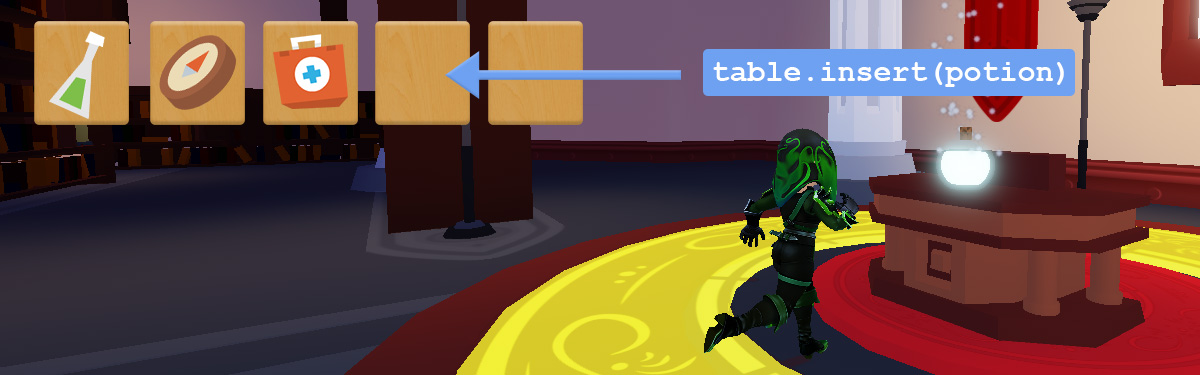
To add a new value to an array, use table.insert(array, valueToInsert). The second parameter can be any value such as a string, number, or entire object, like Player or IntValue.
To practice, you'll create a script that stores player items in a table, then add to it. Since this example is just a script, it can be used with any file or project. Testing the code will be done using the Output window.
Create an empty array named
playerItems.playerItems = {}Add inventory items to the array by typing
table.insert(). In the parenthesis, typeplayerItems, the table to add to, followed by a string for each item. Insert at least three values.playerItems = {} table.insert(playerItems, "Potion") table.insert(playerItems, "Bread") table.insert(playerItems, "Sleeping Bag") print(playerItems)Run the project. In Output, expand the three dots
...to see the printed table.
Remove values from arrays
To remove a value, like if a player used an item or someone in a list of active players leaves a game, use table.remove(). Depending on the parameters provided, the function can either remove the last value of a table, or at a specific index.
Remove the last value
Sometimes a script needs to remove a specific item. For instance, removing the first item in a player's inventory, or picking the first player in a list. To remove the last value in an array, use table.remove(arrayName). In this use case, the only parameter needed is the table itself.
Use the array of items from the previous example. Then, to remove the last value from the table, in this case
"Sleeping Bag", typetable.remove(playerItems)playerItems = {} table.insert(playerItems, "Potion") table.insert(playerItems, "Bread") table.insert(playerItems, "Sleeping bag") table.remove(playerItems) print(playerItems)Run the project. In the Output window, the last value,
"Sleeping Bag", shouldn't print.
Remove by index
To remove a value at a specific point in the array, input in the second parameter the index to remove, such as table.remove(arrayName, 1).
Using the same table, type
table.remove(). In the parameters, input the name of the table and1, the value to remove.playerItems = {} table.insert(playerItems, "Potion") table.insert(playerItems, "Bread") table.insert(playerItems, "Sleeping bag") table.remove(playerItems, 1)
Note
The second parameter for table.remove() only accepts a numerical index. Typing something like "Potion" will create an error.
- Run the project. Check that the first value, "Potion" was removed.
Note
Notice also that all the index values changed or have been pushed. Removing a value from an array will change the array size and shift index values down after the one removed. "Bread" is now index 1, and "Sleeping Bag" is now index 2.
Search for values in an array
To find specific values in arrays, like the name of a winning player, use the table.find() function. Alternatively, you can code your own search function using for loops and if statements.
Find and return a single value
To find a value in an array, create a function named findValue() that goes through an array and stops the first time it finds a matching value.
Once it finds the value, the function will use the return keyword to return that value's index. With an index, you can remove it from the array.
Copy the array named
playerItemsbelow.local playerItems = { "Potion", "Bread", "Bread", "Sleeping Bag" }Code a new function named findValue() with two parameters:
whichArray- the array to search through.itemName- the specific string to check for.local function findValue(whichArray, itemName) end
In
findValue(), use a for loop to check if any value in the array matchesitemName. If the value matches, use the keywordreturnto return the value found incurrentIndex.local function findValue(whichArray, itemName) for currentIndex = 1, #whichArray do if whichArray[currentIndex] == itemName then return currentIndex end end endTest the search function by creating a variable named
valueFoundand callingfindValue(). Pass in the array to search, and what value it should search for. Run the code to confirm that the expected output is index 2.local function findValue(whichArray, itemName) for currentIndex = 1, #whichArray do if whichArray[currentIndex] == itemName then --Sends the value of currentIndex back return currentIndex end end end local valueFound = findValue(playerItems, "Bread") print("The value is at index " .. valueFound)
Remove a value
If a value was found using the find function, it can be removed. Check if a value was found with an if statement.
Check if a value is inside
valueFound; if so, remove the value usingtable.remove().if valueFound then table.remove(playerItems, valueFound) endPrint out the array using the code below.
for index = 1, #playerItems do
    local itemString = playerItems[index]
    print("Index " .. index .. ": " .. itemString)
end
Playtest and check that the first
"Bread"value was removed from the array. Try removing other values by changing the second parameter infindValue().Notice that because this function was called once, only the first instance of
"Bread"was removed. The following section will cover how to find and remove all instances.
Find and remove all of a specific value
While the previous code could only remove the first instance of a value found, this code snippet will find and remove all occurrences from an array. For example, if, say, a player wanted to sell all their bread at an in-game store.
Use an array named
playerItemswith at least four values and a set of duplicates.local playerItems = { "Potion", "Bread", "Bread", "Sleeping Bag" }To go through the array, create a for loop that goes backward through
playerItems, starting at#playerItems, ending at 1, and incrementing by -1.for index = #playerItems, 1, -1 do end
Note
Remember, removing items causes later indexes to shift. By starting at the end, you avoid skipping a value that may have shifted if you started at the beginning.In the loop, use an if statement to check if the value inside
playerItems[index]is equal to"Bread", and if so, remove the item.for index = #playerItems, 1, -1 do if playerItems[index] == "Bread" then table.remove(playerItems, index) end endUse the code below to add a second for loop that prints the array.
for index = 1, #playerItems do
    local itemString = playerItems[index]
    print("Index " .. index .. ": " .. itemString)
end
Run the script and check that all values named "Bread" are removed.
Summary
Values can be removed or added to an array, but be careful of indexes shifting doing so. Use loops to iterate through a table to remove all instances of a value, or just the first instance found.
The keyword return can be used to stop a loop, and send information back where needed.
A finished version of the script can be referenced below.
The following project includes all scripts in this tutorial. Download here.
Note all scripts are in ServerScriptService and disabled. To use a script, in its properties, uncheck the Disabled field and run Studio.
Note
For complete list of all table functions, go to Table API